PluginSidebar
云策文档标注
概述
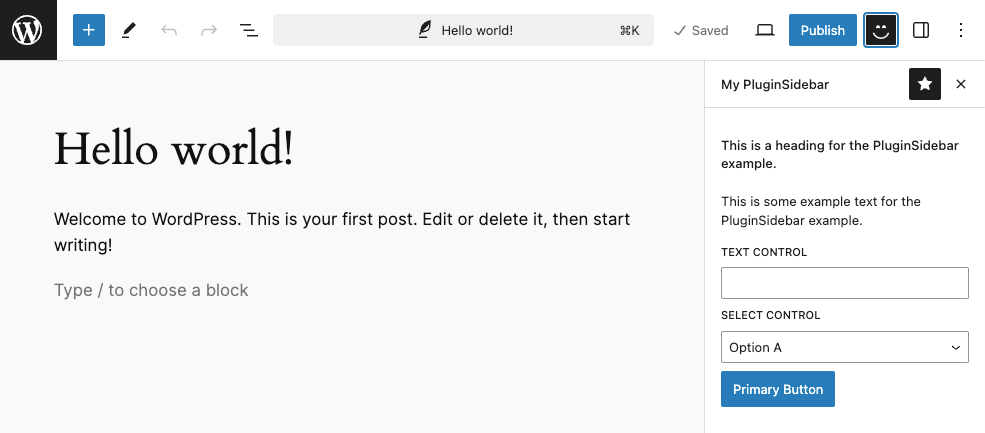
PluginSidebar 是 WordPress 编辑器中的一个插槽,用于在文章编辑器或站点编辑器的工具栏中添加自定义面板。通过此组件,开发者可以扩展编辑器界面,提供插件特定的设置和功能。
关键要点
- PluginSidebar 允许在 Post 或 Site 编辑器的工具栏中添加项目,点击图标会打开一个包含自定义内容的侧边栏面板。
- 使用 PluginSidebar 会自动生成一个 PluginSidebarMoreMenuItem,用于从选项面板中打开侧边栏。
- 组件需要从 @wordpress/editor 导入,并配合其他 WordPress 组件(如 PanelBody、TextControl 等)构建界面。
- 通过 registerPlugin 函数注册插件,将 PluginSidebar 组件渲染到编辑器中。
代码示例
import { __ } from '@wordpress/i18n';
import { PluginSidebar } from '@wordpress/editor';
import {
    PanelBody,
    Button,
    TextControl,
    SelectControl,
} from '@wordpress/components';
import { registerPlugin } from '@wordpress/plugins';
import { useState } from '@wordpress/element';

const PluginSidebarExample = () => {
    const [ text, setText ] = useState( '' );
    const [ select, setSelect ] = useState( 'a' );

    return (
        <PluginSidebar
            name="plugin-sidebar-example"
            title={ __( 'My PluginSidebar' ) }
            icon={ 'smiley' }
        >
            <PanelBody>
                <h2>
                    { __( 'This is a heading for the PluginSidebar example.' ) }
                </h2>
                <p>
                    { __(
                        'This is some example text for the PluginSidebar example.'
                    ) }
                </p>
                <TextControl
                    __next40pxDefaultSize
                    label={ __( 'Text Control' ) }
                    value={ text }
                    onChange={ ( newText ) => setText( newText ) }
                />
                <SelectControl
                    label={ __( 'Select Control' ) }
                    value={ select }
                    options={ [
                        { value: 'a', label: 'Option A' },
                        { value: 'b', label: 'Option B' },
                        { value: 'c', label: 'Option C' },
                    ] }
                    onChange={ ( newSelect ) => setSelect( newSelect ) }
                />
                <Button variant="primary">{ __( 'Primary Button' ) } </Button>
            </PanelBody>
        </PluginSidebar>
    );
};

// Register the plugin.
registerPlugin( 'plugin-sidebar-example', { render: PluginSidebarExample } );
原文内容
This slot allows adding items to the tool bar of either the Post or Site editor screens.
Using this slot will add an icon to the toolbar that, when clicked, opens a panel with containing the items wrapped in the <PluginSidebar /> component.
Additionally, it will also create a <PluginSidebarMoreMenuItem /> that will allow opening the panel from Options panel when clicked.
Example
import { __ } from '@wordpress/i18n';
import { PluginSidebar } from '@wordpress/editor';
import {
    PanelBody,
    Button,
    TextControl,
    SelectControl,
} from '@wordpress/components';
import { registerPlugin } from '@wordpress/plugins';
import { useState } from '@wordpress/element';

const PluginSidebarExample = () => {
    const [ text, setText ] = useState( '' );
    const [ select, setSelect ] = useState( 'a' );

    return (
        <PluginSidebar
            name="plugin-sidebar-example"
            title={ __( 'My PluginSidebar' ) }
            icon={ 'smiley' }
        >
            <PanelBody>
                <h2>
                    { __( 'This is a heading for the PluginSidebar example.' ) }
                </h2>
                <p>
                    { __(
                        'This is some example text for the PluginSidebar example.'
                    ) }
                </p>
                <TextControl
                    __next40pxDefaultSize
                    label={ __( 'Text Control' ) }
                    value={ text }
                    onChange={ ( newText ) => setText( newText ) }
                />
                <SelectControl
                    label={ __( 'Select Control' ) }
                    value={ select }
                    options={ [
                        { value: 'a', label: 'Option A' },
                        { value: 'b', label: 'Option B' },
                        { value: 'c', label: 'Option C' },
                    ] }
                    onChange={ ( newSelect ) => setSelect( newSelect ) }
                />
                <Button variant="primary">{ __( 'Primary Button' ) } </Button>
            </PanelBody>
        </PluginSidebar>
    );
};

// Register the plugin.
registerPlugin( 'plugin-sidebar-example', { render: PluginSidebarExample } );
Location