FormToggle
概述
FormToggle 是 WordPress 组件库中的一个 React 组件,用于实现开关切换功能,允许用户启用或禁用单个设置。文档提供了设计指南和开发指南,帮助开发者正确使用该组件。
关键要点
- FormToggle 用于切换单个选项的开关状态,操作立即生效。
- 设计上应使用清晰的文本标签,避免在开关元素内添加“on”或“off”等文本。
- 开发时需导入 FormToggle 组件,并通过 checked、disabled 和 onChange 等 props 控制其状态和行为。
- 相关组件包括 Radio、CheckboxControl 和 ToggleControl,用于不同场景的选择需求。
代码示例
import { useState } from 'react';
import { FormToggle } from '@wordpress/components';

const MyFormToggle = () => {
    const [ isChecked, setChecked ] = useState( true );

    return (
        <FormToggle
            checked={ isChecked }
            onChange={ () => setChecked( ( state ) => ! state ) }
        />
    );
};
注意事项
- 不要使用单选按钮(radio buttons)来实现开关切换功能,FormToggle 更适用于非数据提交场景。
- 确保开关状态通过视觉元素清晰传达,无需额外文本指示。
FormToggle switches a single setting on or off.

Design guidelines
Usage
When to use toggles
Use toggles when you want users to:
- Switch a single option on or off.
- Immediately activate or deactivate something.
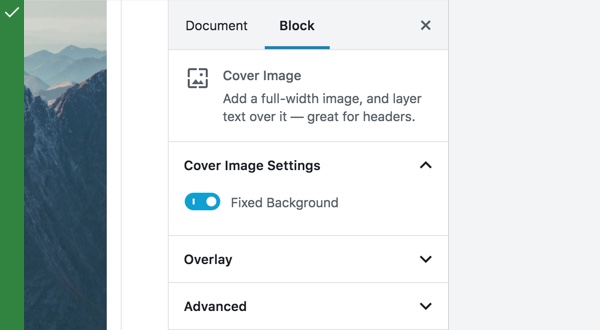
Do
Use toggles to switch an option on or off.
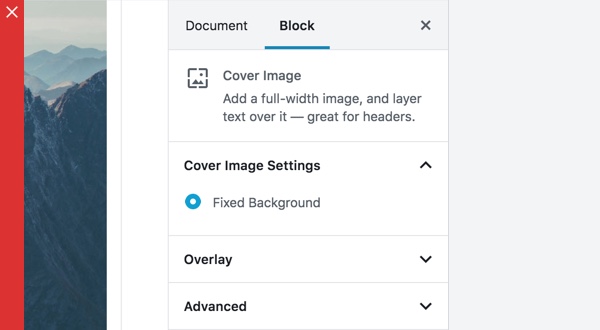
Don’t
Don’t use radio buttons for settings that toggle on and off.
Toggles are preferred when the user is not expecting to submit data, as is the case with checkboxes and radio buttons.
State
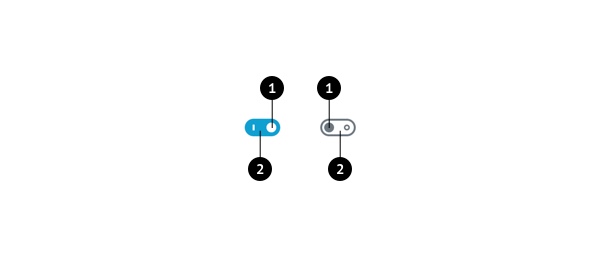
When the user slides a toggle thumb (1) to the other side of the track (2) and the state of the toggle changes, it’s been successfully toggled.
Text label
Toggles should have clear inline labels so users know exactly what option the toggle controls, and whether the option is enabled or disabled.
Do not include any text (e.g. “on” or “off”) within the toggle element itself. The toggle alone should be sufficient to communicate the state.
Behavior
When a user switches a toggle, its corresponding action takes effect immediately.
Development guidelines
Usage
import { useState } from 'react';
import { FormToggle } from '@wordpress/components';

const MyFormToggle = () => {
    const [ isChecked, setChecked ] = useState( true );

    return (
        <FormToggle
            checked={ isChecked }
            onChange={ () => setChecked( ( state ) => ! state ) }
        />
    );
};
Props
The component accepts the following props:
checked: boolean
If checked is true the toggle will be checked. If checked is false the toggle will be unchecked.
If no value is passed the toggle will be unchecked.
- Required: No
disabled: boolean
If disabled is true the toggle will be disabled and apply the appropriate styles.
- Required: No
onChange: ( event: ChangeEvent<HTMLInputElement> ) => void
A callback function invoked when the toggle is clicked.
- Required: Yes
Related components
- To select one option from a set, and you want to show them all the available options at once, use the
Radiocomponent. - To select one or more items from a set, use the
CheckboxControlcomponent. - To display a toggle with label and help text, use the
ToggleControlcomponent.