Context
概述
Block Context 是 WordPress 块编辑器的一项功能,允许祖先块提供值,供其层次结构内的后代块继承使用,无需硬编码或显式知晓提供者块。这在全站编辑中特别有用,例如块内容可基于继承的上下文(如文章 ID)动态显示。
关键要点
- Block Context 通过 providesContext 属性定义提供上下文值,映射上下文名称到块属性。
- 后代块通过 usesContext 属性数组声明继承的上下文名称,在 edit(JavaScript)和 render_callback(PHP)中访问。
- 上下文键名建议包含命名空间(如 my-plugin/recordId)以避免冲突。
- Block Context 在客户端基于 React Context 实现,服务器端也支持,但不适用于 save 函数。
代码示例
// 提供上下文
registerBlockType('my-plugin/record', {
    attributes: {
        recordId: { type: 'number' },
    },
    providesContext: {
        'my-plugin/recordId': 'recordId',
    },
});

// 消费上下文(JavaScript)
registerBlockType('my-plugin/record-title', {
    usesContext: ['my-plugin/recordId'],
    edit({ context }) {
        return 'The record ID: ' + context['my-plugin/recordId'];
    },
});

// 消费上下文(PHP)
register_block_type('my-plugin/record-title', array(
    'render_callback' => function($attributes, $content, $block) {
        return 'The current record ID is: ' . $block->context['my-plugin/recordId'];
    },
));
注意事项
- 上下文值目前仅支持从块属性派生,未来可能扩展其他来源。
- 确保块在 usesContext 中明确定义要继承的上下文名称,否则值不可用。
- 在完整示例中,需创建记录块和记录标题块,并通过 InnerBlocks 和模板实现交互。
Block context is a feature which enables ancestor blocks to provide values which can be consumed by descendent blocks within its own hierarchy. Those descendent blocks can inherit these values without resorting to hard-coded values and without an explicit awareness of the block which provides those values.
This is especially useful in full-site editing where, for example, the contents of a block may depend on the context of the post in which it is displayed. A blogroll template may show excerpts of many different posts. Using block context, there can still be one single “Post Excerpt” block which displays the contents of the post based on an inherited post ID.
If you are familiar with React Context, block context adopts many of the same ideas. In fact, the client-side block editor implementation of block context is a very simple application of React Context. Block context is also supported in server-side render_callback implementations, demonstrated in the examples below.
Defining block context
Block context is defined in the registered settings of a block. A block can provide a context value, or consume a value it seeks to inherit.
Providing block context
A block can provide a context value by assigning a providesContext property in its registered settings. This is an object which maps a context name to one of the block’s own attributes. The value corresponding to that attribute value is made available to descendent blocks and can be referenced by the same context name. Currently, block context only supports values derived from the block’s own attributes. This could be enhanced in the future to support additional sources of context values.
    attributes: {
        recordId: {
            type: 'number',
        },
    },

    providesContext: {
        'my-plugin/recordId': 'recordId',
    },
For a complete example, refer to the section below.
Include a namespace
As seen in the above example, it is recommended that you include a namespace as part of the name of the context key so as to avoid potential conflicts with other plugins or default context values provided by WordPress. The context namespace should be specific to your plugin, and in most cases can be the same as used in the name of the block itself.
Consuming block context
A block can inherit a context value from an ancestor provider by assigning a usesContext property in its registered settings. This should be assigned as an array of the context names the block seeks to inherit.
registerBlockType('my-plugin/record-title', {
    title: 'Record Title',
    category: 'widgets',

    usesContext: ['my-plugin/recordId'],
Using block context
Once a block has defined the context it seeks to inherit, this can be accessed in the implementation of edit (JavaScript) and render_callback (PHP). It is provided as an object (JavaScript) or associative array (PHP) of the context values which have been defined for the block. Note that a context value will only be made available if the block explicitly defines a desire to inherit that value.
Note: Block Context is not available to save.
JavaScript
registerBlockType('my-plugin/record-title', {

    edit({ context }) {
        return 'The record ID: ' + context['my-plugin/recordId'];
    },
PHP
A block’s context values are available from the context property of the $block argument passed as the third argument to the render_callback function.
register_block_type( 'my-plugin/record-title', array(
    'render_callback' => function( $attributes, $content, $block ) {
        return 'The current record ID is: ' . $block->context['my-plugin/recordId'];
    },
) );
Example
- Create a
recordblock.
npm init @wordpress/block --namespace my-plugin record
cd record
- Edit
src/index.js. Insert therecordIdattribute andprovidesContextproperty in theregisterBlockTypefunction and add the registration of therecord-titleblock at the bottom:
registerBlockType( 'my-plugin/record', {
    // ... cut ...

    attributes: {
        recordId: {
            type: 'number',
        },
    },

    providesContext: {
        'my-plugin/recordId': 'recordId',
    },

    /**
     * @see ./edit.js
     */
    edit: Edit,

    /**
     * @see ./save.js
     */
    save,
} );

registerBlockType( 'my-plugin/record-title', {
    title: 'Record Title',
    category: 'widgets',

    usesContext: [ 'my-plugin/recordId' ],

    edit( { context } ) {
        return 'The record ID: ' + context[ 'my-plugin/recordId' ];
    },

    save() {
        return null;
    },
} );
- Edit
src/edit.jsfor therecordblock. Replace theEditfunction with the following code:
import { TextControl } from '@wordpress/components';
import { InnerBlocks } from '@wordpress/block-editor';

export default function Edit( props ) {
    const MY_TEMPLATE = [ [ 'my-plugin/record-title', {} ] ];
    const {
        attributes: { recordId },
        setAttributes,
    } = props;
    return (
        <div>
            <TextControl
                __next40pxDefaultSize
                label={ __( 'Record ID' ) }
                value={ recordId }
                onChange={ ( val ) =>
                    setAttributes( { recordId: Number( val ) } )
                }
            />
            <InnerBlocks template={ MY_TEMPLATE } templateLock="all" />
        </div>
    );
}
- Edit
src/save.jsfor therecordblock. Replace thesavefunction with the following code:
export default function save( props ) {
    return <p>The record ID: { props.attributes.recordId }</p>;
}
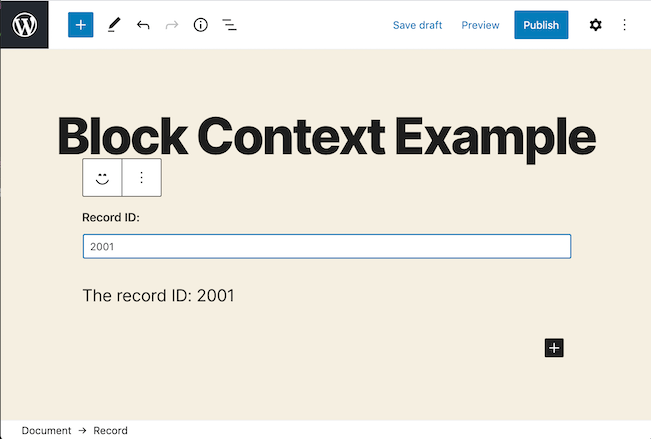
- Create a new post and add the
recordblock. If you type a number in the text box, you’ll see the same number is shown in therecord-titleblock below it.