关于交互性 API
概述
交互性 API 是一个基于声明式代码的指令系统,用于为 Gutenberg 块添加前端交互性。它通过扩展 HTML 属性(指令)来指定 DOM 元素的行为,旨在简化复杂交互的开发,并支持渐进式采用。
关键要点
- API 基于指令系统,通过 HTML 属性(如 data-wp-on--click)实现声明式交互,类似于 Alpine.js,但专为 WordPress 设计。
- 主要目标是为块提供标准化的前端交互处理方式,支持从简单计数器到复杂功能(如即时页面导航)的用例。
- API 强调块优先和 PHP 优先,确保服务器端渲染与客户端水合的一致性,对 SEO 和用户体验至关重要。
- 向后兼容 WordPress 钩子、翻译 API 和现有 JS 库(如 jQuery),允许逐步采用,非交互块可共存。
- 采用声明式和响应式设计,自动更新 UI 以响应数据变化,减少手动 DOM 操作。
- 性能优化:运行时代码约 10 KB,加载一次即可用于所有块,不阻塞页面渲染。
- 可扩展性:允许通过 HTML 修改指令,支持通过 render_block 过滤器调整行为。
- 原子化和可组合性:每个指令控制 DOM 的小部分,可组合创建复杂交互体验。
- 兼容现有块开发工具(如 wp-scripts),需使用 --experimental-modules 标志。
- 内置客户端导航原语,支持无页面重载的导航,提升用户体验。
代码示例
<div
  data-wp-interactive="wpmovies"
  <?php echo wp_interactivity_data_wp_context( array( 'isOpen' => false ) ); ?>
  data-wp-watch="callbacks.logIsOpen"
>
  <button
    data-wp-on--click="actions.toggle"
    data-wp-bind--aria-expanded="context.isOpen"
    aria-controls="p-1"
  >
    Toggle
  </button>

  <p id="p-1" data-wp-bind--hidden="!context.isOpen">
    This element is now visible!
  </p>
</div>
注意事项
- 客户端导航功能可能与其他库的兼容性有例外,需参考相关文档。
- 使用 wp-scripts 构建时,必须添加 --experimental-modules 标志以确保正确构建脚本模块。
The Interactivity API is a standard system of directives, based on declarative code, for adding frontend interactivity to blocks.
Directives extend HTML with special attributes that tell the Interactivity API to attach a specified behavior to a DOM element or even to transform it. For those familiar with Alpine.js, it’s a similar approach but explicitly designed to work seamlessly with WordPress.
API Goals
The main goal of the Interactivity API is to provide a standard and simple way to handle the frontend interactivity of Gutenberg blocks.
A standard makes it easier for developers to create rich, interactive user experiences, from simple cases like counters or popups to more complex features like instant page navigation, instant search, or carts and checkouts.
All these user experiences are technically possible right now without the Interactivity API. However, the more complex the user experience and the more blocks interact with each other, the harder it becomes for developers to build and maintain sites. There are a lot of challenges they have to figure out themselves. The API aims to provide out-of-the-box means for supporting these kinds of interactions.
To address this challenge the following requirements/goals for the Interactivity API were defined:
- Block-first and PHP-first: The API must work well with PHP and the current block system, including dynamic blocks, widely extended in WordPress. It must support server-side rendering. Server-rendered HTML and client-hydrated HTML must be exactly the same. This is important for SEO and the user experience.
- Backward compatible: The API must be compatible with WordPress hooks, which could, for example, modify server-rendered HTML. It must also be compatible with internationalization and existing JS libraries on the site (such as jQuery).
- Optional and gradual adoption: Related to the previous point, the API must remain optional. It should be possible to adopt it gradually, meaning that interactive blocks not using this API can coexist with those using it.
- Declarative and reactive: The API must use declarative code, listen to changes in the data, and update only the parts of the DOM that depend on that data.
- Performant: The runtime must be fast and lightweight to ensure the best user experience.
- Extensible: In the same way WordPress focuses on extensibility, this new system must provide extensibility patterns to cover most use cases.
- Atomic and composable: Having small reusable parts that can be combined to create more complex systems is required to create flexible and scalable solutions.
- Compatible with the existing block development tooling: The API must be integrated with the existing block-building tools without requiring additional tooling or configuration by the developer.
Apart from all these requirements, integrating client-side navigation on top of any solution should be easy and performant. Client-side navigation is the process of navigating between site pages without reloading the entire page, which is one of the most impressive user experiences demanded by web developers. For that reason, this functionality should be compatible with this new system.
Why directives?
Directives are the result of deep research into different possibilities and approaches. We’ve found that this design covers the requirements most effectively.
Block-first and PHP-friendly
The API is designed for the world of blocks and takes WordPress history of being closely attached to web standards to heart.
As directives are HTML attributes, they are perfect for dynamic blocks and PHP.
Dynamic block example
<div
  data-wp-interactive="wpmovies"
  <?php echo wp_interactivity_data_wp_context( array( 'isOpen' => false ) ); ?>
  data-wp-watch="callbacks.logIsOpen"
>
  <button
    data-wp-on--click="actions.toggle"
    data-wp-bind--aria-expanded="context.isOpen"
    aria-controls="p-1"
  >
    Toggle
  </button>

  <p id="p-1" data-wp-bind--hidden="!context.isOpen">
    This element is now visible!
  </p>
</div>
As you can see, directives like data-wp-on--click or data-wp-bind--hidden are added as custom HTML attributes. WordPress can process this HTML on the server, handling the directives’ logic and creating the appropriate markup.
Backward compatible
As the Interactivity API works perfectly with server-side rendering, you can use all the WordPress APIs, including:
- WordPress filters and actions: You can keep using WordPress hooks to modify the HTML or even to modify directives. Additionally, existing hooks will keep working as expected.
- Core Translation API: e.g.
__()and_e(). You can use it to translate the text in the HTML (as you normally would) and even use those APIs on the server side of your directives.
Optional and gradual adoption
The Interactivity API pipeline promotes progressive enhancement by building on top of WordPress’s solid foundation and patterns.
For example, blocks with directives can coexist with other (interactive or non-interactive) blocks. This means that if there are other blocks on the page using other frameworks like jQuery, everything will work as expected.
Declarative and reactive
The Interactivity API follows an approach similar to other popular JS frameworks by separating state, actions, and callbacks and defining them declaratively. Why declaratively?
Declarative code describes what a program should do, while imperative code describes how the program should do it. Using a declarative approach, the UI automatically updates in response to changes in the underlying data. With an imperative approach, you must manually update the UI whenever the data changes. Compare the two code examples:
Imperative code
<button id="toggle-button">Toggle Element</button>
<p>This element is now visible!</p>
<script>
    const button = document.getElementById( 'toggle-button' );

    button.addEventListener( 'click', () => {
        const element = document.getElementById( 'element' );
        if ( element ) {
            element.remove();
        } else {
            const newElement = document.createElement( 'p' );
            newElement.textContent = 'This element is visible';
            document.body.appendChild( newElement );
        }
    } );
</script>
Declarative code
This is the same use case shared above but serves as an example of declarative code using this new system. The JavaScript logic is defined in the view.js file of the block, and adds the directives to the markup in the render.php.
// view.js file

import { store, getContext } from '@wordpress/interactivity';

store( 'wpmovies', {
    actions: {
        toggle: () => {
            const context = getContext();
            context.isOpen = ! context.isOpen;
        },
    },
} );
<?php // render.php ?>

<div
  data-wp-interactive="wpmovies"
  <?php echo wp_interactivity_data_wp_context( array( 'isOpen' => false ) ); ?>
>
  <button
    data-wp-on--click="actions.toggle"
    data-wp-bind--aria-expanded="context.isOpen"
    aria-controls="p-1"
  >
    Toggle
  </button>

  <p id="p-1" data-wp-bind--hidden="!context.isOpen">
    This element is now visible!
  </p>
</div>
Using imperative code may be easier when creating simple user experiences, but it becomes much more difficult as applications become more complex. The Interactivity API must cover all use cases, from the simplest to the most challenging. That’s why a declarative approach using directives better fits the Interactivity API.
Performant
The API has been designed to be as performant as possible:
- The runtime code needed for the directives is just ~10 KB, and it only needs to be loaded once for all the blocks.
- The scripts will load without blocking the page rendering.
Extensible
Directives can be added, removed, or modified directly from the HTML. For example, users could use the render_block filter to modify the HTML and its behavior.
Atomic and composable
Each directive controls a small part of the DOM, and you can combine multiple directives to create rich, interactive user experiences.
Compatible with the existing block development tooling
The API works out of the box with standard block-building tools like wp-scripts. The only requirement for wp-scripts to properly build the Script Modules using the Interactivity API is the use of the –experimental-modules flag for both build and start scripts.
Client-side navigation
The Interactivity API comes with built-in primitives for adding client-side navigation to your site. This functionality is completely optional, but it opens the possibility to create these user experiences without having to opt out of the WordPress rendering system.
Please, visit the Client-Side Navigation guide to learn more about how to use the Interactivity Router and implement client-side navigation in your blocks.
Why a standard?
Blocks using the Interactivity API and interactive blocks using other approaches like jQuery can coexist, and everything will work as expected. However, the Interactivity API comes with some benefits for your interactive blocks:
- Blocks can communicate with each other easily. With a standard, this communication is handled by default. When different blocks use different approaches to frontend interactivity, inter-block communication becomes more complex and almost impossible when different developers create blocks.
- Composability and compatibility: You can combine interactive blocks, and nest them in structures with defined behaviors. Thanks to following the same standard, they are fully cross-compatible. If each block used a different approach to interactivity, they would likely break.
- Fewer KBs will be sent to the browser. If each plugin author uses a different JS framework, more code will be loaded in the front end. If all the blocks use the same one, the code is reused.
- If all the blocks on a page use this standard, site-wide features like client-side navigation can be enabled.
Additionally, with a standard, WordPress can absorb the maximum amount of complexity from the developer because it will handle most of what’s needed to create an interactive block.
Complexities absorbed by the standard
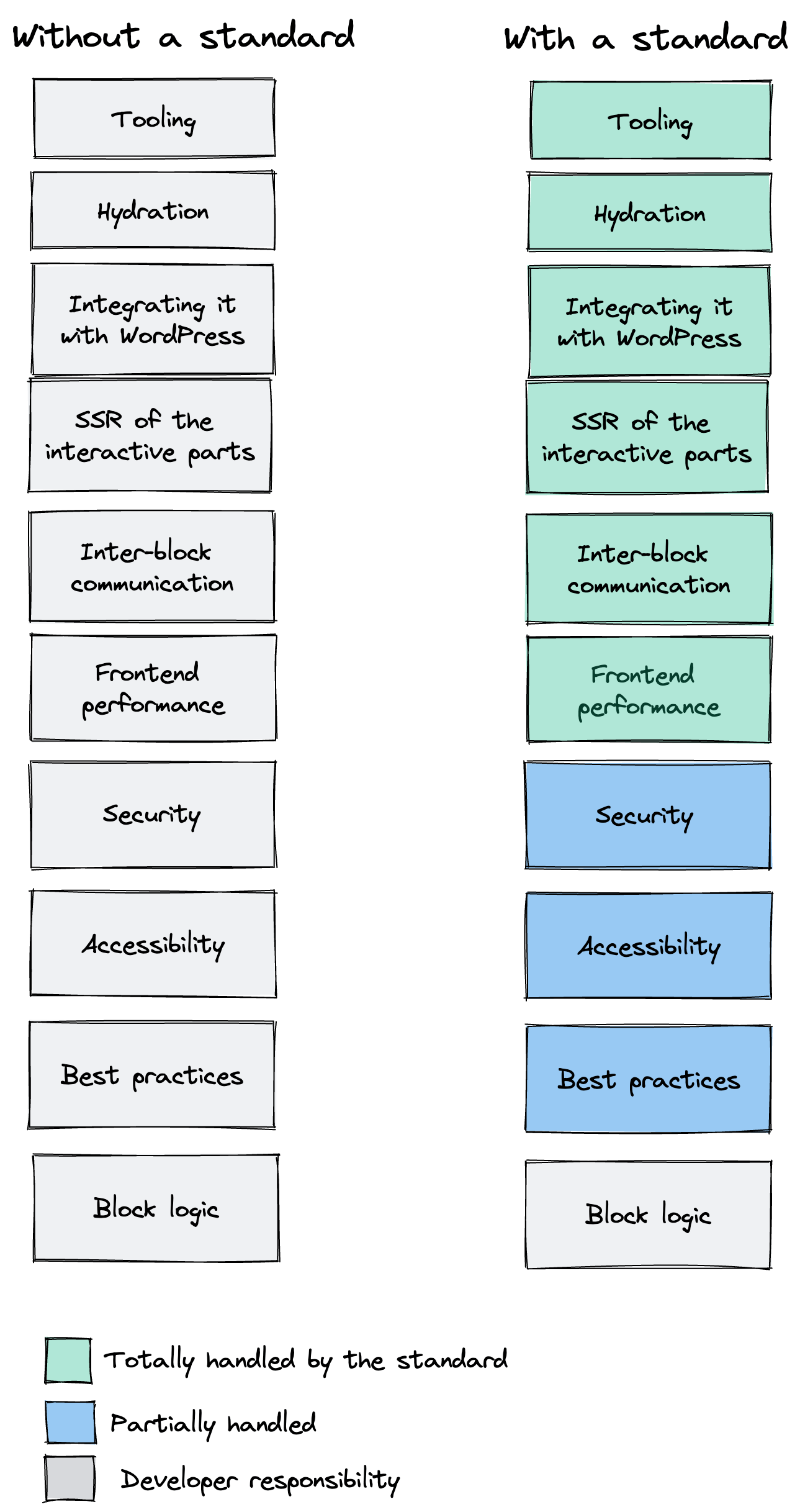
With this absorption, less knowledge is required to create interactive blocks, and developers have fewer decisions to worry about.
By adopting a standard, learning from other interactive blocks is simpler, and fosters collaboration and code reusability. As a result, the development process is leaner and friendlier to less experienced developers.