Modularity
概述
本文档介绍了 WordPress 块编辑器的模块化架构,强调其基于独立包(packages)构建,这些包不仅用于块编辑器本身,还可用于 WordPress 管理界面内外。模块化设计带来了代码可维护性、性能优化和第三方开发便利性等优势。
关键要点
- WordPress 块编辑器采用模块化设计,核心功能由多个独立的 npm 包(WordPress packages)组成,这些包可单独使用或组合。
- 模块化架构有助于核心贡献者专注于单个包的开发,减少代码重复,并允许按需加载脚本以优化性能。
- 第三方开发者可通过 npm 或 WordPress 脚本依赖使用这些包,支持在 WordPress 内外构建应用。
- 包分为生产包(如 @wordpress/components、@wordpress/api-fetch)和开发包(如 @wordpress/scripts),生产包包含脚本、样式和数据存储。
- 编辑器包(如 @wordpress/block-editor、@wordpress/editor、@wordpress/edit-post)采用分层抽象,支持不同场景下的灵活使用。
代码示例
// 使用 npm 安装和使用 @wordpress/components 包
npm install @wordpress/components

import { Button } from '@wordpress/components';

function MyApp() {
    return <Button>Nice looking button</Button>;
}

// 在 WordPress 插件中使用包作为脚本依赖
// myplugin.php
wp_register_script( 'myscript', 'pathtomyscript.js', array ('wp-components', "react" ) );

// 在脚本中使用
const { Button } = wp.components;

function MyApp() {
    return <Button>Nice looking button</Button>;
}
注意事项
- 使用包时需正确定义脚本和样式依赖,以避免未来版本中的潜在问题;在 WordPress 上下文中,样式表句柄与脚本句柄相同。
- 对于包含数据存储的包(如 core/block-editor),需添加相应脚本依赖以确保插件正常工作。
- 编辑器包(@wordpress/block-editor、@wordpress/editor、@wordpress/edit-post)各有特定用途,可根据需求组合使用,支持在非“新建文章”屏幕等场景下应用。
The WordPress block editor is based around the idea that you can combine independent blocks together to write your post or build your page. Blocks can also use and interact with each other. This makes it very modular and flexible.
But the Block Editor does not embrace modularity for its behavior and output only. The Gutenberg repository is also built from the ground up as several reusable and independent modules or packages, that, combined together, lead to the application and interface we all know. These modules are known as WordPress packages and are published and updated regularly on the npm package repository.
These packages are used to power the Block Editor, but they can be used to power any page in the WordPress Admin or outside.
Why?
Using a modular architecture has several benefits for all the actors involved:
- Each package is an independent unit and has a well defined public API that is used to interact with other packages and third-party code. This makes it easier for Core Contributors to reason about the codebase. They can focus on a single package at a time, understand it and make updates while knowing exactly how these changes could impact all the other parts relying on the given package.
- A module approach is also beneficial to the end-user. It allows to selectively load scripts on different WordPress Admin pages while keeping the bundle size contained. For instance, if we use the components package to power our plugin’s settings page, there’s no need to load the block-editor package on that page.
- This architecture also allows third-party developers to reuse these packages inside and outside the WordPress context by using these packages as npm or WordPress script dependencies.
Types of packages
Almost everything in the Gutenberg repository is built into a package. We can split these packages into two different types:
Production packages
These are the packages that ship in WordPress itself as JavaScript scripts. These constitute the actual production code that runs on your browsers. As an example, there’s a components package serving as a reusable set of React components used to prototype and build interfaces quickly. There’s also an api-fetch package that can be used to call WordPress Rest APIs.
Third-party developers can use these production packages in two different ways:
- If you’re building a JavaScript application, website, page that runs outside of the context of WordPress, you can consume these packages like any other JavaScript package in the npm registry.
npm install @wordpress/components
import { Button } from '@wordpress/components';

function MyApp() {
    return <Button>Nice looking button</Button>;
}
- If you’re building a plugin that runs on WordPress, you’d probably prefer consuming the package that ships with WordPress itself. This allows multiple plugins to reuse the same packages and avoid code duplication. In WordPress, these packages are available as WordPress scripts with a handle following this format
wp-package-name(e.g.wp-components). Once you add the script to your own WordPress plugin scripts dependencies, the package will be available on thewpglobal variable.
// myplugin.php
// Example of script registration depending on the "components" and "element packages.
wp_register_script( 'myscript', 'pathtomyscript.js', array ('wp-components', "react" ) );
// Using the package in your scripts
const { Button } = wp.components;

function MyApp() {
    return <Button>Nice looking button</Button>;
}
Script dependencies definition can be a tedious task for developers. Mistakes and oversight can happen easily. If you want to learn how you can automate this task. Check the @wordpress/scripts and @wordpress/dependency-extraction-webpack-plugin documentation.
Packages with stylesheets
Some production packages provide stylesheets to function properly.
- If you’re using the package as an npm dependency, the stylesheets will be available on the
build-stylefolder of the package. Make sure to load this style file on your application. - If you’re working in the context of WordPress, you’ll have to enqueue these stylesheets or add them to your stylesheets dependencies. The stylesheet handles are the same as the script handles.
In the context of existing WordPress pages, if you omit to define the scripts or styles dependencies properly, your plugin might still work properly if these scripts and styles are already loaded there by WordPress or by other plugins, but it’s highly recommended to define all your dependencies exhaustively if you want to avoid potential breakage in future versions.
Packages with data stores
Some WordPress production packages define data stores to handle their state. These stores can also be used by third-party plugins and themes to retrieve data and to manipulate it. The name of these data stores is also normalized following this format core/package-name (E.g. the @wordpress/block-editor package defines and uses the core/block-editor data store).
If you’re using one of these stores to access and manipulate WordPress data in your plugins, don’t forget to add the corresponding WordPress script to your own script dependencies for your plugin to work properly. (For instance, if you’re retrieving data from the core/block-editor store, you should add the wp-block-editor package to your script dependencies like shown above).
Development packages
These are packages used in development mode to help developers with daily tasks to develop, build and ship JavaScript applications, WordPress plugins and themes. They include tools for linting your codebase, building it, testing it…
Editor packages
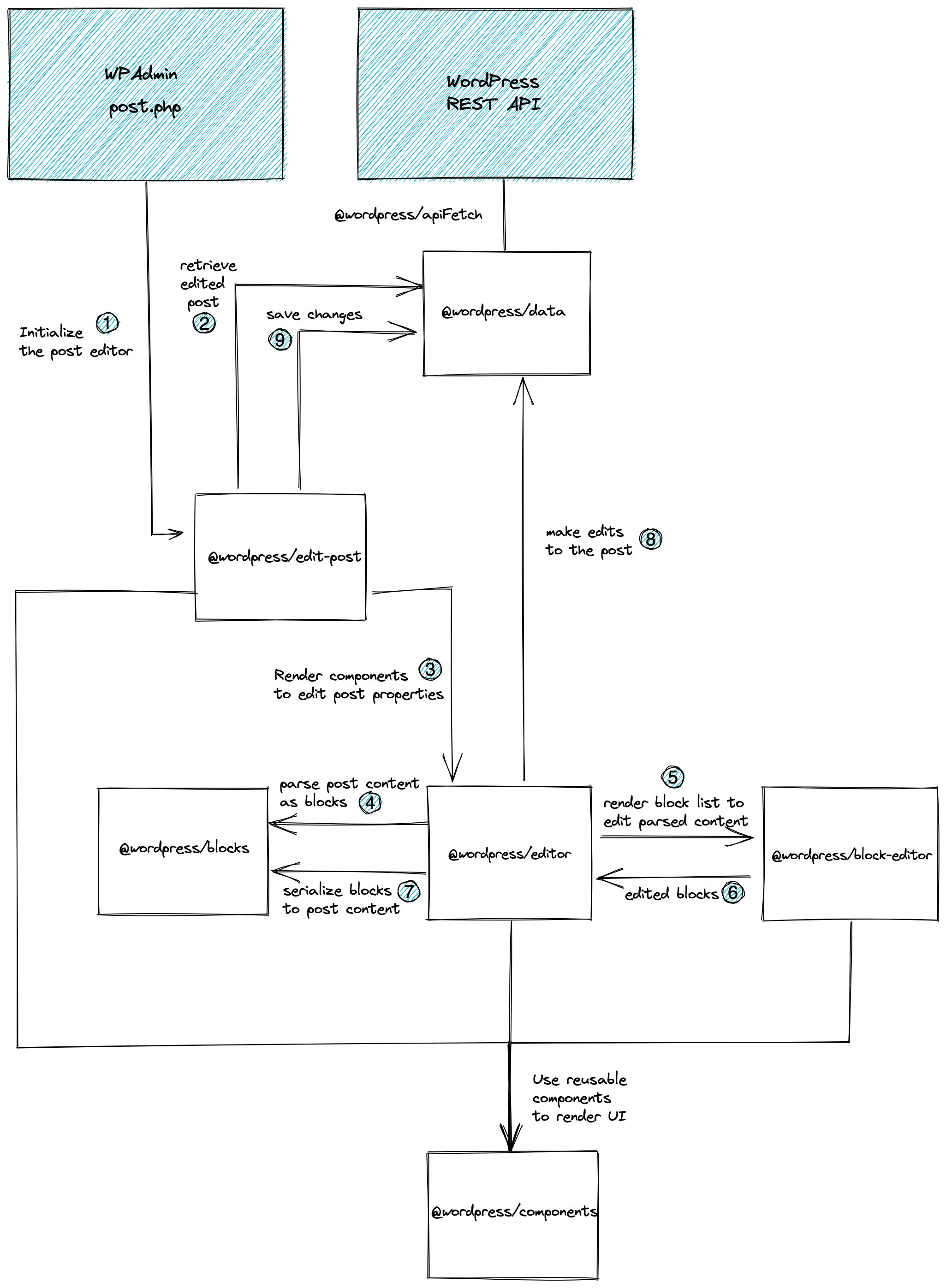
What’s the difference between the different editor packages? What’s the purpose of each package?
It’s often surprising to new contributors to discover that the post editor is constructed as a layered abstraction of three separate packages @wordpress/edit-post, @wordpress/editor, and @wordpress/block-editor.
The above Why? section should provide some context for how individual packages aim to satisfy specific requirements. That applies to these packages as well:
@wordpress/block-editorprovides components for implementing a block editor, operating on a primitive value of an array of block objects. It makes no assumptions for how this value is saved, and has no awareness (or requirement) of a WordPress site.@wordpress/editoris the enhanced version of the block editor for WordPress posts. It utilizes components from the@wordpress/block-editorpackage. Having an awareness of the concept of a WordPress post, it associates the loading and saving mechanism of the value representing blocks to a post and its content. It also provides various components relevant for working with a post object in the context of an editor (e.g., a post title input component). This package can support editing posts of any post type and does not assume that rendering happens in any particular WordPress screen or layout arrangement.@wordpress/edit-postis the implementation of the “New Post” (“Edit Post”) screen in the WordPress admin. It is responsible for the layout of the various components provided by@wordpress/editorand@wordpress/block-editor, with full awareness of how it is presented in the specific screen in the WordPress administrative dashboard.
Structured this way, these packages can be used in a variety of combinations outside the use-case of the “New Post” screen:
- A
@wordpress/edit-siteor@wordpress/edit-widgetspackage can serve as similar implementations of a “Site Editor” or “Widgets Editor”, in much the same way as@wordpress/edit-post. @wordpress/editorcould be used in the implementation of the “Reusable Block” block, since it is essentially a nested block editor associated with the post typewp_block.@wordpress/block-editorcould be used independently from WordPress, or with a completely different save mechanism. For example, it could be used for a comments editor for posts of a site.