常见问题解答
概述
本文档汇总了Gutenberg项目开发过程中的常见问题,涵盖项目背景、编辑体验、开发经验、样式兼容性等方面,旨在为WordPress开发者提供清晰指导。
关键要点
- Gutenberg是WordPress的新编辑器项目,基于块(blocks)概念构建,旨在简化内容创建和设计流程。
- 项目分为四个阶段:简易编辑、自定义、协作和多语言支持,目前处于第二阶段。
- 块编辑器支持嵌套块、拖放重排、键盘快捷键等功能,并可通过插件扩展。
- 主题可以自定义块样式,编辑器样式通过enqueue_block_editor_assets钩子加载。
- 兼容性方面,Gutenberg支持现代浏览器,并提供了Classic Editor插件作为回退选项。
- 数据存储采用HTML注释格式,便于解析和前后端处理。
代码示例
// 加载编辑器样式示例
function gutenbergtheme_editor_styles() {
    wp_enqueue_style( 'gutenbergtheme-blocks-style', get_template_directory_uri() . '/blocks.css');
}
add_action( 'enqueue_block_editor_assets', 'gutenbergtheme_editor_styles' );

// 解析块内容示例(JS)
var blocks = wp.blocks.parse( postContent );

// 解析块内容示例(PHP)
$blocks = parse_blocks( $post_content );
注意事项
- Gutenberg不再支持Internet Explorer,开发者需确保兼容现代浏览器。
- 短代码(shortcodes)仍可工作,但建议升级为块以获得更好的视觉编辑体验。
- 自定义文章类型(Custom Post Types)支持Gutenberg,但功能仍在完善中。
- 可访问性是项目关键价值,但部分功能可能尚未完全优化,欢迎贡献测试。
What follows is a set of questions that have come up from the last few years of Gutenberg development. If you have any questions you’d like to have answered and included here, just open up a GitHub issue with your question. We’d love the chance to answer and provide clarity to questions we might not have thought to answer. For a look back historically, please see Matt’s November 2018 post WordPress 5.0: A Gutenberg FAQ.
The Gutenberg Project
What is Gutenberg?
“Gutenberg” is the name of the project to create a new editor experience for WordPress — contributors have been working on it since January 2017 and it’s one of the most significant changes to WordPress in years. It’s built on the idea of using “blocks” to write and design posts and pages. This will serve as the foundation for future improvements to WordPress, including blocks as a way not just to design posts and pages, but also entire sites. The overall goal is to simplify the first-time user experience of WordPress — for those who are writing, editing, publishing, and designing web pages. The editing experience is intended to give users a better visual representation of what their post or page will look like when they hit publish. Originally, this was the kickoff goal:
The editor will endeavor to create a new page and post building experience that makes writing rich posts effortless, and has “blocks” to make it easy what today might take shortcodes, custom HTML, or “mystery meat” embed discovery.
Key takeaways include the following points:
- Authoring richly laid-out posts is a key strength of WordPress.
- By embracing blocks as an interaction paradigm, we can unify multiple different interfaces into one. Instead of learning how to write shortcodes and custom HTML, or pasting URLs to embed media, there’s a common, reliable flow for inserting any kind of content.
- “Mystery meat” refers to hidden features in software, features that you have to discover. WordPress already supports a large number of blocks and 30+ embeds, so let’s surface them.
Gutenberg is developed on GitHub under the WordPress organization. The block editor has been available in core WordPress since 5.0. If you want to test upcoming features from Gutenberg project, it is available in the plugin repository.
What’s on the roadmap long term?
There are four phases of Gutenberg which you can see on the official WordPress roadmap. As of writing this, we’re currently in phase 2:
- Easier Editing — Already available in WordPress since 5.0, with ongoing improvements.
- Customization — Full Site editing, Block Patterns, Block Directory, Block based themes.
- Collaboration — A more intuitive way to co-author content
- Multi-lingual — Core implementation for Multi-lingual sites
When was Gutenberg started?
The editor focus started in early 2017 with the first three months spent designing, planning, prototyping, and testing prototypes, to help us inform how to approach this project. The first plugin was launched during WordCamp Europe in June 2017.
When was Gutenberg merged into WordPress?
Gutenberg was first merged into WordPress 5.0 in December 2018. See the versions in WordPress page for a complete list of Gutenberg plugin versions merged into WordPress core releases.
WordPress is already the world’s most popular publishing platform. Why change the editor at all?
The Editor is where most of the action happens in WordPress’s daily use, and it was a place where we could polish and perfect the block experience in a contained environment. Further, as an open-source project, we believe that it is critical for WordPress to continue to innovate and keep working to make the core experience intuitive and enjoyable for all users. As a community project, Gutenberg has the potential to do just that, and we’re excited to pursue this goal together. If you’d like to test, contribute, or offer feedback, we welcome you to share what you find on GitHub.
The Editing Experience
What are “blocks” and why are we using them?
The classic WordPress editor is an open text window—it’s always been a wonderful blank canvas for writing, but when it comes to building posts and pages with images, multimedia, embedded content from social media, polls, and other elements, it required a mix of different approaches that were not always intuitive:
- Media library/HTML for images, multimedia and approved files.
- Pasted links for embeds.
- Shortcodes for specialized assets from plugins.
- Featured images for the image at the top of a post or page.
- Excerpts for subheadings.
- Widgets for content on the side of a page.
As we thought about these uses and how to make them obvious and consistent, we began to embrace the concept of “blocks.” All of the above items could be blocks: easy to search and understand, and easy to dynamically shift around the page. The block concept is very powerful, and when designed thoughtfully, can offer an outstanding editing and publishing experience. Ultimately, the idea with blocks is to create a new common language across WordPress, a new way to connect users to plugins, and replace a number of older content types — things like shortcodes and widgets — that one usually has to be well-versed in the idiosyncrasies of WordPress to understand.
What is the writing experience like?
Our goal with Gutenberg is not just to create a seamless post- and page-building experience. We also want to ensure that it provides a seamless writing experience. To test this out yourself, head to this demo and give it a try!
Is Gutenberg built on top of TinyMCE?
No. TinyMCE is only used for the “Classic” block.
Are there Keyboard Shortcuts for Gutenberg?
Yes. There are a lot! There is a help modal showing all available keyboard shortcuts.
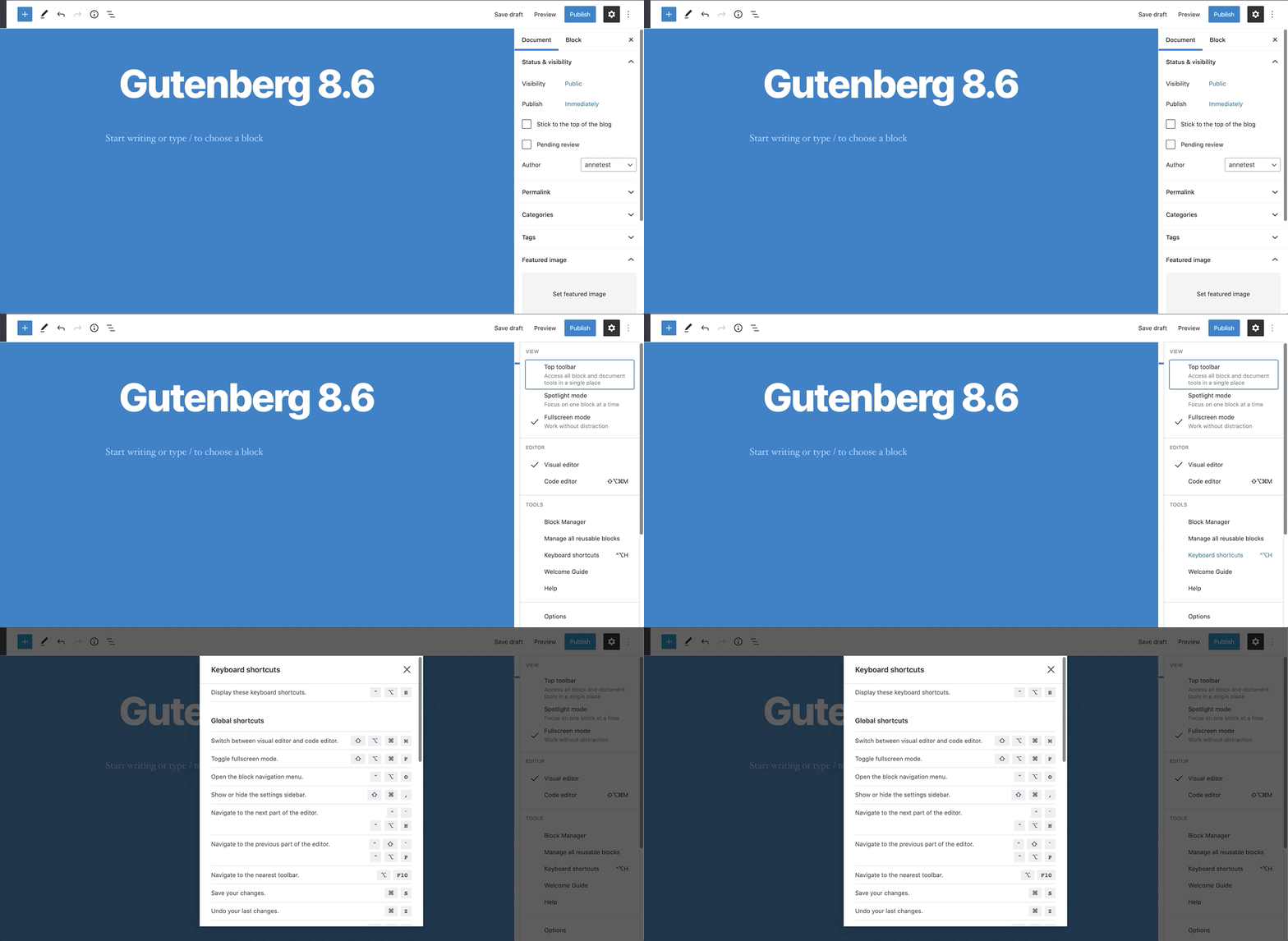
You can see the whole list going to the top right corner menu of the new editor and clicking on “Keyboard Shortcuts” (or by using the keyboard shortcut Shift+Alt+H on Linux/Windows and ⌃⌥H on macOS).
Here is a brief animation illustrating how to find and use the keyboard shortcuts:
Does Gutenberg support columns?
Yes, a columns block is available in Gutenberg.
Does Gutenberg support nested blocks?
Yes, it is supported. You can have multiple levels of nesting – blocks within blocks within blocks. See the Nested Block Tutorial for more information.
Does drag and drop work for rearranging blocks?
Yes, you can drag and drop blocks to rearrange their order.
The Development Experience
How do I make my own block?
The best place to start is the Create a Block Tutorial.
Does Gutenberg involve editing posts/pages in the front end?
No, we are designing Gutenberg primarily as a replacement for the post and page editing screens. That said, front-end editing is often confused with an editor that looks exactly like the front end. And that is something that Gutenberg will allow as themes customize individual blocks and provide those styles to the editor. Since content is designed to be distributed across so many different experiences—from desktop and mobile to full-text feeds and syndicated article platforms—we believe it’s not ideal to create or design posts from just one front-end experience.
Given Gutenberg is built in JavaScript, how do old meta boxes (PHP) work?
See the Meta Box Tutorial for more information on using Meta boxes with the new block editor.
How can plugins extend the Gutenberg UI?
The main extension point we want to emphasize is creating new blocks. Blocks are added to the block editor using plugins, see the Build your first block Tutorial to get started.
Are Custom Post Types still supported?
Indeed. There are multiple ways in which custom post types can leverage Gutenberg. The plan is to allow them to specify the blocks they support, as well as defining a default block for the post type. It’s not currently the case, but if a post type disables the content field, the “advanced” section at the bottom would fill the page.
Styles
Can themes style blocks?
Yes. Blocks can provide their own styles, which themes can add to or override, or they can provide no styles at all and rely fully on what the theme provides.
How do block styles work in both the front-end and back-end?
Blocks are able to provide base structural CSS styles, and themes can add styles on top of this. Some blocks, like a Separator (<hr/>), likely don’t need any front-end styles, while others, like a Gallery, need a few.
Other features, like the new wide and full-wide alignment options, are simply CSS classes applied to blocks that offer this alignment. We are looking at how a theme can opt into this feature, for example using add_theme_support.
This is currently a work in progress and we recommend reviewing the block based theme documentation to learn more.
What are block variations? Are they the same as block styles?
No, block variations are different versions of a single base block, sharing a similar functionality but with slight differences in their implementation or settings (attributes, InnerBlocks, etc.). Block variations are transparent for users, and once there is a registered block variation, it will appear as a new block. For example, the embed block registers different block variations to embed content from specific providers.
Meanwhile, block styles allow you to provide alternative styles to existing blocks, and they work by adding a className to the block’s wrapper. Once a block has registered block styles, a block style selector will appear in its sidebar so that users can choose among the different registered styles.
How do editor styles work?
Regular editor styles are opt-in and work as is in most cases. Themes can also load extra stylesheets by using the following hook:
function gutenbergtheme_editor_styles() {
    wp_enqueue_style( 'gutenbergtheme-blocks-style', get_template_directory_uri() . '/blocks.css');
}
add_action( 'enqueue_block_editor_assets', 'gutenbergtheme_editor_styles' );
See: Editor Styles
Compatibility
What browsers does Gutenberg support?
Gutenberg works in modern browsers.
The list of supported browsers can be found in the Make WordPress handbook. The term “modern browsers” generally refers to the current and previous two versions of each major browser.
Since WordPress 5.8, Gutenberg no longer supports any version of Internet Explorer.
Should I be concerned that Gutenberg will make my plugin obsolete?
The goal of Gutenberg is not to put anyone out of business. It’s to evolve WordPress so there’s more business to be had in the future, for everyone.
Aside from enabling a rich post and page building experience, a meta goal is to move WordPress forward as a platform. Not only by modernizing the UI, but by modernizing the foundation.
We realize it’s a big change. We also think there will be many new opportunities for plugins. WordPress is likely to ship with a range of basic blocks, but there will be plenty of room for highly tailored premium plugins to augment existing blocks or add new blocks to the mix.
Is it possible to opt out of Gutenberg for my site?
There is a “Classic” block, which is virtually the same as the current editor, except in block form.
There is also the Classic Editor plugin which restores the previous editor, see the plugin for more information. The WordPress Core team has committed to supporting the Classic Editor plugin until December 2021.
How do custom TinyMCE buttons work in Gutenberg?
Custom TinyMCE buttons still work in the “Classic” block, which is a block version of the classic editor you know today.
Gutenberg comes with a new universal inserter tool, which gives you access to every block available, searchable, sorted by recency and categories. This inserter tool levels the playing field for every plugin that adds content to the editor, and provides a single interface to learn how to use.
How do shortcodes work in Gutenberg?
Shortcodes continue to work as they do now.
However we see the block as an evolution of the [shortcode]. Instead of having to type out code, you can use the universal inserter tray to pick a block and get a richer interface for both configuring the block and previewing it. We would recommend people eventually upgrade their shortcodes to be blocks.
Should I move shortcodes to content blocks?
We think so for a variety of reasons including but not limited to:
- Blocks have visual editing built-in which creates a more rich, dynamic experience for building your site.
- Blocks are simply html and don’t persist things the browser doesn’t understand on the front-end. In comparison, if you disable a plugin that powers a shortcode, you end up with strange visuals on the front-end (often just showing the shortcode in plain text).
- Blocks will be discovered more readily with the launch of the block directory in a way shortcodes never could be allowing for more people to get more functionality.
Ultimately, Blocks are designed to be visually representative of the final look, and, with the launch of the Block Directory in 5.5, they will become the expected way in which users will discover and insert content in WordPress.
Miscellaneous
Is Gutenberg made to be properly accessible?
Accessibility is not an afterthought. Not every aspect of Gutenberg is accessible at the moment. You can check logged issues here. We understand that WordPress is for everyone, and that accessibility is about inclusion. This is a key value for us.
If you would like to contribute to the accessibility of Gutenberg, we can always use more people to test and contribute.
How is data stored? I’ve seen HTML comments. What is their purpose?
Our approach—as outlined in the technical overview introduction—is to augment the existing data format in a way that doesn’t break the decade-and-a-half-fabric of content WordPress provides. In other terms, this optimizes for a format that prioritizes human readability (the HTML document of the web) and easy-to-render-anywhere over a machine convenient file (JSON in post-meta) that benefits the editing context primarily.
This also gives us the flexibility to store those blocks that are inherently separate from the content stream (reusable pieces like widgets or small post type elements) elsewhere, and just keep token references for their placement.
We suggest you look at the Gutenberg key concepts to learn more about how this aspect of the project works.
How can I parse the post content back out into blocks in PHP or JS?
In JS:
var blocks = wp.blocks.parse( postContent );
In PHP:
$blocks = parse_blocks( $post_content );