PluginSidebarMoreMenuItem
云策文档标注
概述
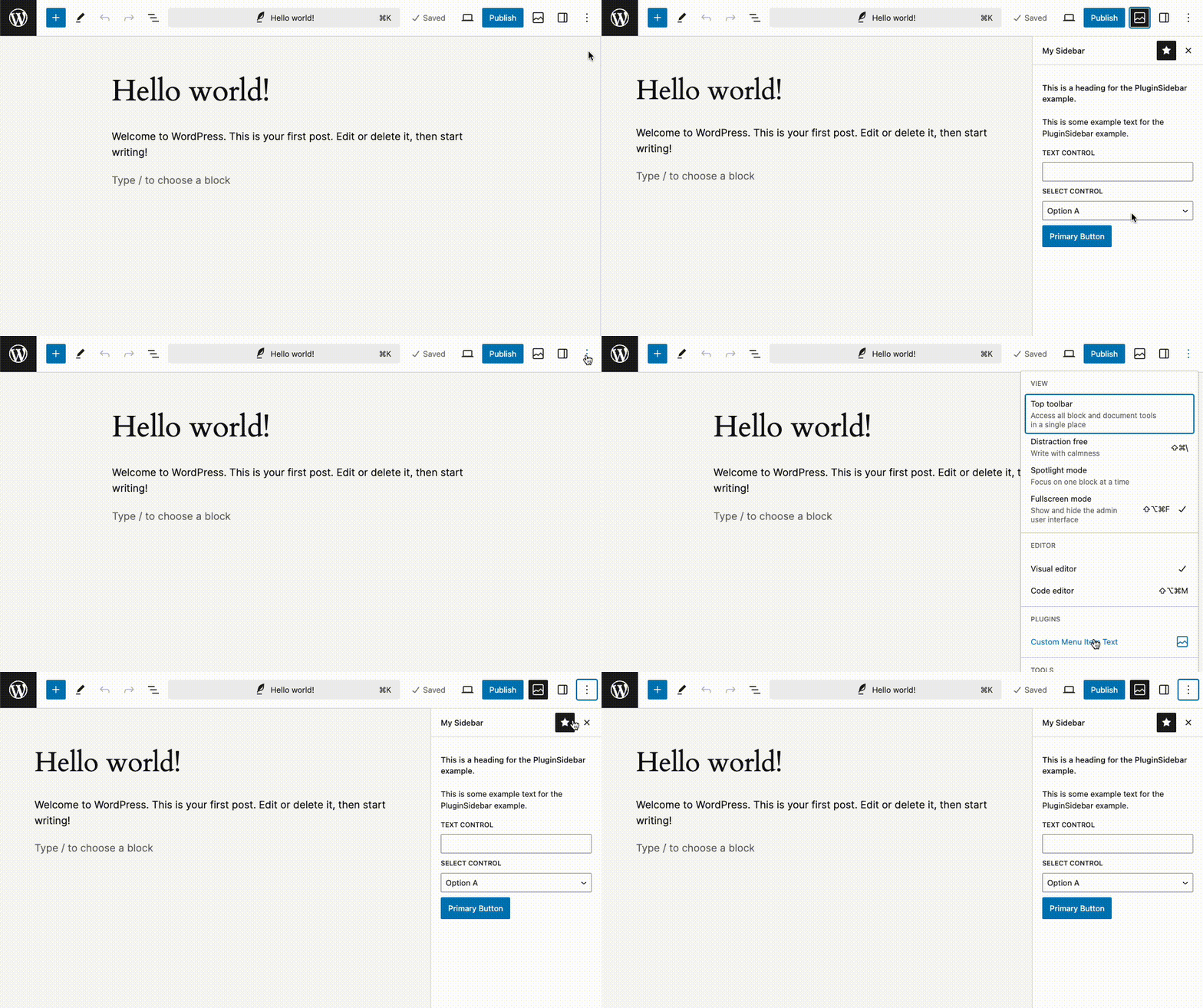
PluginSidebarMoreMenuItem 是一个用于从选项下拉菜单中打开 PluginSidebar 面板的插槽。当注册 PluginSidebar 时,会自动使用其 title 属性创建对应的 PluginSidebarMoreMenuItem,因此通常无需手动使用此插槽。
关键要点
- PluginSidebarMoreMenuItem 允许自定义菜单项文本,而非默认使用 PluginSidebar 的 title。
- 通过 target 属性与 PluginSidebar 的 name 属性关联,确保正确打开对应面板。
- 示例展示了如何结合 useState、TextControl、SelectControl 等组件实现交互式侧边栏。
代码示例
import { __ } from '@wordpress/i18n';
import { PluginSidebar, PluginSidebarMoreMenuItem } from '@wordpress/editor';
import {
    PanelBody,
    Button,
    TextControl,
    SelectControl,
} from '@wordpress/components';
import { registerPlugin } from '@wordpress/plugins';
import { useState } from '@wordpress/element';
import { image } from '@wordpress/icons';

const PluginSidebarMoreMenuItemTest = () => {
    const [ text, setText ] = useState( '' );
    const [ select, setSelect ] = useState( 'a' );
    return (
        <>
            <PluginSidebarMoreMenuItem target="sidebar-name" icon={ image }>
                { __( 'Custom Menu Item Text' ) }
            </PluginSidebarMoreMenuItem>
            <PluginSidebar
                name="sidebar-name"
                icon={ image }
                title="My Sidebar"
            >
                <PanelBody>
                    <h2>
                        { __(
                            'This is a heading for the PluginSidebar example.'
                        ) }
                    </h2>
                    <p>
                        { __(
                            'This is some example text for the PluginSidebar example.'
                        ) }
                    </p>
                    <TextControl
                        __next40pxDefaultSize
                        label={ __( 'Text Control' ) }
                        value={ text }
                        onChange={ ( newText ) => setText( newText ) }
                    />
                    <SelectControl
                        label={ __( 'Select Control' ) }
                        value={ select }
                        options={ [
                            { value: 'a', label: __( 'Option A' ) },
                            { value: 'b', label: __( 'Option B' ) },
                            { value: 'c', label: __( 'Option C' ) },
                        ] }
                        onChange={ ( newSelect ) => setSelect( newSelect ) }
                    />
                    <Button variant="primary">
                        { __( 'Primary Button' ) }{ ' ' }
                    </Button>
                </PanelBody>
            </PluginSidebar>
        </>
    );
};

registerPlugin( 'plugin-sidebar-more-menu-item-example', {
    render: PluginSidebarMoreMenuItemTest,
} );
原文内容
This slot is used to allow the opening of a <PluginSidebar /> panel from the Options dropdown.
When a <PluginSidebar /> is registered, a <PluginSidebarMoreMenuItem /> is automatically registered using the title prop from the <PluginSidebar /> and so it’s not required to use this slot to create the menu item.
Example
This example shows how customize the text for the menu item instead of using the default text provided by the <PluginSidebar /> title.
import { __ } from '@wordpress/i18n';
import { PluginSidebar, PluginSidebarMoreMenuItem } from '@wordpress/editor';
import {
    PanelBody,
    Button,
    TextControl,
    SelectControl,
} from '@wordpress/components';
import { registerPlugin } from '@wordpress/plugins';
import { useState } from '@wordpress/element';
import { image } from '@wordpress/icons';

const PluginSidebarMoreMenuItemTest = () => {
    const [ text, setText ] = useState( '' );
    const [ select, setSelect ] = useState( 'a' );
    return (
        <>
            <PluginSidebarMoreMenuItem target="sidebar-name" icon={ image }>
                { __( 'Custom Menu Item Text' ) }
            </PluginSidebarMoreMenuItem>
            <PluginSidebar
                name="sidebar-name"
                icon={ image }
                title="My Sidebar"
            >
                <PanelBody>
                    <h2>
                        { __(
                            'This is a heading for the PluginSidebar example.'
                        ) }
                    </h2>
                    <p>
                        { __(
                            'This is some example text for the PluginSidebar example.'
                        ) }
                    </p>
                    <TextControl
                        __next40pxDefaultSize
                        label={ __( 'Text Control' ) }
                        value={ text }
                        onChange={ ( newText ) => setText( newText ) }
                    />
                    <SelectControl
                        label={ __( 'Select Control' ) }
                        value={ select }
                        options={ [
                            { value: 'a', label: __( 'Option A' ) },
                            { value: 'b', label: __( 'Option B' ) },
                            { value: 'c', label: __( 'Option C' ) },
                        ] }
                        onChange={ ( newSelect ) => setSelect( newSelect ) }
                    />
                    <Button variant="primary">
                        { __( 'Primary Button' ) }{ ' ' }
                    </Button>
                </PanelBody>
            </PluginSidebar>
        </>
    );
};

registerPlugin( 'plugin-sidebar-more-menu-item-example', {
    render: PluginSidebarMoreMenuItemTest,
} );
Location