block.json
概述
block.json 文件通过 JSON 格式定义块,简化了在服务器端和客户端(Block Editor)注册块的过程。它用于指定块的基本元数据、功能文件、数据存储方式和界面设置面板,提升性能并确保一致性。
关键要点
- block.json 统一注册块,支持服务器和客户端,简化开发流程。
- 基本元数据包括 apiVersion、name、title、category、icon、description、keywords 和 textdomain。
- 功能文件属性:editorScript、editorStyle、script、style、viewScript 和 render(用于动态渲染)。
- 使用 attributes 属性定义块的自定义数据存储,如字符串、布尔值等类型。
- supports 属性启用常见设置(如颜色、内边距),确保与 Core 块行为一致。
- 块通过 HTML 注释分隔符存储属性,便于解析和渲染。
代码示例
"attributes": {
    "fallbackCurrentYear": {
        "type": "string"
    },
    "showStartingYear": {
        "type": "boolean"
    },
    "startingYear": {
        "type": "string"
    }
}"supports": {
"color": {
"text": true,
"link": true,
"background": true
}
}注意事项
- 属性默认序列化存储在块分隔符中,但可配置以适应需求。
- Edit 组件通过 setAttributes 函数修改属性,save 函数和 render.php 用于生成标记。
- 使用 supports 时,需手动将生成的属性和 CSS 类添加到块包装元素中。
The block.json file simplifies the process of defining and registering a block by using the same block’s definition in JSON format to register the block on both the server and the client (Block Editor).
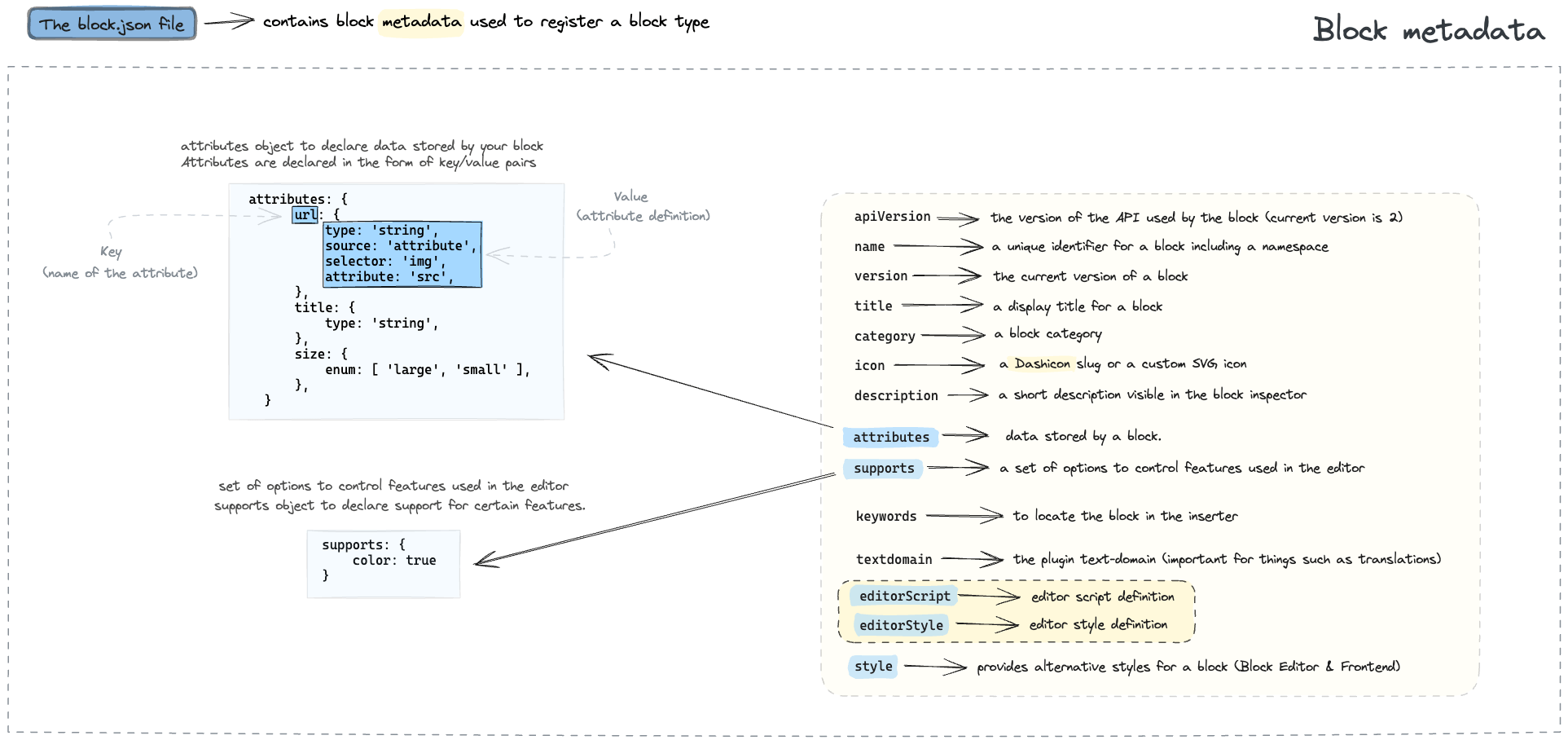
The diagram below details the basic structure of the block.json file.
block.json file, visit the Block Development Examples GitHub repository.
Besides simplifying a block’s registration, using a block.json has several benefits, including improved performance.
The Metadata in block.json documentation has a comprehensive guide on all the properties you can use in a block.json file for a block. This article will cover the most common options, which allow you to specify:
- The block’s basic metadata.
- The files that dictate the block’s functionality, appearance, and output.
- How data is stored within the block.
- The block’s setting panels within the user interface.
Basic metadata of a block
Using block.json properties, you can define how the block will be uniquely identified and what information is displayed in the Block Editor. These properties include:
apiVersion: Specifies the API version the block uses. Use the latest version unless you have specific requirements.name: The unique name of the block, including namespace (e.g.,my-plugin/my-custom-block).title: The display title for the block, shown in the Inserter.category: The category under which the block appears in the Inserter. Common categories includetext,media,design,widgets, andtheme.icon: An icon representing the block in the Inserter. This can be a Dashicon slug or a custom SVG icon.description: A short description of the block, providing more context than the title.keywords: An array of keywords to help users find the block when searching.textdomain: The text domain for the block, used for internationalization.
Files for the block’s behavior, output, or style
The block.json file also allows you to specify the essential files for a block’s functionality:
editorScript: A JavaScript file or files for use only in the Block Editor.editorStyle: A CSS file or files for styling within the Block Editor.script: A JavaScript file or files loaded in both the Block Editor and the front end.style: A CSS file or files applied in both the Block Editor and the front end.viewScript: A JavaScript file or files intended solely for the front end.
For all these properties, you can provide a file path (starting with file:), a handle that has been registered using wp_register_script or wp_register_style, or an array combining both options.
Additionally, the render property, introduced on WordPress 6.1, specifies the path to a PHP template file responsible for generating a dynamically rendered block’s front-end markup. This approach is used if a $render_callback function is not provided to the register_block_type() function.
Using block attributes to store data
Block attributes are settings or data assigned to blocks. They can determine various aspects of a block, such as its content, layout, style, and any other specific information you need to store along with your block’s structure. If the user changes a block, such as modifying the font size, you need a way to persist these changes. Attributes are the solution.
When registering a new block type, the attributes property of block.json describes the custom data the block requires and how they’re stored in the database. This allows the Block Editor to parse these values correctly and pass the attributes to the block’s Edit component and save function.
Here’s an example of three attributes defined in block.json:
"attributes": {
"fallbackCurrentYear": {
"type": "string"
},
"showStartingYear": {
"type": "boolean"
},
"startingYear": {
"type": "string"
}
},
Blocks are “delimited” using HTML-style comment tags that contain specific JSON-like attributes. These delimiters make it possible to recognize block boundaries and parse block attributes when rendering post content or editing a post in the Block Editor.
The code example below demonstrates the attributes defined in the block delimiter.
<!-- wp:block-development-examples/copyright-date-block-09aac3 {"fallbackCurrentYear":"2023","showStartingYear":true,"startingYear":"2020"} -->
<p class="wp-block-block-development-examples-copyright-date-block-09aac3">© 2020–2023</p>
<!-- /wp:block-development-examples/copyright-date-block-09aac3 -->
All attributes are serialized and stored in the block’s delimiter by default, but this can be configured to suit your needs. Check out the Understanding Block Attributes article to learn more.
Reading and updating attributes
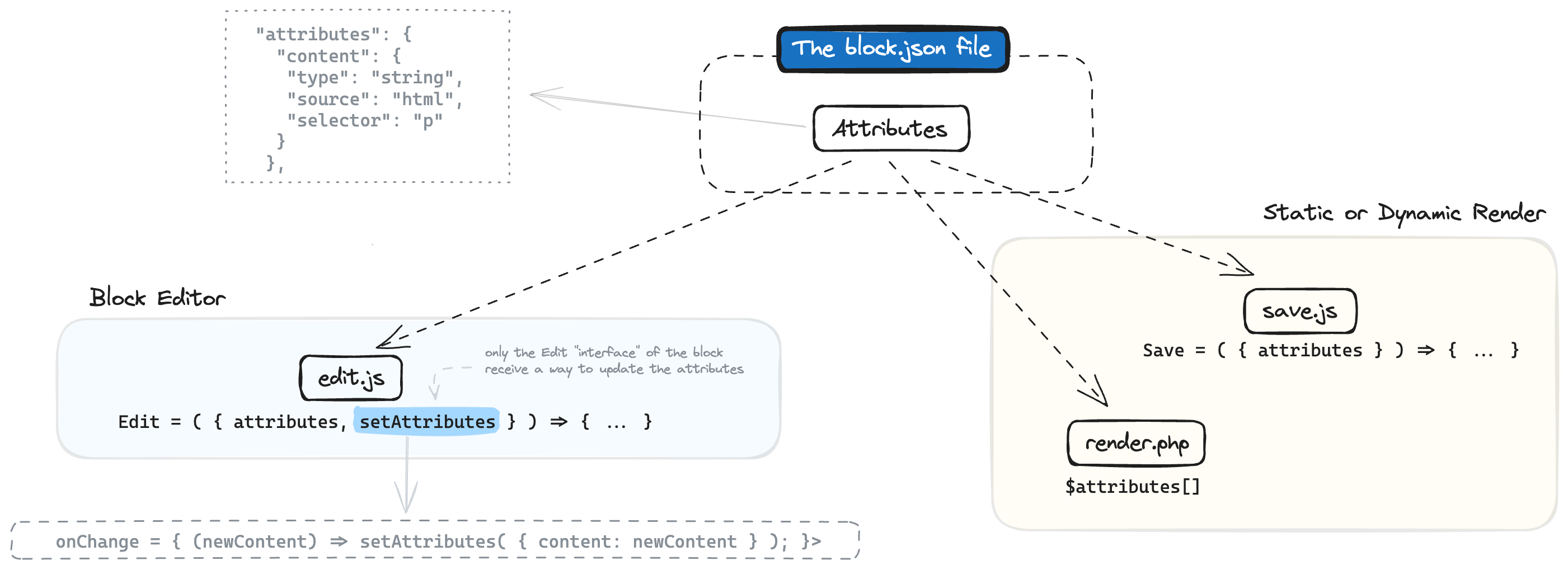
These attributes are passed to the block’s Edit React component for display in the Block Editor, to the save function for generating the markup that gets stored in the database, and to any server-side rendering definition for the block.
The Edit component uniquely possesses the ability to modify these attributes through the setAttributes function.
The following diagram details how attributes are stored, read, and updated in a typical block.
See how the attributes are passed to the Edit component, the save function, and render.php in this complete block example.
For more information about attributes and how to use them in your custom blocks, visit the Attributes API reference page.
Using block supports to enable settings and styles
Many blocks, including Core blocks, offer similar customization options, such as background color, text color, and padding adjustments.
The supports property in block.json allows a block to declare support for a set of these common customization options. When enabled, users of the block can then adjust things like color or padding directly from the Settings Sidebar.
Leveraging these predefined block supports helps ensure your block behaves consistently with Core blocks, eliminating the need to recreate similar functionalities from scratch.
Here’s an example of color supports defined in block.json:
"supports": {
    "color": {
        "text": true,
        "link": true,
        "background": true
    }
}
The use of block supports generates a set of properties that need to be manually added to the wrapping element of the block. This ensures they’re properly stored as part of the block data and taken into account when generating the markup of the block that will be delivered to the front end.
The following code demonstrates how the attributes and CSS classes generated by enabling block supports are stored in the markup representation of the block.
<!-- wp:block-development-examples/block-supports-6aa4dd {"backgroundColor":"contrast","textColor":"accent-4"} -->
<p class="wp-block-block-development-examples-block-supports-6aa4dd has-accent-4-color has-contrast-background-color has-text-color has-background">Hello World</p>
<!-- /wp:block-development-examples/block-supports-6aa4dd -->
See the complete block example of the code above.
For more information about supports and how to use them in your custom blocks, visit the Supports API reference page.