区块编辑器手册
概述
本文档是WordPress区块编辑器的开发指南,介绍其作为现代网站构建和发布工具的核心概念,包括模块化块系统、主要元素(如插入器、内容画布和设置面板),以及如何通过API进行扩展和定制。
关键要点
- 区块编辑器基于Gutenberg项目,使用块作为离散元素(如段落、标题、媒体)来创建和格式化内容。
- 手册分为五个主要部分:入门指南、操作指南、参考指南、解释说明和贡献者指南,覆盖从基础到高级的开发内容。
- 提供额外资源,如WordPress开发者博客、Learn WordPress平台、WordPress.tv视频和Gutenberg仓库,以辅助学习和开发。
注意事项
- 本手册专注于区块开发,而非最终用户文档;其他相关手册(如主题手册、插件手册)也可供参考。
- 区块编辑器是一个强大的开发者平台,提供丰富的API,支持无限扩展和定制。
Welcome to the Block Editor Handbook.
The Block Editor is a modern paradigm for WordPress site building and publishing. It uses a modular system of blocks to compose and format content and is designed to create rich and flexible layouts for websites and digital products.
The Block Editor consists of several primary elements, as shown in the following figure:
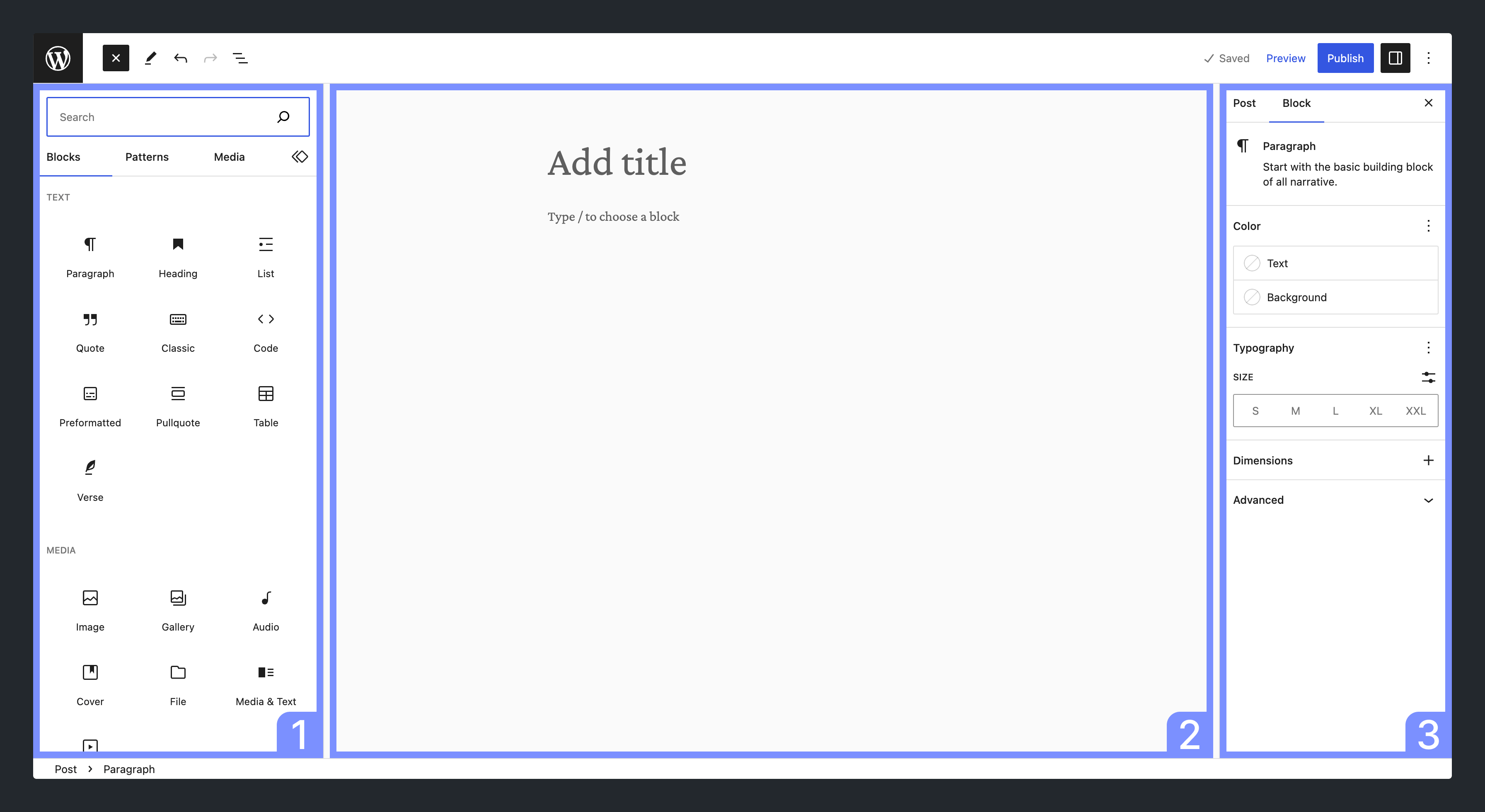
The elements highlighted are:
- Inserter: A panel for inserting blocks into the content canvas
- Content canvas: The content editor, which holds content created with blocks
- Settings Panel: A panel for configuring a block’s settings when selected or the settings of the post
Through the Block Editor, you create content modularly using blocks. Many blocks are available in WordPress by default, and you can also create your own.
A block is a discrete element such as a Paragraph, Heading, Media, or Embed. Each block is treated as a separate element with individual editing and format controls. When all these components are pieced together, they make up the content of the page or post, which is then stored in the WordPress database.
The Block Editor is the result of the work done on the Gutenberg project, which aims to revolutionize the WordPress editing experience.
Besides offering an enhanced editing experience through visual content creation tools, the Block Editor is also a powerful developer platform with a rich feature set of APIs that allow it to be manipulated and extended in countless ways.
Navigating this handbook
This handbook is focused on block development and is divided into five major sections.
- Getting Started: For those just starting out with block development, this is where you can get set up with a development environment and learn the fundamentals of block development. Its Quick Start Guide and Tutorial: Build your first block are great places to start learning block development.
-
How-to Guides: Here, you can build on what you learned in the Getting Started section and learn how to solve particular problems. You will also find tutorials and example code to reuse in your own projects, such as working with WordPress data or Curating the Editor Experience.
-
Reference Guides: This section is the heart of the handbook and is where you can get down to the nitty-gritty and look up the details of the particular API you’re working with or need information on. Among other things, the Block API Reference covers most of what you will want to do with a block, and each component and package is also documented here. Components are also documented via Storybook.
-
Explanations: This section enables you to go deeper and reinforce your practical knowledge with a theoretical understanding of the Architecture of the Block Editor.
-
Contributor Guide: Gutenberg is open-source software, and everyone is welcome to contribute to the project. This section details how to contribute, whether with code, design, documentation, or in some other way.
Further resources
This handbook should be considered the canonical resource for all things related to block development. However, there are other resources that can help you.
- WordPress Developer Blog: An ever-growing resource of technical articles covering specific topics related to block development and a wide variety of use cases. The blog is also an excellent way to keep up with the latest developments in WordPress.
- Learn WordPress: The WordPress hub for learning resources where you can find courses like Introduction to Block Development: Build your first custom block, Converting a Shortcode to a Block, or Using the WordPress Data Layer.
- WordPress.tv: A hub of WordPress-related videos (from talks at WordCamps to recordings of online workshops) curated and moderated by the WordPress community. You’re sure to find something to aid your learning about block development or the Block Editor here.
- Gutenberg repository: Development of the Block Editor takes place on GitHub. The repository contains the code of interesting packages such as
block-library(core blocks) orcomponents(common UI elements). The block-development-examples repository is another useful reference. - End User Documentation: This documentation site is targeted to the end user (not developers), where you can also find documentation about the Block Editor and working with blocks.
Are you in the right place?
The Block Editor Handbook is designed for those looking to create and develop for the Block Editor. However, it’s important to note that there are multiple other handbooks available within the Developer Resources that you may find beneficial: