区块的文件结构
概述
本文档详细介绍了使用 create-block 工具生成的 WordPress 自定义区块在插件中的文件结构,强调在插件中注册区块以确保主题切换时的可访问性,并提供了各核心文件的作用和配置说明。
关键要点
- 推荐在插件而非主题中注册区块,以保证区块在不同主题下的可用性。
- 遵循 create-block 工具生成的文件结构有助于保持一致性、组织性和可维护性。
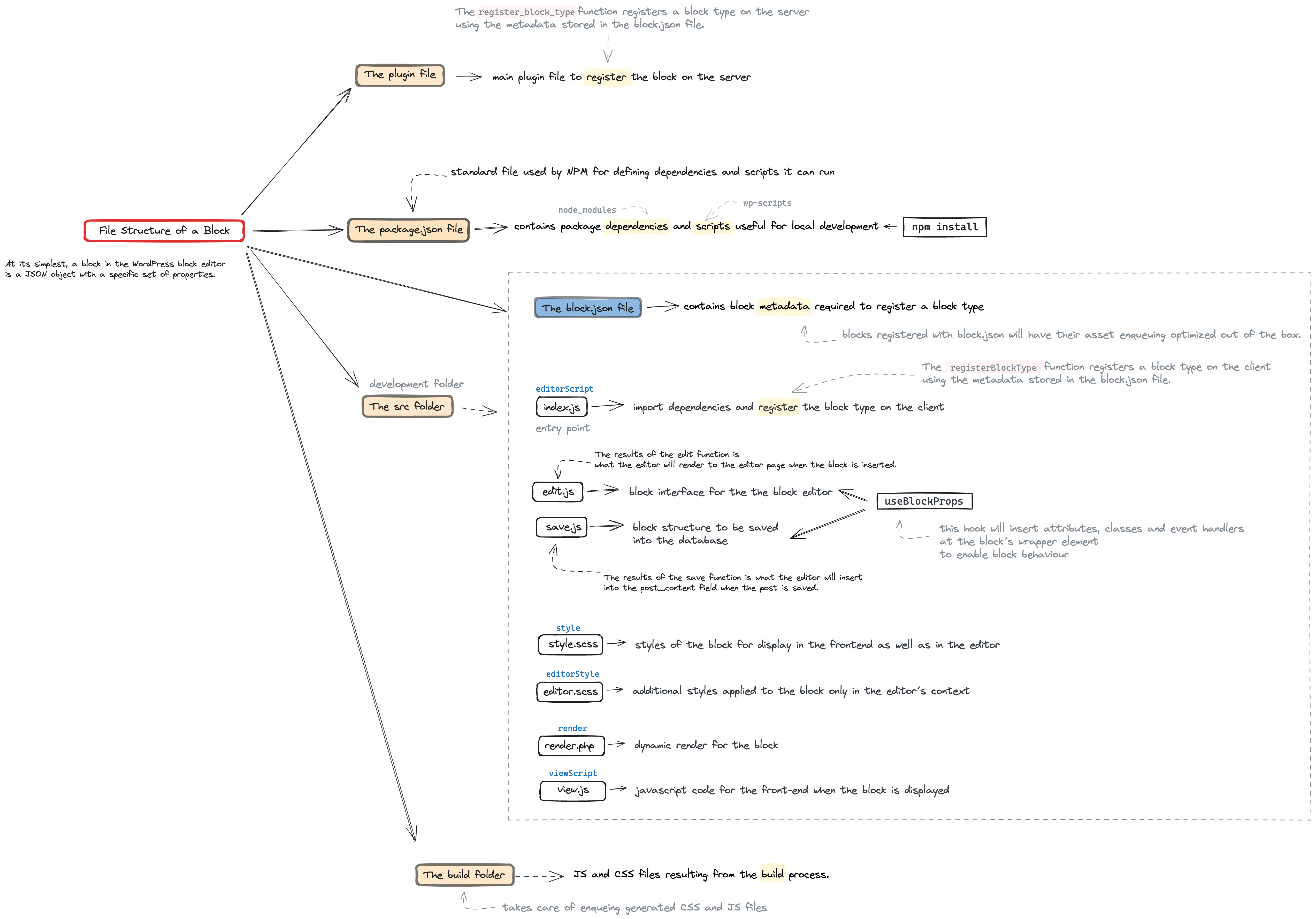
- 核心文件包括主 PHP 文件(用于服务器端注册)、package.json(配置 Node.js 项目)、src 文件夹(存放源代码)、block.json(定义区块元数据)、index.js(客户端注册入口)、edit.js(编辑界面组件)、save.js(保存 HTML 标记)、样式文件(如 style.css 和 editor.css)、render.php(服务器端渲染)和 view.js(前端脚本)。
- build 文件夹包含编译后的生产就绪文件,由 wp-scripts 构建过程生成。
代码示例
<plugin-file>.php
package.json
src/
  index.js
  edit.js
  save.js
  style.css
  editor.css
  render.php
  view.js
block.json
build/
注意事项
- 使用 wp_register_block_types_from_metadata_collection()(WordPress 6.8+)或 register_block_type() 注册区块,具体取决于 WordPress 版本和设置。
- block.json 中的属性如 editorScript、style、editorStyle、render 和 viewScript 指向构建后的文件路径。
- wp-scripts 的构建过程包括压缩、转译和捆绑,可通过 webpack-src-dir 和 output-path 选项自定义入口和输出点。
When developing custom blocks for WordPress, it’s best practice to register them within plugins rather than themes. This strategy guarantees that your blocks stay accessible, even when users switch themes. While there might be situations where embedding blocks directly into a theme could be appropriate, this guide focuses on blocks housed within a plugin. Specifically, it details the file structure as produced by the create-block tool.
Adhering to the create-block tool’s structure is not mandatory, but it serves as a reliable reference. The files it generates encompass everything needed for a block’s definition and registration. Following this structure can help maintain consistency and ensure your blocks are well-organized and easy to maintain.
<plugin-file>.php
When creating a block in a WordPress plugin, you register the block on the server in the main PHP file of the plugin. For plugins built with wp-scripts (WordPress 6.8+), the recommended approach is to use wp_register_block_types_from_metadata_collection(), which registers all blocks from a generated blocks-manifest.php file in a single call. For simpler setups or older WordPress versions, you can use register_block_type() to register individual blocks. See Registration of a block for full details on all available registration methods.
package.json
The package.json file is used to configure a Node.js project, which is technically what a block plugin is. In this file, you define the npm dependencies of the block and the scripts used for local development.
src folder
In a standard project, the src (source) folder contains the raw, uncompiled code, including JavaScript, CSS, and other assets necessary for developing the block. This is where you write and edit your block’s source code, utilizing modern JavaScript features and JSX for React components.
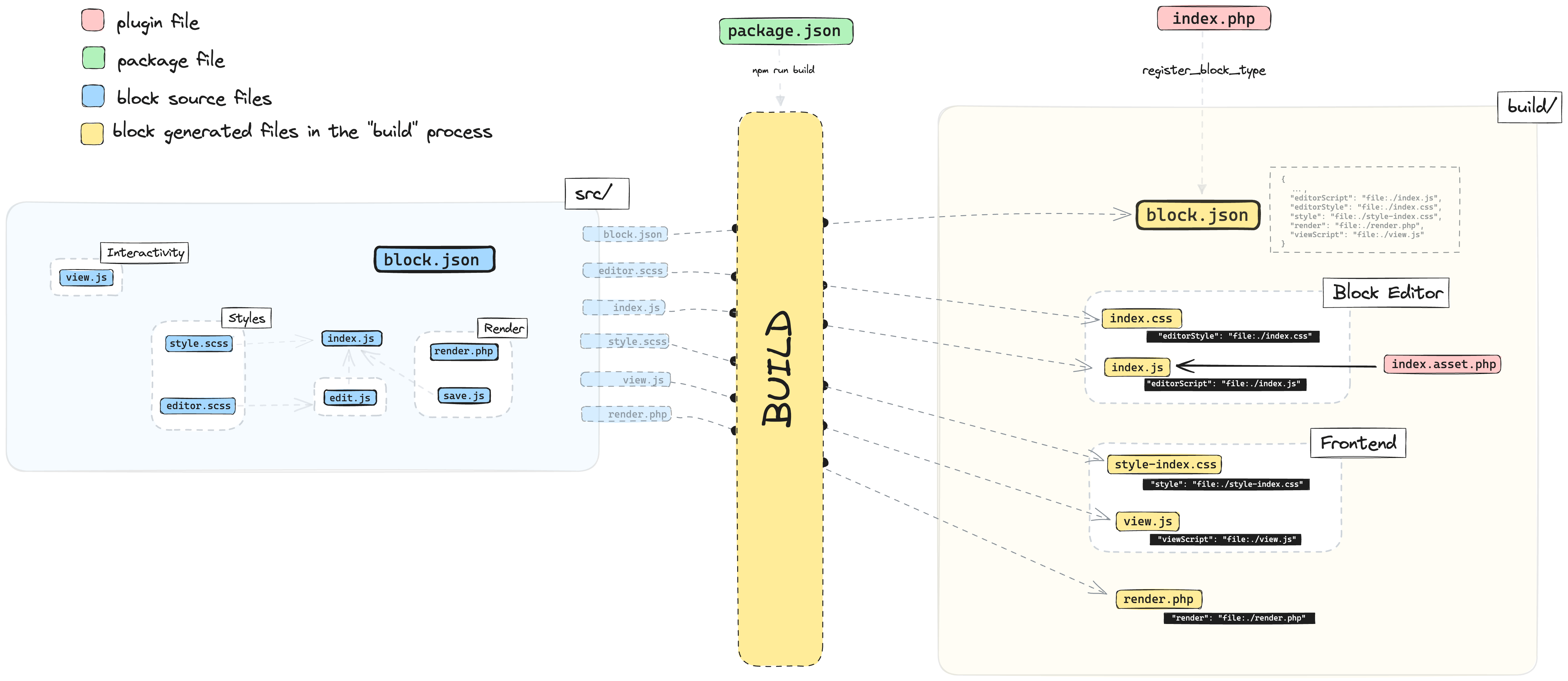
The build process provided by wp-scripts will then take the files from this folder and generate the production-ready files in the project’s build folder.
block.json
The block.json file contains the block’s metadata, streamlining its definition and registration across client-side and server-side environments.
This file includes the block name, description, attributes, supports, and more, as well as the locations of essential files responsible for the block’s functionality, appearance, and styling.
When a build process is applied, the block.json file and the other generated files are moved to a designated folder, often the build folder. Consequently, the file paths specified within block.json point to these processed, bundled versions of the files.
A few of the most important properties that can be defined in a block.json are:
editorScript: Usually set with the path of a bundledindex.jsfile that was built fromsrc/index.js.style: Usually set with the path of a bundledstyle-index.cssfile that was built fromsrc/style.(css|scss|sass).editorStyle: Usually set with the path of a bundledindex.cssthat was built fromsrc/editor.(css|scss|sass).render: Usually set with the path of a bundledrender.phpthat was copied fromsrc/render.php.viewScript: Usually set with the path of a bundledview.jsthat was built fromsrc/view.js.
index.js
The index.js file (or any other file defined in the editorScript property of block.json) is the entry point file for JavaScript that should only get loaded in the Block Editor. It’s responsible for calling the registerBlockType function to register the block on the client and typically imports the edit.js and save.js files to get the functions required for block registration.
edit.js
The edit.js file contains the React component responsible for rendering the block’s editing user interface, allowing users to interact with and customize the block’s content and settings in the Block Editor. This component gets passed to the edit property of the registerBlockType function in the index.js file.
save.js
The save.js exports the function that returns the static HTML markup that gets saved to the WordPress database. This function gets passed to the save property of the registerBlockType function in the index.js file.
style.(css|scss|sass)
A style file with extensions .css, .scss, or .sass contains the styles of the block that will be loaded in both the Block Editor and on the front end. In the build process, this file is converted into style-index.css, which is usually defined using the style property in block.json
wp-scripts includes a css-loader chained with postcss-loader and sass-loader that allows it to process CSS, SASS or SCSS files. Check Default webpack config for more info
editor.(css|scss|sass)
An editor file with extensions .css, .scss, or .sass contains the additional styles applied to the block in the Block Editor. You will often use this file for styles specific to the block’s user interface. This file is converted to index.css during the build process, usually defined using the editorStyle property in block.json.
render.php
The render.php file (or any other file defined in the render property of block.json) defines the server-side process that returns the markup for the block when there is a request from the front end. If defined, this file will take precedence over other ways to render the block’s markup on the front end.
view.js
The view.js file (or any other file defined in the viewScript property of block.json) will be loaded in the front end when the block is displayed.
build folder
The build folder contains the compiled and optimized versions of the code from the src folder. These files are generated from the build process, triggered by the build or start commands of wp-scripts.
This transformation process includes minification, transpilation from modern JavaScript to a version compatible with a wider range of browsers, and bundling of assets for efficient loading. WordPress ultimately enqueues and uses the build folder’s contents to render the block in the Block Editor and on the front end.
webpack-src-dir and output-path option of wp-scripts build commands to customize the entry and output points.