MainDashboardButton
云策文档标注
概述
MainDashboardButton 是一个 SlotFill,用于替换文章编辑器中的默认主仪表板按钮,在 WordPress 6.2 及更高版本中,站点编辑器不再支持此功能。它主要用于在全屏编辑模式下返回 wp-admin 仪表板。
关键要点
- MainDashboardButton 允许自定义文章编辑器中的主仪表板按钮,但自 WordPress 6.2 起,站点编辑器已移除此功能。
- 该 SlotFill 仍被视为实验性功能,未来可能发生变化,使用时需注意兼容性。
- 通过注册插件并使用 MainDashboardButton 组件,可以替换按钮的图标和链接,例如使用 close 或 external 图标。
代码示例
import { registerPlugin } from '@wordpress/plugins';
import { __experimentalMainDashboardButton as MainDashboardButton } from '@wordpress/edit-post';
import { close } from '@wordpress/icons';

const MainDashboardButtonTest = () => (
    <MainDashboardButton>
        <FullscreenModeClose icon={ close } />
    </MainDashboardButton>
);

registerPlugin( 'main-dashboard-button-test', {
    render: MainDashboardButtonTest,
} );
import { registerPlugin } from '@wordpress/plugins';
import {
__experimentalFullscreenModeClose as FullscreenModeClose,
__experimentalMainDashboardButton as MainDashboardButton,
} from '@wordpress/edit-post';
import { external } from '@wordpress/icons';
const MainDashboardButtonIconTest = () => (
<MainDashboardButton>
<FullscreenModeClose icon={ external } href="https://wordpress.org" />
</MainDashboardButton>
);
registerPlugin( 'main-dashboard-button-icon-test', {
render: MainDashboardButtonIconTest,
} );注意事项
MainDashboardButton 是实验性功能,可能在未来版本中修改或移除,建议在开发中谨慎使用并关注更新。
原文内容
This slot allows replacing the default main dashboard button in the post editor. It is no longer available in the site editor as of WordPress 6.2.
It’s used for returning back to main wp-admin dashboard when editor is in fullscreen mode.
Please note that this SlotFill is still considered experimental and may change
Examples
Change the icon
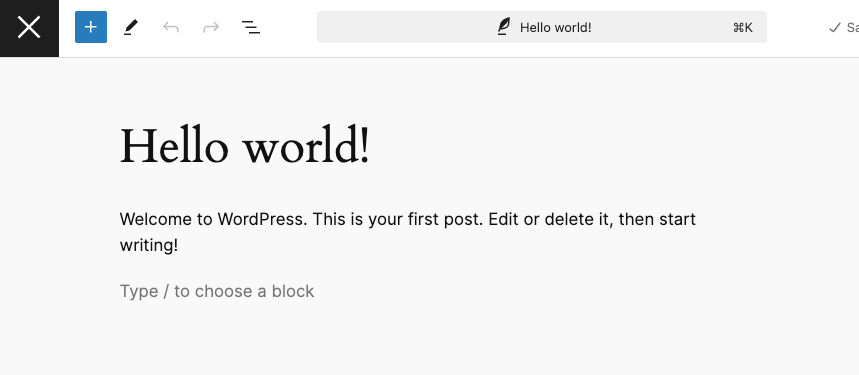
This will replace the W icon button in the header with a close icon.
import { registerPlugin } from '@wordpress/plugins';
import { __experimentalMainDashboardButton as MainDashboardButton } from '@wordpress/edit-post';
import { close } from '@wordpress/icons';
const MainDashboardButtonTest = () => (
<MainDashboardButton>
<FullscreenModeClose icon={ close } />
</MainDashboardButton>
);
registerPlugin( 'main-dashboard-button-test', {
render: MainDashboardButtonTest,
} );
Change the icon and link
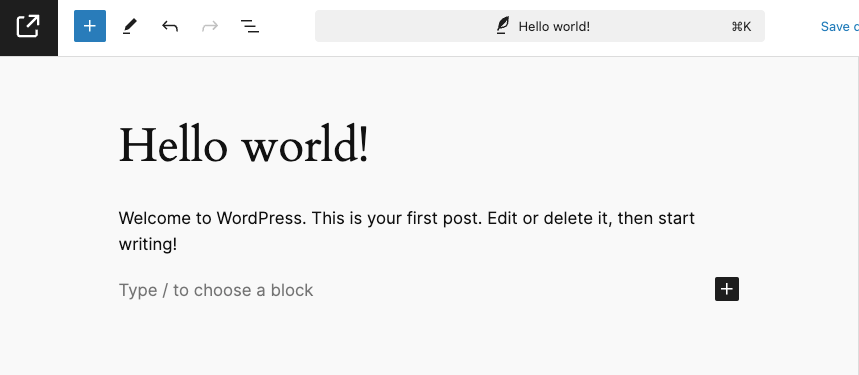
This example will change the icon in the header to indicate an external link that will take the user to https://wordpress.org when clicked.
import { registerPlugin } from '@wordpress/plugins';
import {
    __experimentalFullscreenModeClose as FullscreenModeClose,
    __experimentalMainDashboardButton as MainDashboardButton,
} from '@wordpress/edit-post';
import { external } from '@wordpress/icons';

const MainDashboardButtonIconTest = () => (
    <MainDashboardButton>
        <FullscreenModeClose icon={ external } href="https://wordpress.org" />
    </MainDashboardButton>
);

registerPlugin( 'main-dashboard-button-icon-test', {
    render: MainDashboardButtonIconTest,
} );