发布包至 NPM 与 WordPress 核心更新
概述
本文档详细介绍了 Gutenberg 仓库中 npm 包的发布流程,包括与 WordPress 核心更新的同步机制。它涵盖了多种发布类型,如 Gutenberg 插件同步、WordPress 发布、开发发布和独立 bugfix 发布,并提供了自动化与手动操作的步骤指南。
关键要点
- Gutenberg 仓库遵循 WordPress SVN 的分支策略,并包含 wp/latest 和 wp/next 两个特殊分支,分别对应 npm 的 latest 和 next 分发标签。
- 发布类型包括:同步 Gutenberg 插件(每两周自动发布)、WordPress 发布(按需从 wp/X.Y 分支触发)、开发发布(随时可进行测试)和独立 bugfix 发布(用于紧急修复)。
- 自动化流程通过 GitHub Actions 和 ./bin/plugin/cli.js 脚本实现,但文档也提供了手动操作的详细步骤,包括分支管理、版本控制和 npm 发布。
- 版本号管理至关重要:同步发布时至少提升次要版本,WordPress 发布时仅提升补丁版本,独立 bugfix 发布需谨慎处理 CHANGELOG.md 更新。
- 所有发布都需要 Gutenberg 核心团队成员的批准,并涉及 2FA 认证和 OTP 输入。
代码示例
# 手动同步 wp/latest 分支的示例命令
git checkout wp/latest
git rm -r .
git checkout release/x.x -- .
git commit -m "Merge changes published in the Gutenberg plugin vX.X release"
git push

# 手动发布 npm 包的示例命令
npx lerna publish --no-private
npx lerna publish patch --no-private --dist-tag wp-5.2
npx lerna publish from-package  # 用于恢复不完整的发布过程

# 开发发布安装示例
npm install @wordpress/components@next
注意事项
- wp/latest 和 trunk 分支仅限 Gutenberg 核心团队推送,确保发布流程的安全性和一致性。
- 在 WordPress 5.0 和 5.1 的发布中,版本号需使用“元数据”修饰符(如 5.6.1+patch.1),因为补丁版本可能已被占用。
- 发布过程中可能多次要求输入 OTP,需确保 2FA 认证应用可用,以防超时或错误导致发布中断。
- 独立 bugfix 发布应仅用于关键 bug 或安全修复,避免干扰常规发布周期。
The Gutenberg repository follows the WordPress SVN repository’s branching strategy for every major WordPress release. In addition to that, it also contains two other special branches that control npm publishing workflows:
- The
wp/latestbranch contains the same version of packages as those published to npm with thelatestdistribution tag. The goal here is to have this branch synchronized with the last Gutenberg plugin release, and the only exception would be an unplanned bugfix release. - The
wp/nextbranch contains the same version of packages as those published to npm with thenextdistribution tag. It always gets synchronized with thetrunkbranch. Projects should use those packages for development or testing purposes only. - A Gutenberg branch
wp/X.Y(examplewp/6.2) targeting a specific WordPress major release (including its further minor increments) gets created based on the current Gutenberg plugin release branchrelease/X.Y(examplerelease/15.1) shortly after the last release planned for inclusion in the next major WordPress release.
Release types and their schedule:
- Synchronizing Gutenberg Plugin (
latestdist tag) – publishing happens automatically every two weeks based on the newly createdrelease/X.Y(examplerelease/12.8) branch with the RC1 version of the Gutenberg plugin. - WordPress Releases (
wp-X.Ydist tag, examplewp-6.2) – publishing gets triggered on demand from thewp/X.Y(examplewp/6.2) branch. Once we reach the point in the WordPress major release cycle (shortly before Beta 1) where we only cherry-pick commits from the Gutenberg repository to the WordPress core, we usewp/X.Ybranch (created fromrelease/X.Ybranch, examplerelease/15.1) for npm publishing with thewp-X.Ydist-tag. It’s also possible to use older branches to backport bug or security fixes to the corresponding older versions of WordPress Core. - Development Releases (
nextdist tag) – it is also possible to perform development releases at any time when there is a need to test the upcoming changes.
There is also an option to perform Standalone Bugfix Package Releases at will. It should be reserved only for critical bug fixes or security releases that must be published to npm outside of regular cycles.
Synchronizing the Gutenberg plugin
For each Gutenberg plugin release, we also publish to npm an updated version of WordPress packages. This is automated with the Release Tool that handles releases for the Gutenberg plugin. A successful RC1 release triggers the npm publishing job, and this needs to be approved by a Gutenberg Core team member. Locate the “Build Gutenberg Plugin Zip” workflow for the new version, and have it approved.
We deliberately update the wp/latest branch within the Gutenberg repo with the content from the Gutenberg release release/X.Y (example release/12.7) branch at the time of the Gutenberg RC1 release. This is done to ensure that the wp/latest branch is as close as possible to the latest version of the Gutenberg plugin. It also practically removes the chances of conflicts while backporting to trunk commits with updates applied during publishing to package.json and CHANGELOG.md files. In the past, we had many issues in that aspect when doing npm publishing after the regular Gutenberg release a week later. When publishing the new package versions to npm, we pick at least the minor version bump to account for future bugfix or security releases.
Behind the scenes, all steps are automated via ./bin/plugin/cli.js npm-latest command. For the record, the manual process would look very close to the following steps:
- Ensure the WordPress
trunkbranch is open for enhancements. - Get the last published Gutenberg release branch with
git fetch. - Check out the
wp/latestbranch. - Remove all files from the current branch:
git rm -r .. - Check out all the files from the release branch:
git checkout release/x.x -- .. - Commit all changes to the
wp/latestbranch withgit commit -m "Merge changes published in the Gutenberg plugin vX.X release"and push to the repository. - Update the
CHANGELOG.mdfiles of the packages with the new publish version calculated and commit to thewp/latestbranch. Assuming the package versions are written using this formatmajor.minor.patch, make sure to bump at least theminorversion bumps gets applied. For example, if the CHANGELOG of the package to be released indicates that the next unreleased version is5.6.1, choose5.7.0as a version in case ofminorversion. This is important as the patch version numbers should be reserved in case bug fixes are needed for a minor WordPress release (see below). - Log-in to npm via the console:
npm login. Note that you should have 2FA enabled. - From the
wp/latestbranch, install npm dependencies withnpm ci. - Run the script
npx lerna publish --no-private.- When asked for the version numbers to choose for each package pick the values of the updated CHANGELOG files.
- You’ll be asked for your One-Time Password (OTP) a couple of times. This is the code from the 2FA authenticator app you use. Depending on how many packages are to be released you may be asked for more than one OTP, as they tend to expire before all packages are released.
- If the publishing process ends up incomplete (perhaps because it timed-out or a bad OTP was introduced) you can resume it via
npx lerna publish from-package.
- Finally, now that the npm packages are published, cherry-pick the commits created by lerna (“Publish” and the CHANGELOG update) into the
trunkbranch of Gutenberg.
WordPress releases
The following workflow is needed when bug or security fixes need to be backported into WordPress Core. This can happen in a few use-cases:
- During the
betaandRCperiods of the WordPress release cycle whenwp/X.Y(examplewp/5.7) branch for the release is already present. - For WordPress minor releases and WordPress security releases (example
5.1.1).
- Check out the relevant WordPress major branch (If the minor release is
5.2.1, check outwp/5.2). - Create a feature branch from that branch, and cherry-pick the merge commits for the needed bug fixes onto it. The cherry-picking process can be automated with the
npm run other:cherry-pickscript. - Create a Pull Request from this branch targeting the WordPress major branch used above.
- Merge the Pull Request using the “Rebase and Merge” button to keep the history of the commits.
Now, the wp/X.Y branch is ready for publishing npm packages. In order to start the process, go to Gutenberg’s GitHub repository’s Actions tab, and locate the “Publish npm packages” action. Note the blue banner that says “This workflow has a workflow_dispatch event trigger.”, and expand the “Run workflow” dropdown on its right hand side.
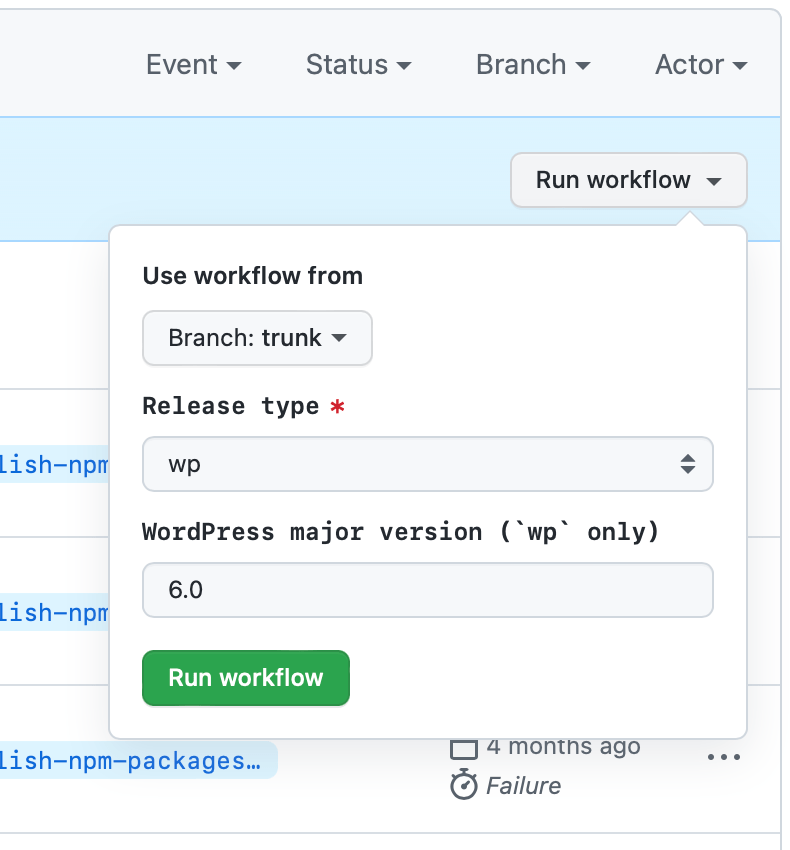
To publish packages to npm for the WordPress major release, select trunk as the branch to run the workflow from (this means that the script used to run the workflow comes from the trunk branch, though the packages themselves will published from the release branch as long as the correct “Release type” is selected below), then select wp from the “Release type” dropdown and enter X.Y (example 5.2) in the “WordPress major release” input field. Finally, press the green “Run workflow” button. It triggers the npm publishing job, and this needs to be approved by a Gutenberg Core team member. Locate the “Publish npm packages” action for the current publishing, and have it approved.
For the record, the manual process would look like the following:
- Check out the WordPress branch used before (example
wp/5.2). git pull.- Run the
npx lerna publish patch --no-private --dist-tag wp-5.2command (see more in package release process) but when asked for the version numbers to choose for each package, (assuming the package versions are written using this formatmajor.minor.patch) make sure to bump only thepatchversion number. For example, if the last published package version for this WordPress branch was5.6.0, choose5.6.1as a version.
Note: For WordPress 5.0 and WordPress 5.1, a different release process was used. This means that when choosing npm package versions targeting these two releases, you won’t be able to use the next patch version number as it may have been already used. You should use the “metadata” modifier for these. For example, if the last published package version for this WordPress branch was 5.6.1, choose 5.6.1+patch.1 as a version.
- Optionally update the
CHANGELOG.mdfiles of the published packages with the new released versions and commit to the corresponding branch (Examplewp/5.2). - Cherry-pick the CHANGELOG update commits, if any, into the
trunkbranch of Gutenberg.
Now, the npm packages should be ready and a patch can be created and committed into the corresponding WordPress SVN branch.
Standalone bugfix package releases
The following workflow is needed when packages require bug fixes or security releases to be published to npm outside of a regular release cycle.
Note: Both the trunk and wp/latest branches are restricted and can only be pushed to by the Gutenberg Core team.
Identify the commit hashes from the pull requests that need to be ported from the repo trunk branch to wp/latest
The wp/latest branch now needs to be prepared to release and publish the packages to npm.
Open a terminal and perform the following steps:
git checkout trunkgit pullgit checkout wp/latestgit pull
Before porting commits check that the wp/latest branch does not have any outstanding packages waiting to be published:
git checkout wp/latestnpx lerna updated
Now cherry-pick the commits from trunk to wp/latest, use -m 1 commithash if the commit was a pull request merge commit:
git cherry-pick -m 1 cb150a2git push
Whilst waiting for the GitHub actions build for wp/latestbranch to pass, identify and begin updating the CHANGELOG.md files:
git checkout wp/latestnpx lerna updated
Example:
shell<br />

npx lerna updated<br />

@wordpress/e2e-tests<br />

@wordpress/jest-preset-default<br />

@wordpress/scripts<br />

lerna success found 3 packages ready to publish
Check the versions listed in the current CHANGELOG.md file, looking through the commit history of a package e.g @wordpress/scripts and look out for “chore(release): publish” and “Update changelogs” commits to determine recent version bumps, then looking at the commits since the most recent release should aid with discovering what changes have occurred since the last release.
Note: You may discover the current version of each package is not up to date, if so updating the previously released versions would be appreciated.
Now, the wp/latest branch is ready for publishing npm packages. In order to start the process, go to Gutenberg’s GitHub repository’s Actions tab, and locate the “Publish npm packages” action. Note the blue banner that says “This workflow has a workflow_dispatch event trigger.”, and expand the “Run workflow” dropdown on its right hand side.
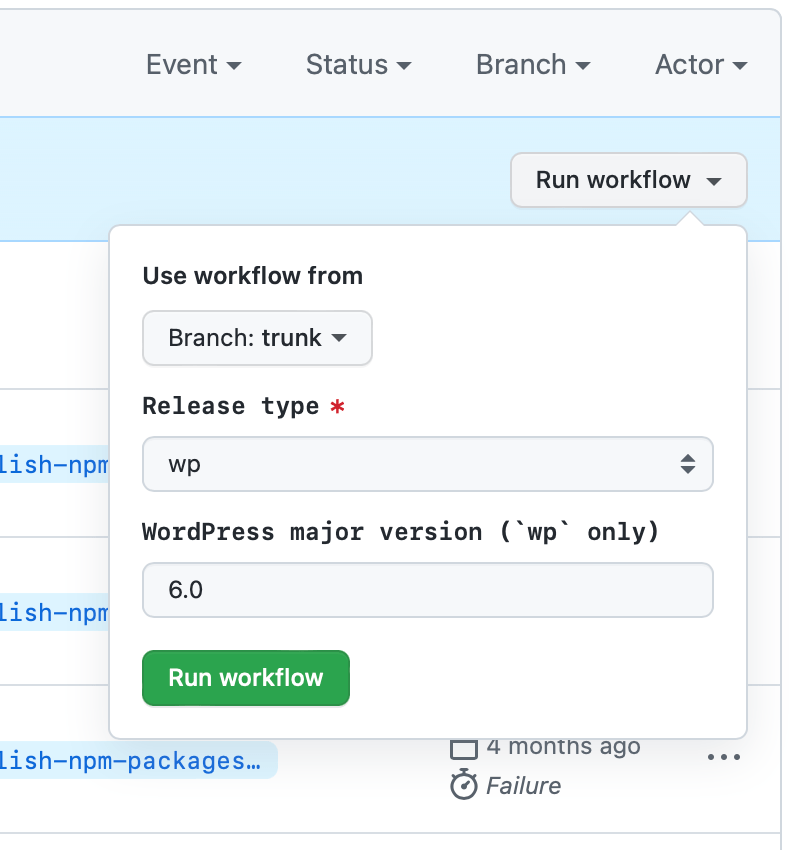
To publish packages to npm with bugfixes, select bugfix from the “Release type” dropdown and leave empty “WordPress major release” input field. Finally, press the green “Run workflow” button. It triggers the npm publishing job, and this needs to be approved by a Gutenberg Core team member. Locate the “Publish npm packages” action for the current publishing, and have it approved.
Behind the scenes, the rest of the process is automated with ./bin/plugin/cli.js npm-bugfix command. For the record, the manual process would look very close to the following steps:
- Check out the
wp/latestbranch. - Update the
CHANGELOG.mdfiles of the packages with the new publish version calculated and commit to thewp/latestbranch. - Log-in to npm via the console:
npm login. Note that you should have 2FA enabled. - From the
wp/latestbranch, install npm dependencies withnpm ci. - Run the script
npx lerna publish --no-private.- When asked for the version numbers to choose for each package pick the values of the updated CHANGELOG files.
- You’ll be asked for your One-Time Password (OTP) a couple of times. This is the code from the 2FA authenticator app you use. Depending on how many packages are to be released you may be asked for more than one OTP, as they tend to expire before all packages are released.
- If the publishing process ends up incomplete (perhaps because it timed-out or a bad OTP was introduced) you can resume it via
npx lerna publish from-package.
- Finally, now that the npm packages are published, cherry-pick the commits created by lerna (“Publish” and the CHANGELOG update) into the
trunkbranch of Gutenberg.
Development releases
As noted in the Synchronizing Gutenberg Plugin section, packages publishing happens every two weeks from the wp/latest branch. It’s also possible to use the development release to test the upcoming changes present in the trunk branch at any time. We are taking advantage of package distribution tags that make it possible to consume the future version of the codebase according to npm guidelines:
By default, the
latesttag is used by npm to identify the current version of a package, andnpm install <pkg>(without any@<version>or@<tag>specifier) installs thelatesttag. Typically, projects only use thelatesttag for stable release versions, and use other tags for unstable versions such as prereleases.
In our case, we use the next distribution tag for code. Developers that want to install such a version of the package need to type:
npm install @wordpress/components@next
In order to start the publishing process for development version of npm packages, go to Gutenberg’s GitHub repository’s Actions tab, and locate the “Publish npm packages” action. Note the blue banner that says “This workflow has a workflow_dispatch event trigger.”, and expand the “Run workflow” dropdown on its right hand side.
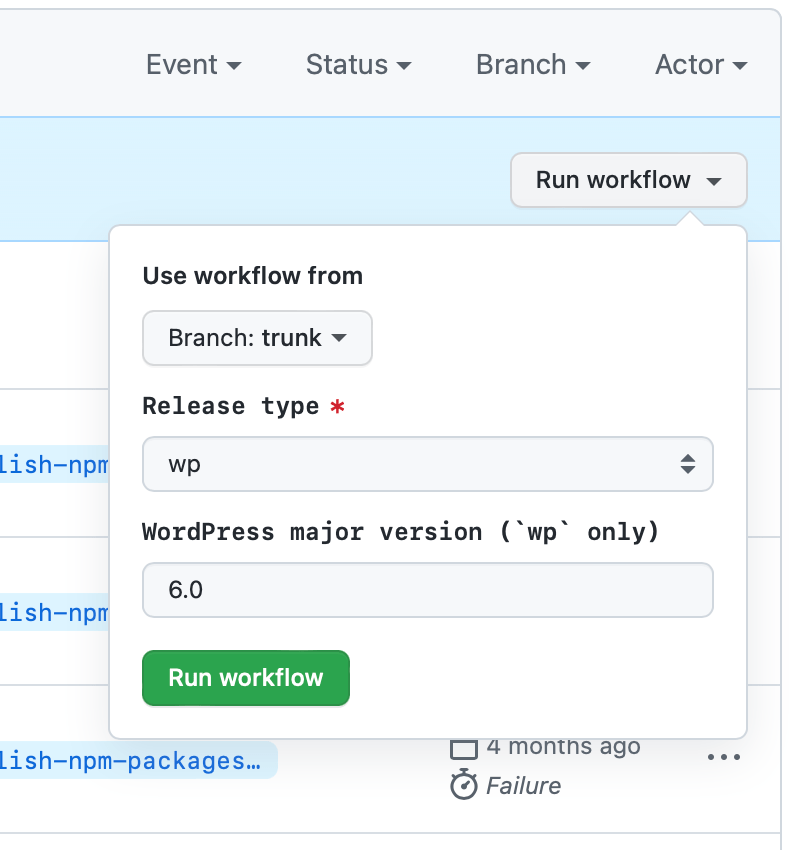
To publish development packages to npm, select development from the “Release type” dropdown and leave empty “WordPress major release” input field. Finally, press the green “Run workflow” button. It triggers the npm publishing job, and this needs to be approved by a Gutenberg Core team member. Locate the “Publish npm packages” action for the current publishing, and have it approved.
Behind the scenes, the release process is fully automated via ./bin/plugin/cli.js npm-next command. It ensures
the wp/next branch is synchronized with the latest release branch (release/X.Y) created for the Gutenberg plugin. To avoid collisions in the versioning of packages, we always include the newest commit’s sha, for example, @wordpress/block-editor@5.2.10-next.645224df70.0.