模板层级
概述
本文档解释了 WordPress 模板加载器如何根据查询信息构建模板层级,并详细说明了不同查询类型下的有效模板文件。模板层级决定了在特定 URL 上应加载哪个模板文件来生成页面结构。
关键要点
- WordPress 使用查询字符串确定模板,通过模板层级搜索匹配的模板文件,优先级从用户创建的模板到主题文件夹中的模板。
- 模板层级按查询类型划分,包括首页、主页、单篇文章、页面、附件、分类、作者、日期、搜索、404 和嵌入等,每种类型有特定的模板文件命名规则和层级顺序。
- 核心概念如 front-page.html 和 home.html 的区别取决于“设置 > 阅读”中的配置,而自定义模板(如 {custom-template}.html)通常位于层级顶部。
- 附件页面在 WordPress 6.4 后默认禁用,但主题仍需支持;嵌入模板使用 PHP 文件,不支持块模板系统。
代码示例
// 单篇文章模板层级示例(自定义文章类型为 product,文章名为 blue-shirt)
{custom-template}.html
single-product-blue-shirt.html
single-product.html
single.html
singular.html
index.html

// 页面模板层级示例(页面名为 about-me,ID 为 200)
{custom-template}.html
page-about-me.html
page-200.html
page.html
index.html

// 分类模板层级示例(分类 slug 为 news,ID 为 123)
category-news.html
category-123.html
category.html
archive.html
index.html
注意事项
- 首页模板 front-page.html 始终优先,但层级中的其他模板受“设置 > 阅读”中的“首页显示”设置影响。
- 附件页面在 WordPress 6.4 后默认禁用,用户可通过插件启用,主题应确保兼容性。
- 嵌入模板使用 PHP 文件,位于主题根目录,不支持块模板系统,且不回落至 index 模板。
As covered in the Templates documentation, templates are reusable files that are used to generate the document structure of pages on your WordPress site. WordPress’ template loader determines which template file should be loaded on any given URL.
This document explains how WordPress’ template loader uses the queried information for a page to build a template hierarchy. Then it covers what the valid templates are for the hierarchy.
Overview
When a visitor lands on any page on a WordPress site, WordPress uses the query string to decide which template should be used to display the page. The query string contains data from the URL that helps make this determination.
With this data available, WordPress searches through the template hierarchy until it finds a matching template file. There are generally three potential areas that WordPress might look for a block template within the hierarchy (in order of priority):
- User-created templates stored under the
wp_templatepost type in the database. - Templates located in a child theme’s
/templatesfolder (if child theme is active). - Templates in the theme’s
/templatesfolder.
Your theme can package as many or as few templates as needed to achieve your theme design. The index.html template is the only required template file for a block theme.
Visual overview
This diagram shows which template files are called to generate a WordPress page based on the template hierarchy:
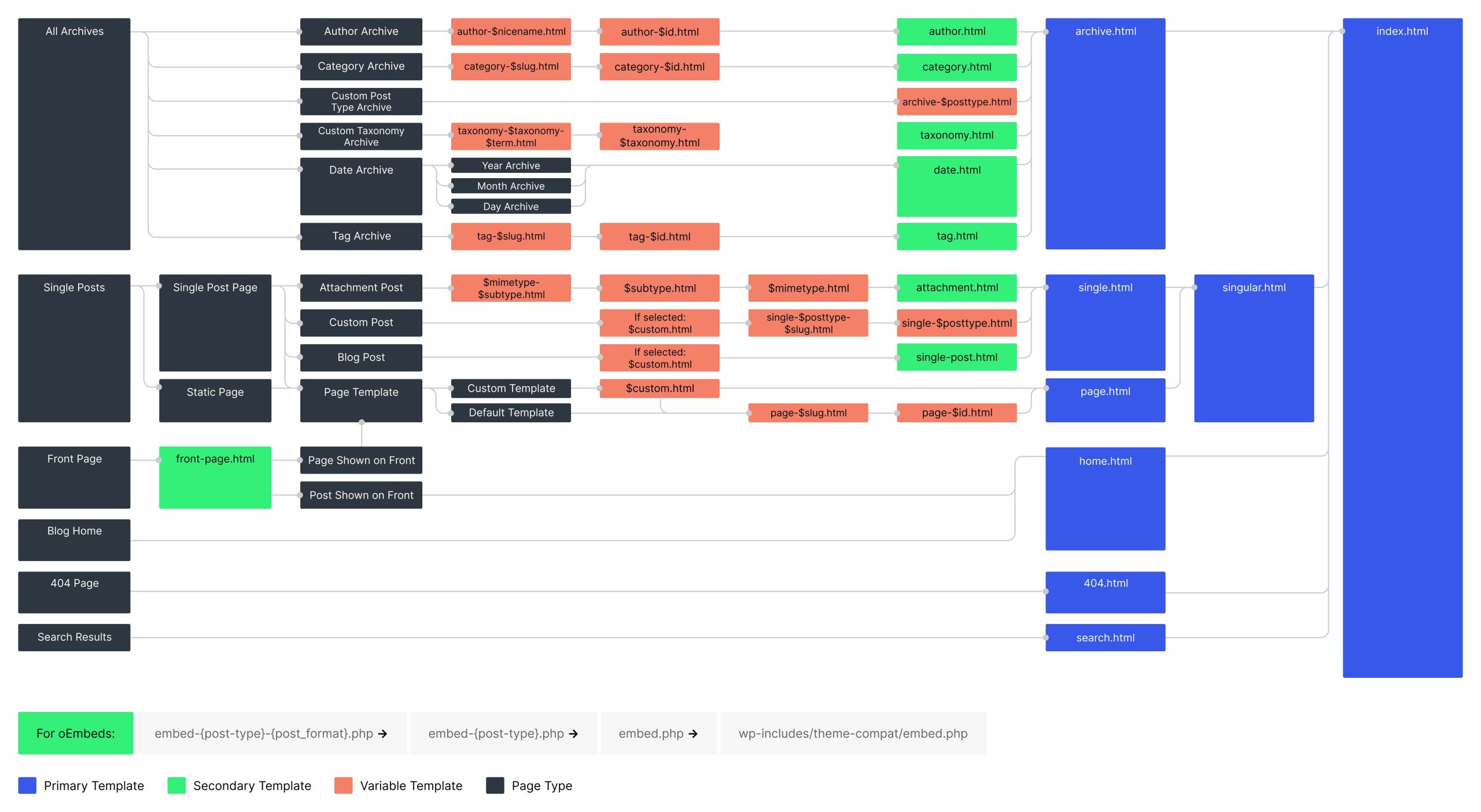
The template hierarchy by query type
In WordPress, there is not technically a single template hierarchy. It’s best to think of the hierarchy by the type of page being queried. For example, if the front page is being queried, then it will use the front page template hierarchy.
Below, you will find each template hierarchy broken down by its query type (and some subtypes). This will help you determine which template files to include in your theme.
Front page hierarchy
The Front Page template hierarchy is unique among templates and can change drastically based on what the user has chosen for their Front page displays setting under Settings > Reading in the admin.
If Your latest posts is chosen for the Front page displays setting, the hierarchy is:
front-page.html- Falls back to the Home template hierarchy
If A static page is chosen for the Front page displays setting, the hierarchy is:
front-page.html- Falls back to the Page template hierarchy
Keep in mind that the front-page.html template always takes precedence, regardless of the Front page displays setting. It is only the templates lower in the hierarchy that are affected by it.
Home hierarchy
Despite its name, the Home template is not always used for the homepage of a site. Technically, it refers to the page where your latest blog posts are shown (i.e., the blog posts index).
Like the Front Page template hierarchy, the Home template also depends on the Front page displays setting under Settings > Reading in the admin.
If Your latest posts is chosen for the Front page displays setting, this hierarchy will be applied to the front page of the site:
front-page.htmlhome.htmlindex.html
If A static page is chosen for the Front page displays setting and a page is selected for Posts page setting, the Home template hierarchy applies to the selected posts page (it does not apply to the front page in this case). The hierarchy in this scenario is:
home.htmlindex.html
Some history: The term “home” goes back to WordPress’ earliest days when it was only a blogging system and the only thing that appeared on the site’s front page was blog posts. While WordPress has evolved to allow anything on the front page, the “home” terminology was retained to refer to the blog posts index. And the “front page” terminology was used to refer to the site’s front page.
Singular hierarchy
When a visitor lands on a single post, page, attachment page, or entry from a custom post type, WordPress attempts to locate a template based on the queried post for that view.
All singular templates can utilize a custom template, which you’ll see listed as {custom_template}.html in the sub-sections below. These almost always sit at the top of the hierarchy. For more information on creating custom templates, check out the “Custom Templates” section of the main Templates documentation.
Single hierarchy
The Single template hierarchy is fired when a visitor lands upon a single post or a single entry from a custom post type. The following hierarchy is used to determine the template:
{custom-template}.htmlsingle-{post_type}-{post_name}.htmlsingle-{post_type}.htmlsingle.htmlsingular.htmlindex.html
A custom post type of product with a post name (i.e., slug) of blue-shirt would use this hierarchy:
{custom-template}.htmlsingle-product-blue-shirt.htmlsingle-product.htmlsingle.htmlsingular.htmlindex.html
The core WordPress page and attachment post types are special cases and are handled differently from the default Single template hierarchy. See the below Page and Attachment sections for more details.
Page hierarchy
The Page template hierarchy fires when someone visits a single page on your website. This hierarchy is used to determine the template:
{custom-template}.htmlpage-{post_name}.htmlpage-{post_id}.htmlpage.htmlindex.html
A page with a post name (i.e., slug) of about-me and an ID of 200 would use this hierarchy:
{custom-template}.htmlpage-about-me.htmlpage-200.htmlpage.htmlindex.html
Attachment (media) hierarchy
When visiting the singular views for attachments (media file pages), WordPress prepends the default Single template hierarchy with some additional templates. This is the Attachment template hierarchy:
{mime_type}-{sub_type}.html{sub_type}.html{mime_type}.htmlattachment.html- Falls back to the default Single template hierarchy
If you had an attachment with the image/jpeg mime type, the image piece of that would be considered the mime_type, and the jpeg part would be the sub_type.
Suppose you had an attachment with the image/jpeg type and the post name (i.e., slug) of red-bird. The full attachment template hierarchy would be:
image-jpeg.htmljpeg.htmlimage.htmlattachment.html{custom-template}.htmlsingle-attachment-red-bird.htmlsingle-attachment.htmlsingle.htmlsingular.htmlindex.html
As of WordPress 6.4, attachment pages are no longer enabled by default on new installations. Users can enable them with a plugin, so it is still good practice to test your theme and ensure it properly displays content when viewing an attachment page.
Privacy Policy page hierarchy
The Privacy Policy page in WordPress is a special case in comparison to other pages. WordPress will look for a privacy-policy.html template before looking at the normal page template hierarchy. For the Privacy Policy page, the following is the template hierarchy:
privacy-policy.html- Falls back to the Page template hierarchy
Archive hierarchy
Archives in WordPress display posts that are grouped by either some type of metadata (e.g., date, author, post type) or by a taxonomy term (category, tag).
Taxonomy term hierarchy
When working with publicly-rendered taxonomies, each term within the taxonomy will have its own archive page. The taxonomy term template hierarchy is:
taxonomy-{taxonomy_slug}-{term_slug}.htmltaxonomy-{taxonomy_slug}.htmltaxonomy.htmlarchive.htmlindex.html
If you had a taxonomy with the slug of location and a term within that taxonomy with the slug of alabama, the template hierarchy would become:
taxonomy-location-alabama.htmltaxonomy-location.htmltaxonomy.htmlarchive.htmlindex.html
The core WordPress category and post_tag taxonomies do not use the taxonomy term template. See the Category and Tag sections below for more details.
Category hierarchy
When a visitor clicks on a category link and views the category archive page, the following template hierarchy is used:
category-{slug}.htmlcategory-{id}.htmlcategory.htmlarchive.htmlindex.html
When viewing a category archive where the category slug is news and the category ID is 123, the template hierarchy becomes:
category-news.htmlcategory-123.htmlcategory.htmlarchive.htmlindex.html
Tag hierarchy
When a visitor clicks on a tag link and views a tag archive page, the following template hierarchy is used:
tag-{slug}.htmltag-{id}.htmltag.htmlarchive.htmlindex.html
When viewing a tag archive where the tag slug is flowers and the tag ID is 456, the template hierarchy becomes:
tag-flowers.htmltag-456.htmltag.htmlarchive.htmlindex.html
Post type archive hierarchy
A custom post type can have a publicly-facing archive page, which essentially serves as an index page for that post type, listing its latest posts by default (though, this can be filtered and changed). When a visitor views a post type archive, the template hierarchy is:
archive-{post_type}.htmlarchive.htmlindex.html
If you had a post type with the slug of portfolio_project, its hierarchy would be:
archive-portfolio_project.htmlarchive.htmlindex.html
The core WordPress post post type uses the Home template hierarchy, and the default page and attachment post types do not have archive views.
Author hierarchy
Despite its use of the term “author,” an author archive is one part user profile and one part post author archives. An archive URL is generated for all users on a WordPress site, regardless of whether they have published posts. But the intent of the author template is generally to display some metadata about the user and list their posts.
When visiting an author archive page on the front end of a site, this is the template hierarchy:
author-{user_nicename}.htmlauthor-{user_id}.htmlauthor.htmlarchive.htmlindex.html
When visiting an author archive page for a user with a nicename of matt and an ID of 333, the author archive template hierarchy becomes:
author-matt.htmlauthor-333.htmlauthor.htmlarchive.htmlindex.html
Date hierarchy
When viewing a date or datetime-based archive page (e.g., yearly, monthly, weekly archives), The template hierarchy is:
date.htmlarchive.htmlindex.html
Search hierarchy
The search template hierarchy is used when viewing the search results on your website. It is similar to archives in that it lists multiple posts, but it is not technically an archive page. The template hierarchy for search results is:
search.htmlindex.html
404 (not found) hierarchy
When a URL is visited on the website that doesn’t exist, WordPress looks for a 404 template, which is intended to provide some helpful information about the page not existing. The template hierarchy for 404 pages is:
404.htmlindex.html
Embed hierarchy
The embed template is used when one site embeds a post from your WordPress site. WordPress wraps the output in an <iframe> and displays the embedded content according to the template.
Embed templates are not supported by the block templates system. To build and use custom embed templates, they must be located in your theme’s root folder and use the PHP file extension.
The template hierarchy for embedded content is:
embed-{post_type}-{post_format}.phpembed-{post_type}.phpembed.php
If a custom embed template is not included in the theme, WordPress will use the /wp-includes/theme-compat/embed.php template bundled with core. It does not fall back to the index template like other template types.
If you were embedding a post with a post type of post and the post format of image, the hierarchy becomes:
embed-post-image.phpembed-post.phpembed.php