自定义背景
概述
自定义背景是 WordPress 主题功能,允许用户通过定制器修改背景颜色和图像。主题开发者需通过两个步骤实现:启用自定义背景和显示自定义背景。
关键要点
- 启用自定义背景:在 functions.php 中使用 add_theme_support('custom-background'),可指定默认参数如背景颜色和图像。
- 显示自定义背景:在 header.php 中调用 wp_head() 和 body_class(),wp_head() 会生成内联样式覆盖主题样式表。
- 默认参数设置:包括 default-color、default-image、default-position-x、default-position-y 和 default-repeat,但设置 default-image 会立即生效,而 default-color 仅在定制器中作为默认值。
代码示例
// 启用自定义背景并设置默认参数
$args = array(
    'default-color' => '0000ff',
    'default-image' => get_template_directory_uri() . '/images/wapuu.jpg',
);
add_theme_support( 'custom-background', $args );
注意事项
- 设置 default-image 参数会立即生效为自定义背景,而 default-color 仅作为定制器中的默认背景颜色,需管理员保存后才生效。
Custom Backgrounds is a theme feature that provides for customization of the background color and image.
Theme developer needs 2 steps to implement it.
- Enable Custom Background – add_theme_support()
- Display Custom Background – wp_head() and body_class()
Enable Custom Backgrounds
Use add_theme_support() in the functions.php file to enable custom backgrounds.
add_theme_support( 'custom-background' );You can specify default parameters. In below example using default ‘#0000ff’ background color (blue) with ‘wapuu.jpg’ background image that was stored under the /images folder.
$args = array(
    'default-color' => '0000ff',
    'default-image' => get_template_directory_uri() . '/images/wapuu.jpg',
);
add_theme_support( 'custom-background', $args );
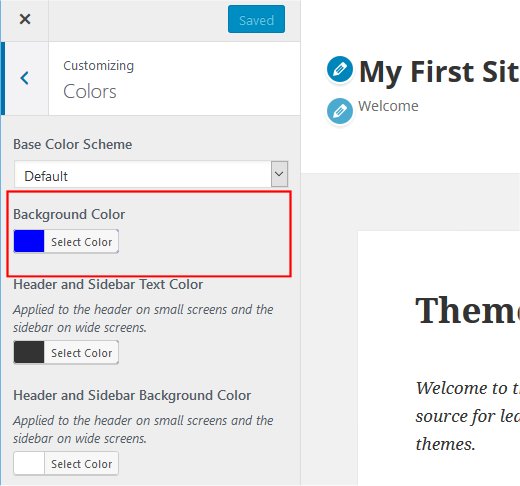
By calling add_theme_support() , Customizer displays ‘Background Image’ menu and ‘Background Color’ section in Colors menu.
Display Custom Backgrounds
In general, invokes wp_head() and body_class() in header.php file to display the custom backgrounds.
<!DOCTYPE html>
<html>
<head>
    <?php wp_head(); ?>
</head>
<body <?php body_class(); ?>>
wp_head() generates an extra style sheet in-line with the HTML headers, usually right before the end of the document’s HEAD element. The extra style sheet overrides the background values from the theme’s style sheet.
In our example, following code will be generated in the HTML. Notice that body tag includes “custom-background ” class.
<!DOCTYPE html>
<html lang="en-US" class="no-js">

<head>
	...
<style type="text/css" id="custom-background-css">
body.custom-background {
  background-image: url("http://example.com/wordpress/wp-content/themes/my-first-theme/images/wapuu.jpg");
  background-position: left top;
  background-size: auto;
  background-repeat: repeat;
  background-attachment: scroll;
}
</style>
	...
</head>

<body class="home page-template-default page page-id-211 logged-in admin-bar no-customize-support custom-background">

	...
Now you’ll see repeated background images

Another default example
This is another example of default value set.
$another_args = array(
    'default-color'      => '0000ff',
    'default-image'      => get_template_directory_uri() . '/images/wapuu.jpg',
    'default-position-x' => 'right',
    'default-position-y' => 'top',
    'default-repeat'     => 'no-repeat',
);
add_theme_support( 'custom-background', $another_args );
This will show single image at the top right corner as below.