置顶文章
概述
置顶文章是一种功能,允许将特定文章固定在文章首页顶部显示。此功能仅适用于内置的文章类型(post),不适用于自定义文章类型。
关键要点
- 置顶文章仅适用于内置文章类型,不支持自定义文章类型。
- 可通过管理后台的“文章”编辑界面设置文章为置顶。
- 使用 get_option('sticky_posts') 获取置顶文章ID数组,结合 WP_Query 进行查询控制。
- 通过 post_class() 函数为置顶文章添加“sticky”CSS类,便于主题样式定制。
代码示例
// 显示第一篇置顶文章
$sticky = get_option('sticky_posts');
$query = new WP_Query('p=' . $sticky[0]);

// 排除所有置顶文章
$args = array('post__not_in' => get_option('sticky_posts'));
$query = new WP_Query($args);

// 获取并排序置顶文章
$sticky = get_option('sticky_posts');
rsort($sticky);
$sticky = array_slice($sticky, 0, 5);
$query = new WP_Query(array(
    'post__in' => $sticky,
    'ignore_sticky_posts' => 1,
));
注意事项
- “sticky”CSS类仅在首页第一页(is_home() 为真且 is_paged() 为假)时添加。
- 使用 ignore_sticky_posts 参数可控制是否在查询中忽略置顶文章的默认排序行为。
- 在静态首页模板中,应使用 get_query_var('page') 而非 get_query_var('paged') 来处理分页。
A Sticky Post is the post will be placed at the top of the front page of posts. This feature is only available for the built-in post type post and not for custom post types.
How to stick a post
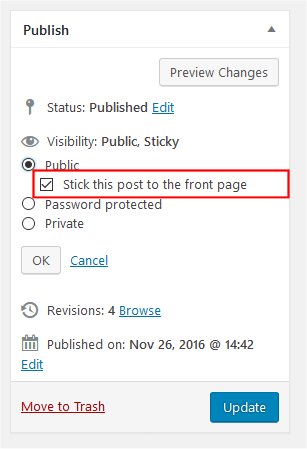
- Go to Administration Screen > Posts > Add New or Edit
- In the right side menu, Click Edit link of Visibility option in Publish group
- Click Stick this post to the front page option
Display Sticky Posts
Show Sticky Posts
Display just the first sticky post. At least one post must be designated as a “sticky post” or else the loop will display all posts:
<?php
$sticky = get_option( 'sticky_posts' );
$query  = new WP_Query( 'p=' . $sticky[0] );
Display just the first sticky post, if none return the last post published:
<?php
$args  = array(
	'posts_per_page'      => 1,
	'post__in'            => get_option( 'sticky_posts' ),
	'ignore_sticky_posts' => 1,
);
$query = new WP_Query( $args );
Display just the first sticky post, if none return nothing:
<?php
$args   = array(
	'posts_per_page'      => 1,
	'post__in'            => get_option( 'sticky_posts' ),
	'ignore_sticky_posts' => 1,
);
$query  = new WP_Query( $args );
if ( isset( $sticky[0] ) ) {
	// Insert here your stuff...
}
Don’t Show Sticky Posts
Exclude all sticky posts from the query:
<?php
$args  = array( 'post__not_in' => get_option( 'sticky_posts' ) );
$query = new WP_Query( $args );
Exclude sticky posts from a category. Return ALL posts within the category, but don’t show sticky posts at the top. The ‘sticky posts’ will still show in their natural position (e.g. by date):
<?php
$args  = array(
	'ignore_sticky_posts' => 1,
	'posts_per_page'      => 3,
	'cat'                 => 6,
);
$query = new WP_Query( $args );
Exclude sticky posts from a category. Return posts within the category, but exclude sticky posts completely, and adhere to paging rules:
<?php
$args  = array(
	'cat'                 => 3,
	'ignore_sticky_posts' => 1,
	'post__not_in'        => get_option( 'sticky_posts' ),
	'paged'               => get_query_var( 'paged' ) ? get_query_var( 'paged' ) : 1,
);
$query = new WP_Query( $args );<?php
/* Get all Sticky Posts */
$sticky = get_option( 'sticky_posts' );
/* Sort Sticky Posts, newest at the top */
rsort( $sticky );
/* Get top 5 Sticky Posts */
$sticky = array_slice( $sticky, 0, 5 );
/* Query Sticky Posts */
$query = new WP_Query( array(
'post__in' => $sticky,
'ignore_sticky_posts' => 1,
) );Style Sticky Posts
To help theme authors perform simpler styling, the post_class() function is used to add class=”…” to DIV, just add:
<div id="post-<?php the_ID(); ?>" <?php post_class(); ?>>The post_class() outputs the class=”whatever” piece for that div. This includes several different classes of value: post, hentry (for hAtom microformat pages), category-X (where X is the slug of every category the post is in), and tag-X (similar, but with tags). It also adds “sticky” for posts marked as Sticky Posts.
.sticky { color: red; }