查找服务器信息
概述
本文档介绍了如何通过 phpinfo() 函数快速获取 WordPress 服务器信息,如 PHP 版本、服务器软件、MySQL 版本和操作系统,适用于安装前准备或故障排除场景。
关键要点
- 使用 phpinfo() 函数生成服务器信息报告,包含 PHP 版本、系统详情、构建日期、服务器 API 和 Apache 版本等关键数据。
- 创建包含 的 PHP 文件,上传到网站根目录并通过浏览器访问以查看信息。
- 注意安全风险:该文件包含敏感信息,应使用晦涩文件名并访问后立即删除,以防黑客利用。
代码示例
<?php phpinfo(); ?>注意事项
- 确保文件名晦涩(如 sffdsajk234.php),避免被黑客轻易发现。
- 访问完成后务必删除文件,防止服务器信息泄露。
- 可参考 PHP.net 和 Zend 的 phpinfo 手册或 WordPress Environment PHP 库获取更多资源。
What version of PHP are you using? What server software is your site host using? What version of MySQL do you have? What operating system does your site host use?
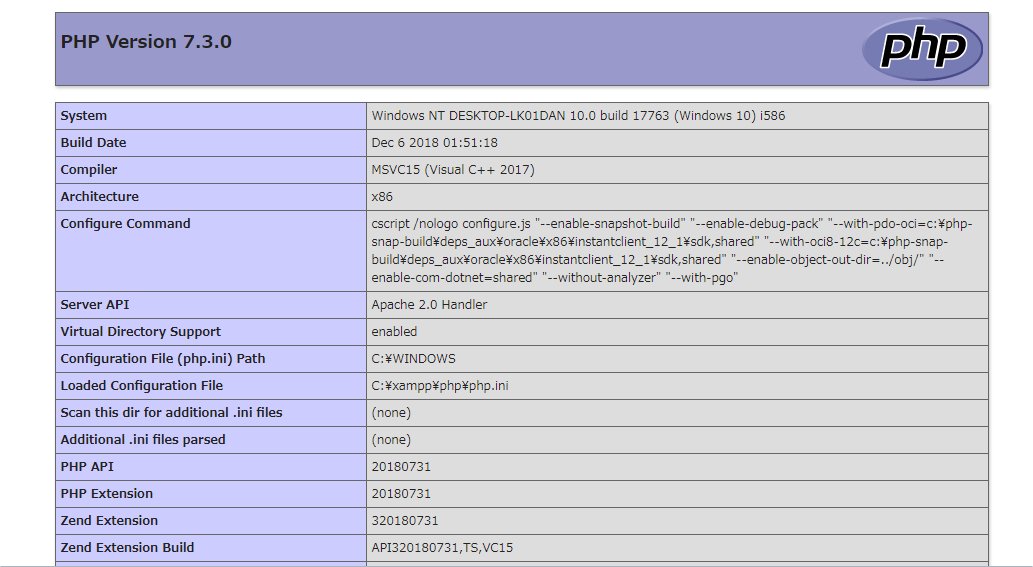
ALT= Top of PHP Info test file results
These are questions often asked by WordPress users as they prepare to install WordPress. Other times, these questions are asked while troubleshooting a problem with a WordPress installation. But don’t spend at lot of time searching your site, or your host’s site, for the answers—there’s a very easy way to get that information.
The easiest way to collect the information is to make use of a PHP function called phpinfo(). The phpinfo() function will query your (or your host’s) server and generate a report with a long list of data. Note: Remember to bookmark this page, because, in the future, a volunteer in the WordPress Support Forum may ask you to use this method to get information to assist them in troubleshooting a question you asked on the Support Forum.
Warning: This file will contain some moderately sensitive information about your server that could help an attacker gain access to it. Make sure that you give the file an obscure filename and delete it as soon as you’re done.
In a text editor, copy and paste the following command:
<?php phpinfo(); ?>
Make sure there are no spaces before or after the command, just the command, and save the file as something obscure like sffdsajk234.php. It’s important to make the file difficult for hackers to file, because it will contain information that could help them compromise your server.
Upload the file to the root directory of your site. Then type in the address to the file in your browser:
https://example.com/sffdsajk234.php
The result will be several pages long and it will contain a ton of information. Though your data may be in a different order, for the most part, you just need the summary items that lists things like this:
| PHP | Version 7.3.0 |
| System | Windows NT DESKTOP-LK01DAN 10.0 build 17763 (Windows 10) i586 |
| Build Date | Dec 6 2018 01:51:18 |
| Server API | Apache 2.0 Handler |
| Apache Version | Apache/2.4.37 (Win32) OpenSSL/1.1.1a PHP/7.3.0 |
That’s it. Make sure you remember to delete the file once you’re done with it, because leaving it there could help hackers compromise your server.