网络管理员设置屏幕
概述
网络管理员设置屏幕是用于配置和管理整个 WordPress 多站点网络的核心界面,包括网络名称、注册选项、新站点设置、上传限制和语言菜单等全局参数。设置主要从网络中的第一个站点(主站点)继承。
关键要点
- 操作设置:设置网络名称和网络管理员邮箱,后者用于注册和支持邮件。
- 注册设置:控制新注册的启用状态、注册类型(用户账户、站点或两者)、通知邮件、管理员添加用户权限,以及禁止的名称和域名限制。
- 新站点设置:自定义新站点创建时的欢迎邮件、第一篇文章、页面、评论及其作者和 URL 的默认内容。
- 上传设置:限制站点上传空间大小、允许的文件类型(默认包括 jpg、mp3 等)和最大上传文件大小,注意文件类型需通过 upload_mimes filter 添加。
- 语言和菜单设置:设置默认语言,并启用插件管理菜单以允许用户访问插件面板(默认在多站点中禁用)。
注意事项
- 上传文件类型时,仅在此字段添加未在默认列表中列出的 MIME 类型无效,必须使用 upload_mimes filter 进行添加,否则上传会因安全原因失败。
- 在多站点网络中,插件管理默认禁用,需在此屏幕启用才能让用户访问插件面板。
The Network Admin Settings is where a network admin sets and changes settings for the network as a whole. The first site is the main site in the network and network settings are pulled from that original site’s options.
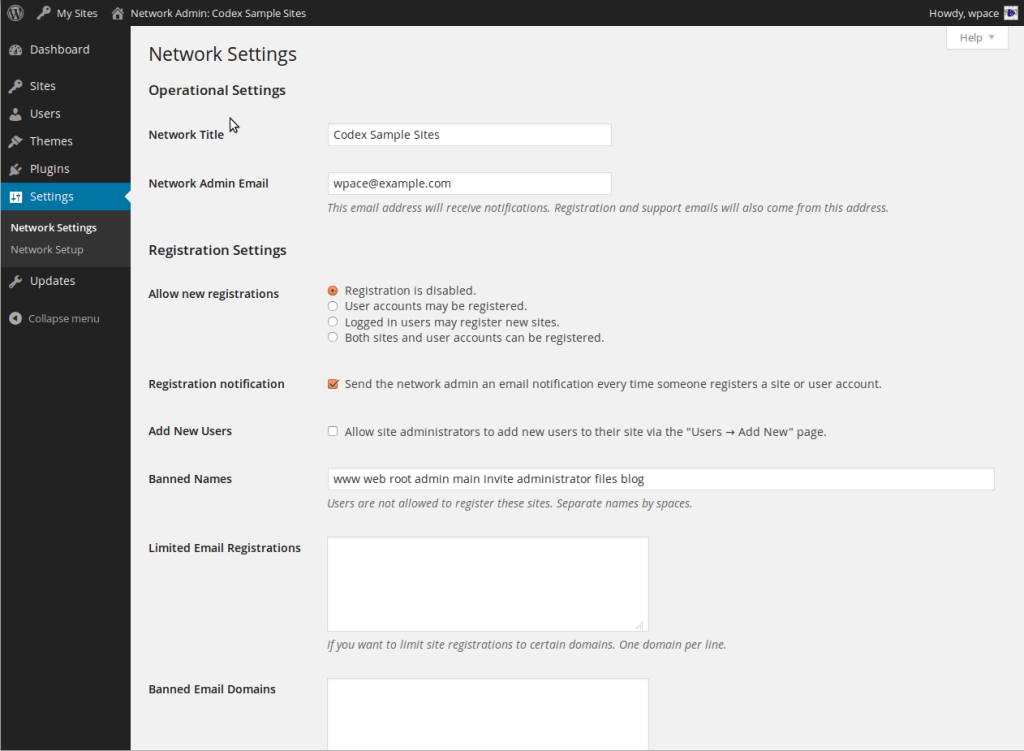
Operational Settings
Network Name
What you would like to call this website.
Network Admin Email
Registration and support emails will come from this address. An address such as support@example.com is recommended.
Registration Settings
Allow new registrations
Disable or enable registration and who or what can be registered. (Default is disabled.)
- Registration is disabled. (default)
- User accounts may be registered.
- Logged in users may register new sites.
- Both sites and user accounts can be registered.
Registration notification
Send the network admin an email notification every time someone registers a site or user account.
Add New Users
Allow site administrators to add new users to their site via the “Users -> Add New” page.
Banned Names
Users are not allowed to register these sites. Separate names by spaces.
Limited Email Registrations
If you want to limit site registrations to certain domains. Enter one domain per line.
Banned Email Domains
If you want to ban domains from site registrations. Enter one domain per line.
New Site Settings
Welcome Email
The welcome email sent to new site owners.

Dear User,

Your new SITE_NAME blog has been successfully set up at:
BLOG_URL

You can log in to the administrator account with the following information:
Username: USERNAME
Password: PASSWORD
Login Here: BLOG_URLwp-login.php

We hope you enjoy your new blog.
Thanks!

--The Team @ SITE_NAME
Welcome User Email
The welcome email sent to new users.

Dear User,

Your new account is set up.

You can log in with the following information:
Username: USERNAME
Password: PASSWORD
LOGINLINK

Thanks!

--The Team @ SITE_NAME
First Post
The first post on a new site.
Welcome to <a href="SITE_URL">SITE_NAME</a>. This is your first post. Edit or delete it, then start blogging!
First Page
The first page on a new site.
First Comment
The first comment on a new site.
First Comment Author
The author of the first comment on a new site.
First Comment URL
The URL for the first comment on a new site.
Upload Settings
Site upload space
Limit total size of files uploaded to [ 50 ] MB.
Upload file types
Default is jpg jpeg png gif mp3 mov avi wmv midi mid pdf m2ts.
Note: Adding arbitrary file types will not work unless a corresponding function is also hooked to upload_mimes filter. See the wp_get_mime_types function in wp-includes/functions.php for the current default set of supported mime-types / file extensions. Adding mime types in the ‘upload file types’ field not listed in the default set will NOT work unless you’ve added them using the upload_mimes filter! Uploading files with mime types not supported (without adding them using the filter) will fail with the message “Sorry, this file type is not permitted for security reasons”.
Max upload file size
Default is [ 1500 ] KB.
Language Settings
Default Language
Default is English.
Menu Settings
Enable administration menus
- Plugins
On WordPress Multisite the default setting for plugins is disabled. This means your users won’t have access to the plugin admin panel inside their dashboard unless you first enable access to plugins network wide.