安装多个 WordPress 实例
概述
本文档介绍了安装多个 WordPress 实例的三种方法:WordPress 多站点网络、单数据库多实例和多数据库多实例。重点解释了每种方法的配置方式,特别是通过修改 wp-config.php 文件来管理数据库连接和表前缀。
关键要点
- WordPress 多站点网络:单个 WordPress 实例和数据库,支持创建多个站点,需参考相关网络管理文档。
- 多数据库多实例:每个 WordPress 实例使用独立的数据库,安装过程与单实例相同,需在 wp-config.php 中设置 DB_NAME、DB_USER、DB_PASSWORD 和 DB_HOST。
- 单数据库多实例:多个 WordPress 实例共享一个数据库,通过修改 wp-config.php 中的 $table_prefix 为每个博客设置唯一表前缀(如 main_、projects_)。
- 增强安全性:可以为每个 WordPress 实例分配独立的 MySQL 用户,或使用 CUSTOM_USER_TABLE 和 CUSTOM_USER_META_TABLE 常量共享用户表。
代码示例
define('DB_NAME', 'wordpress');
define('DB_USER', 'username');
define('DB_PASSWORD', 'password');
define('DB_HOST', 'localhost');

$table_prefix = 'wp_'; // 可自定义为 'main_'、'projects_' 等
注意事项
- 多站点网络虽然看似简单,但有特定限制,建议在创建前查阅相关文档。
- 上传修改后的 wp-config.php 文件到各自的安装目录,并运行安装过程。
- 表前缀可以自定义,以区分不同博客的数据库表。
If you need multiple WordPress instances, there are three types of installations based on system architecture, or a combination of WordPress instances and databases:
- WordPress Multisite Network: a single WordPress instance (with multiple sites created within the same WP instance) sharing a single database instance.
- Single Database: multiple WordPress instances sharing a single database instance.
- Multiple Databases: multiple WordPress instances with each instance using its own databases instance.
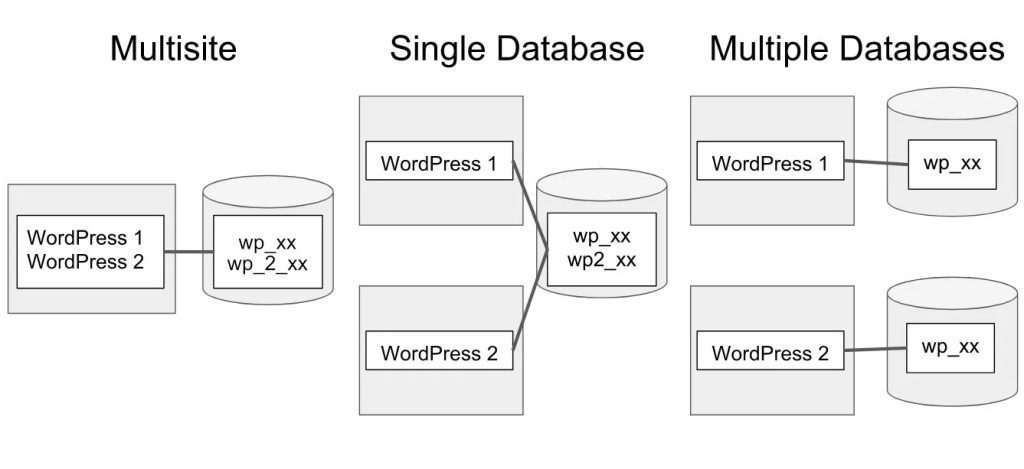
Let’s first look at the third type, multiple WordPress instances with multiple databases, because it has the same installation process as a single WordPress instance.
Multiple WordPress Instances with Multiple Databases
You’ll need a separate MySQL database for each instance you plan to install. If you have not yet created these, basic instructions are found here.
To make sure each WordPress instance connects to the right database you need to add those information to the wp-config.php file. The lines to change are the following:
define('DB_NAME', 'wordpress');    // The name of the database
define('DB_USER', 'username');     // Your MySQL username
define('DB_PASSWORD', 'password'); // The users password
define('DB_HOST', 'localhost' );  // The host of the database
DB_NAME is the name of the individual database created for that blog hosted on the DB_HOST MySQL server. If you are using different user logins for each database, edit DB_USER and DB_PASSWORD to reflect this as well.
Upload each wp-config.php file to its specific root/installation directory, and run the installation. See Installing WordPress for more information.
The Multisite Feature
If you want multiple sites to use WordPress, you can use the multisite feature to create what is referred to as a network of sites. The multisite feature involves installing a single WordPress instance and a single database.
The multisite feature appears to be simpler than other types of multiple WordPress installations, but there are some considerations and restrictions. Refer to the following documents for more detailed information:
Multiple WordPress Instances with a Single Database
As with the multiple-database solution described above, the wp-config.php file will vary for each installation. In this case, however, only a single line is unique to each blog:
$table_prefix = 'wp_'; // example: 'wp_' or 'b2' or 'mylogin_'
By default, WordPress assigns the table prefix wp_ to its MySQL database tables, but this prefix can be anything you choose. This allows you to create unique identifiers for each blog in your database. For example, let’s say you have three blogs to set up, with the names Main, Projects, and Test. You should substitute the prefix wp_ in each blog’s
wp-config.php:
Main blog:
$table_prefix = 'main_';
Projects blog:
$table_prefix = 'projects_';
Test blog:
$table_prefix = 'test_';
As noted, you may use a prefix of your own making. Those provided here are for example only.
Upload each wp-config.php file to its specific root/installation directory, and run the installation. See Installing WordPress for more information.
For enhanced security you can also add multiple users to the same database and give each WordPress Instance their own MySQL user.
Multiple Databases, Same Users
You can use the same userbase for all your blogs on the same domain by defining the CUSTOM_USER_TABLE and optionally the CUSTOM_USER_META_TABLE constants to point to the same wp_your_blog_users and wp_your_blog_usermeta tables.
See Editing wp-config.php/Custom User and Usermeta Tables.