控制面板
概述
本文档介绍了如何在 cPanel & WHM 和 Plesk 控制面板中使用 WP Toolkit 来安装和管理 WordPress。WP Toolkit 是一个统一的管理界面,支持 WordPress 4.9 及以上版本的安装、配置和管理。
关键要点
- WP Toolkit 是 cPanel & WHM(版本 102 及以上)和 Plesk(需安装扩展)的默认或可选工具,用于简化 WordPress 管理。
- 在 cPanel & WHM 中,通过登录 cPanel 界面,从左侧菜单选择 WP Toolkit,点击“安装 WordPress”进行安装,可自定义目录、标题、插件/主题集、语言、版本、管理员凭据、数据库设置和自动更新选项。
- 在 Plesk 中,使用 Web Installer 安装 Plesk,然后通过 WP Toolkit 进行 WordPress 安装,可选择快速安装(使用默认设置)或自定义安装(设置管理员用户、版本、数据库等)。
- WP Toolkit 提供“管理 WordPress 实例”功能,以卡片形式展示网站截图和常用工具,包括同步、克隆、文件管理、备份/恢复等。
- 工具部分包括搜索引擎索引、缓存(nginx)、调试、维护模式和密码保护等设置,帮助优化和管理网站。
WP Toolkit for cPanel & WHM and Plesk
WP Toolkit is a single management interface that allows you to install, configure, and manage WordPress® easily. WP Toolkit can install, configure, and manage WordPress versions 4.9 or later.
cPanel & WHM versions 102 and above install WP Toolkit by default. WP Toolkit is available in Plesk if the server administrator has installed the WP Toolkit extension.
cPanel & WHM
This tutorial describes how to install WordPress in the cPanel & WHM control panel using WP Toolkit. For other options to install WordPress in cPanel & WHM, read cPanel’s How to Install WordPress with cPanel documentation.
To install WordPress via WP Toolkit, perform the following actions:
- Log in to the cPanel interface with the information provided by your hosting company.
- Select WP Toolkit from the lefthand menu bar. The WP Toolkit interface will appear.
- Click Install WordPress to create a new WordPress installation.
Install WordPress
In the Install WordPress interface, click Install to use the default settings. Or provide the following optional information to customize your installation, then click Install:
- The installation directory. By default, the installation uses the account’s
public_htmldirectory. - The title for the website.
- The plugin or theme set.
- The language of the website.
- The version of WordPress to install. By default, the installation uses the current WordPress version.
- The WordPress Administrator username and password.
- The database name, table prefix, username and password.
- The automatic update settings for the WordPress software, plugins, and themes.
Click Install Plugins if you want to install plugins and themes, or click No, thanks to optionally install them later.
Plesk
This tutorial provides step-by-step examples of installing Plesk WP Toolkit using the Plesk Web Installer.
Using Web Installer
Install Plesk using Web Installer please open your browser and go to get.plesk.com. For Plesk installation, it is required a fresh Linux server with access to the Internet. You can install Plesk on any supported Linux-based OS.
Provide your server’s IP address or hostname, enter your root password, or just add a private key.
- Accept the terms of End-User License Agreement and click Install button.
- Relax and wait for some time to let the installation be finalized.
- Click on the Login link. No worries about “secure connection warnings”, just make an exception.
Installing WordPress
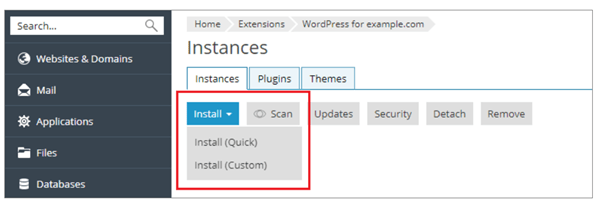
- For an express installation, click Install (Quick). The latest version of WordPress will be installed, and the default settings will be used. The new instance will be available via HTTPS if SSL/TLS support is enabled for the domain.
- If you want to change the default installation settings, click Install (Custom). This enables you to set up the administrator user, select the desired WordPress version, specify the database name, select auto-update settings, and more.
Managing WordPress Instances
Go to WordPress to see all your WordPress instances. WP Toolkit groups information about each instance in blocks we call cards.
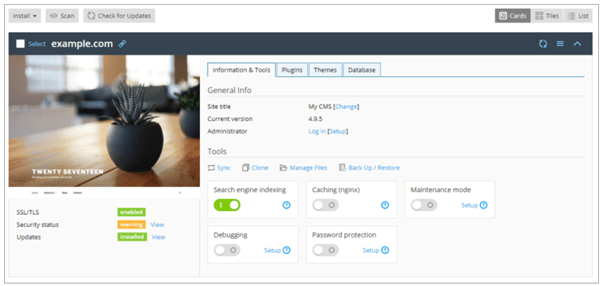
A card shows a screenshot of your website and features several controls that give you easy access to frequently used tools. The screenshot changes in real time to reflect the changes you make to your website. For example, if you switch the maintenance mode on or change the WordPress theme, the screenshot of the website will change immediately.
Tools
In the “Tools” section, click to access the following WP Toolkit features:
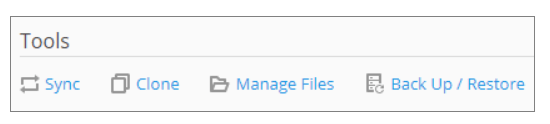
- “Sync” to synchronize the content of your website with another one.
- “Clone” to make a full copy of your website.
- “Manage Files” to manage the website’s files in File Manager.
- “Back Up/Restore” to create a backup of your website and restore it if necessary.
The controls below give you easy access to the following settings and tools:
- “Search engine indexing” shows your website in search results of search engines.
- “Caching (nginx)” speeds up the website load time and reduces server load.
- “Debugging” helps you debug a website that is not ready for viewing and being tested or developed.
- “Maintenance mode” hides your website’s content from visitors.
- “Password Protection” specifies the password you will use to log in to WordPress from Plesk.