清空数据库表
概述
本文档指导 WordPress 开发者如何清空数据库表,以解决统计插件生成大量数据导致的数据库大小问题,适用于迁移或主机限制场景。操作基于 phpMyAdmin 工具,强调备份重要性以避免数据丢失。
关键要点
- 统计插件可能快速生成大量数据,影响数据库大小和迁移效率。
- 使用 phpMyAdmin 清空表可重置内容为零,不影响插件功能或数据库结构。
- 操作前必须备份数据库,并确认表名非 WordPress 核心表(如 wp_dstats2 示例)。
- phpMyAdmin 无撤销功能,需谨慎选择表和数据库。
注意事项
- 清空前检查表名,避免误删 WordPress 核心表(参考 Database_Description)。
- 建议在操作前创建备份,以防数据丢失。
Plugins which generate site statistics for you can rapidly create large amounts of data — every visitor causes something to be written to the database. Ordinarily, this is not a problem, but if your database size is limited by your host it could be. Also, if you are moving the database for whatever reason, its size will impact the export and import time. This page will show you how to empty a table, thus resetting its contents and size to zero. This does not stop the statistics plugins from working or otherwise damage your database.
phpMyAdmin is the name of the program used to manipulate your database. A good hosting package will have this included. Accessing phpMyAdmin offers information on accessing phpMyAdmin under various server control panels.
The procedure outlined in this article has been tried and tested using phpMyAdmin versions 2.5.3 and 2.5.7 pl1 running on Unix.
Note: When making significant changes like this to your database, you should always create a BACKUP!
See WordPress Backups and Backing Up Your Database for details.
The Process
- Login to phpMyAdmin on your server.
-
From the left side bar, select your WordPress database.
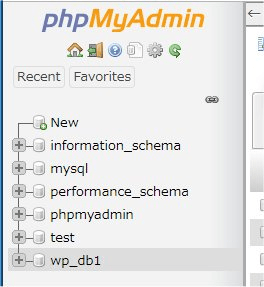
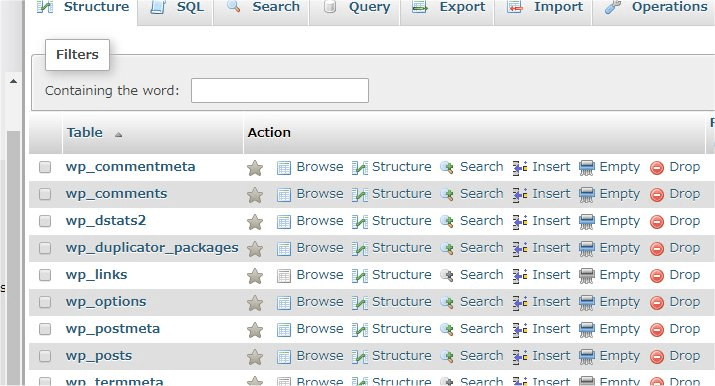
- All the tables in the WordPress database will appear.
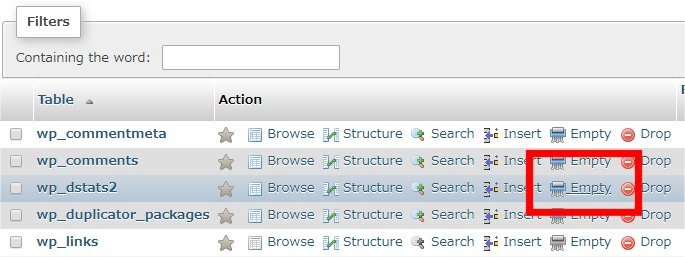
- Click “Erase” button of the table you wish to empty. For this example, we will be emptying the “wp_dstats2” table.
Note: Your table may well have a different name, check the plugin’s documentation to find out what it is. DO NOT empty a table that is used by the WordPress core. (Please see the list under Database_Description for those specific table names.)
- You will now get a confirmation screen.
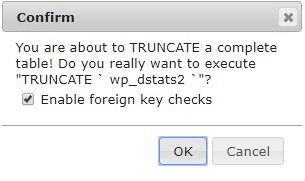
This is your last chance to check that you have the right table and database selected — phpMyAdmin has no UNDO function, so once changes are committed, you are stuck with them. Unless, of course, you made that suggested back up.
- Click “OK” and you will be returned to viewing all the tables in your database with the specified table’s contents emptied.