使用自定义分类法
概述
本文档介绍了WordPress中自定义分类法的概念、优势及创建方法。通过一个食谱网站示例,说明如何利用自定义分类法(如“课程”和“成分”)来替代默认的分类和标签,实现更结构化的内容组织。
关键要点
- 自定义分类法允许开发者创建独立的分类系统,与默认的Categories和Tags区分,提供更灵活的内容管理。
- 使用自定义分类法可以构建自定义界面,提升用户体验,并便于在插件中重用,例如创建一个食谱插件。
- 通过register_taxonomy()函数注册自定义分类法,需定义$labels和$args数组来配置标签和参数。
- 自定义分类法会自动生成归档页面和子页面,便于前端展示,并支持多种WordPress函数(如the_terms、wp_tag_cloud)进行交互。
代码示例
function wporg_register_taxonomy_course() {
    $labels = array(
        'name'              => _x( 'Courses', 'taxonomy general name' ),
        'singular_name'     => _x( 'Course', 'taxonomy singular name' ),
        'search_items'      => __( 'Search Courses' ),
        'all_items'         => __( 'All Courses' ),
        'parent_item'       => __( 'Parent Course' ),
        'parent_item_colon' => __( 'Parent Course:' ),
        'edit_item'         => __( 'Edit Course' ),
        'update_item'       => __( 'Update Course' ),
        'add_new_item'      => __( 'Add New Course' ),
        'new_item_name'     => __( 'New Course Name' ),
        'menu_name'         => __( 'Course' ),
    );
    $args   = array(
        'hierarchical'      => true,
        'labels'            => $labels,
        'show_ui'           => true,
        'show_admin_column' => true,
        'query_var'         => true,
        'rewrite'           => [ 'slug' => 'course' ],
    );
    register_taxonomy( 'course', [ 'post' ], $args );
}
add_action( 'init', 'wporg_register_taxonomy_course' );
注意事项
- 在创建自定义分类法前,建议阅读Taxonomy介绍和Plugin Basics章节,确保理解基础概念。
- 代码可以集成到插件、主题或现有插件中,不一定需要独立的插件。
- 激活插件后,需检查Posts > Add New页面是否显示新的“Courses”元框,以验证分类法是否成功注册。
Introduction to Taxonomies
To understand what Taxonomies are and what they do please read the Taxonomy introduction.
Custom Taxonomies
As classification systems go, “Categories” and “Tags” aren’t very structured, so it may be beneficial for a developer to create their own.
WordPress allows developers to create Custom Taxonomies. Custom Taxonomies are useful when one wants to create distinct naming systems and make them accessible behind the scenes in a predictable way.
Why Use Custom Taxonomies?
You might ask, “Why bother creating a Custom Taxonomy, when I can organize by Categories and Tags?”
Well… let’s use an example. Suppose we have a client that is a chef who wants you to create a website where she’ll feature original recipes.
One way to organize the website might be to create a Custom Post Type called “Recipes” to store her recipes. Then create a Taxonomy “Courses” to separate “Appetizers” from “Desserts”, and finally a Taxonomy “Ingredients” to separate “Chicken” from “Chocolate” dishes.
These groups could be defined using Categories or Tags, you could have a “Courses” Category with Subcategories for “Appetizers” and “Desserts”, and an “Ingredients” Category with Subcategories for each ingredient.
The main advantage of using Custom Taxonomies is that you can reference “Courses” and “Ingredients” independently of Categories and Tags. They even get their own menus in the Administration area.
In addition, creating Custom Taxonomies allows you to build custom interfaces which will ease the life of your client and make the process of inserting data intuitive to their business nature.
Now imagine that these Custom Taxonomies and the interface is implemented inside a plugin; you’ve just built your own Recipes plugin that can be reused on any WordPress website.
Example: Courses Taxonomy
The following example will show you how to create a plugin which adds a Custom Taxonomy “Courses” to the default post Post Type. Note that the code to add custom taxonomies does not have to be in its own plugin; it can be included in a theme or as part of an existing plugin if desired.
Please make sure to read the Plugin Basics chapter before attempting to create your own plugin.
Step 1: Before You Begin
Go to Posts > Add New page. You will notice that you only have Categories and Tags.
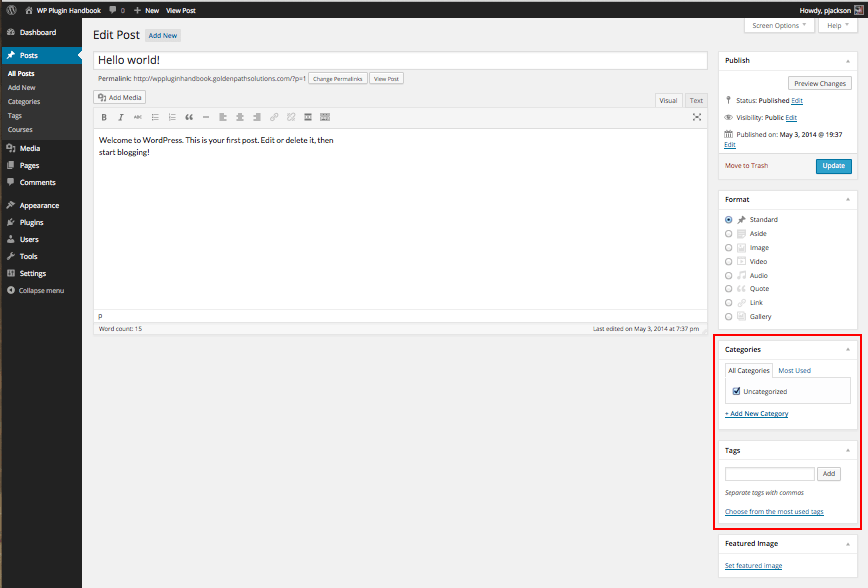
Step 2: Creating a New Plugin
Register the Taxonomy “course” for the post type “post” using the init action hook.
/*
* Plugin Name: Course Taxonomy
* Description: A short example showing how to add a taxonomy called Course.
* Version: 1.0
* Author: developer.wordpress.org
* Author URI: https://codex.wordpress.org/User:Aternus
*/

function wporg_register_taxonomy_course() {
	 $labels = array(
		 'name'              => _x( 'Courses', 'taxonomy general name' ),
		 'singular_name'     => _x( 'Course', 'taxonomy singular name' ),
		 'search_items'      => __( 'Search Courses' ),
		 'all_items'         => __( 'All Courses' ),
		 'parent_item'       => __( 'Parent Course' ),
		 'parent_item_colon' => __( 'Parent Course:' ),
		 'edit_item'         => __( 'Edit Course' ),
		 'update_item'       => __( 'Update Course' ),
		 'add_new_item'      => __( 'Add New Course' ),
		 'new_item_name'     => __( 'New Course Name' ),
		 'menu_name'         => __( 'Course' ),
	 );
	 $args   = array(
		 'hierarchical'      => true, // make it hierarchical (like categories)
		 'labels'            => $labels,
		 'show_ui'           => true,
		 'show_admin_column' => true,
		 'query_var'         => true,
		 'rewrite'           => [ 'slug' => 'course' ],
	 );
	 register_taxonomy( 'course', [ 'post' ], $args );
}
add_action( 'init', 'wporg_register_taxonomy_course' );
Step 3: Review the Result
Activate your plugin, then go to Posts > Add New. You should see a new meta box for your “Courses” Taxonomy.

Code Breakdown
The following discussion breaks down the code used above describing the functions and parameters.
The function wporg_register_taxonomy_course contains all the steps necessary for registering a Custom Taxonomy.
The $labels array holds the labels for the Custom Taxonomy.
These labels will be used for displaying various information about the Taxonomy in the Administration area.
The $args array holds the configuration options that will be used when creating our Custom Taxonomy.
The function register_taxonomy() creates a new Taxonomy with the identifier course for the post Post Type using the $args array for configuration.
The function add_action() ties the wporg_register_taxonomy_course function execution to the init action hook.
$args
The $args array holds important configuration for the Custom Taxonomy, it instructs WordPress how the Taxonomy should work.
Take a look at register_taxonomy() function for a full list of accepted parameters and what each of these do.
Summary
With our Courses Taxonomy example, WordPress will automatically create an archive page and child pages for the course Taxonomy.
The archive page will be at /course/ with child pages spawning under it using the Term’s slug (/course/%%term-slug%%/).
Using Your Taxonomy
WordPress has many functions for interacting with your Custom Taxonomy and the Terms within it.
Here are some examples:
the_terms: Takes a Taxonomy argument and renders the terms in a list.wp_tag_cloud: Takes a Taxonomy argument and renders a tag cloud of the terms.is_taxonomy: Allows you to determine if a given taxonomy exists.