jQuery
概述
本文档介绍了在WordPress开发中使用jQuery的基础知识,包括jQuery脚本在浏览器端运行的基本结构、选择器和事件的使用。文档基于一个插件管理设置页面的HTML示例,展示了如何通过jQuery处理表单元素的变化事件。
关键要点
- jQuery脚本在用户浏览器中执行,基本语句由选择器和事件/动作组成。
- 选择器使用CSS选择器形式(如".class"或"#id"),事件如'click'或'change'用于触发函数。
- 示例代码基于一个包含单选按钮的HTML表单,演示了如何使用".pref"类和'change'事件来响应元素变化。
- jQuery代码可以放在外部文件或页面内的<script>块中,外部文件需注意从PHP传递值的问题。
代码示例
$.(".pref").change(function(){
    /*do stuff*/
});
注意事项
本文档中的代码示例仅用于说明AJAX使用,未包含生产环境所需的消毒、安全、错误处理和国际化的相关操作,实际开发中必须补充这些重要部分。
Using jQuery
Your jQuery script runs on the user’s browser after your WordPress webpage is received. A basic jQuery statement has two parts: a selector that determines which HTML elements the code applies to, and an action or event, which determines what the code does or what it reacts to. The basic event statement looks like this:
jQuery.(selector).event(function);When an event, such as a mouse click, occurs in an HTML element selected by the selector, the function that is defined inside the final set of parentheses is executed.
All the following code examples are based on this HTML page content. Assume it appears on your plugin’s admin settings screen, defined by the file myplugin_settings.php. It is a simple table with radio buttons next to each title.
<form id="radioform">
	<table>
		<tbody>
		<tr>
			<td><input class="pref" checked="checked" name="book" type="radio" value="Sycamore Row" />Sycamore Row</td>
			<td>John Grisham</td>
		</tr>
		<tr>
			<td><input class="pref" name="book" type="radio" value="Dark Witch" />Dark Witch</td>
			<td>Nora Roberts</td>
		</tr>
		</tbody>
	</table>
</form>
The output could look something like this on your settings page.
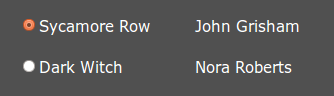
In the article on AJAX, we will build an AJAX exchange that saves the user selection in usermeta and adds the number of posts tagged with the selected title. Not a very practical application, but it illustrates all the important steps. jQuery code can either reside in an external file or be output to the page inside a <script> block. We will focus on the external file variation because passing values from PHP requires special attention. The same code can be output to the page if that seems more expedient to you.
Selector and Event
The selector is the same form as CSS selectors: ".class" or "#id". There’s many more forms, but these are the two you will frequently use. In our example, we will use class ".pref". There’s also a slew of possible events, one you will likely use a lot is ‘click’. In our example we will use ‘change’ to capture a radio button selection. Be aware that jQuery events are often named somewhat differently than those with JavaScript. So far, after we add in an empty anonymous function, our example statement looks like this:
$.(".pref").change(function(){
	/*do stuff*/
});
This code will “do stuff” when any element of the “pref” class changes.