站点健康
概述
自 WordPress 5.8 起,开发者可以扩展站点健康屏幕。该 API 允许开发者在站点健康界面中添加自定义标签页。
关键要点
- 使用 site_health_navigation_tabs 过滤器注册自定义标签页导航,通过关联数组定义标签页键和标签。
- 使用 site_health_tab_content 动作显示自定义标签页内容,该动作在用户访问非默认标签页时触发,并传递标签页 slug 参数。
- 导航区域最多直接显示前三个标签页,超过四个时其余标签页将放入子导航中,以避免界面混乱。
- 开发者可以扩展默认的 Info 标签页(slug 为 debug),例如添加按钮以复制插件或主题特定信息。
代码示例
function wporg_example_site_health_navigation_tabs( $tabs ) {
    $tabs['example-site-health-tab'] = esc_html_x( 'My New Tab', 'Site Health', 'text-domain' );
    return $tabs;
}
add_filter( 'site_health_navigation_tabs', 'wporg_example_site_health_navigation_tabs' );

function wporg_example_site_health_tab_content( $tab ) {
    if ( 'example-site-health-tab' !== $tab ) {
        return;
    }
    include trailingslashit( plugin_dir_path( __FILE__ ) ) . 'views/site-health-tab.php';
}
add_action( 'site_health_tab_content', 'wporg_example_site_health_tab_content' );

function wporg_add_button_to_site_health_info_tab( $tab ) {
    if ( 'debug' !== $tab ) {
        return;
    }
    ?>
    <button class="copy-my-plugin-info">
        <?php esc_html_e( 'Click to copy plugin info', 'text-domain' ); ?>
    </button>
    <?php
}
add_action( 'site_health_tab_content', 'wporg_add_button_to_site_health_info_tab' );Since WordPress 5.8, developers are allowed to extend Site Health screen. This API allows developers to add their own tabs to the Site Health interface.
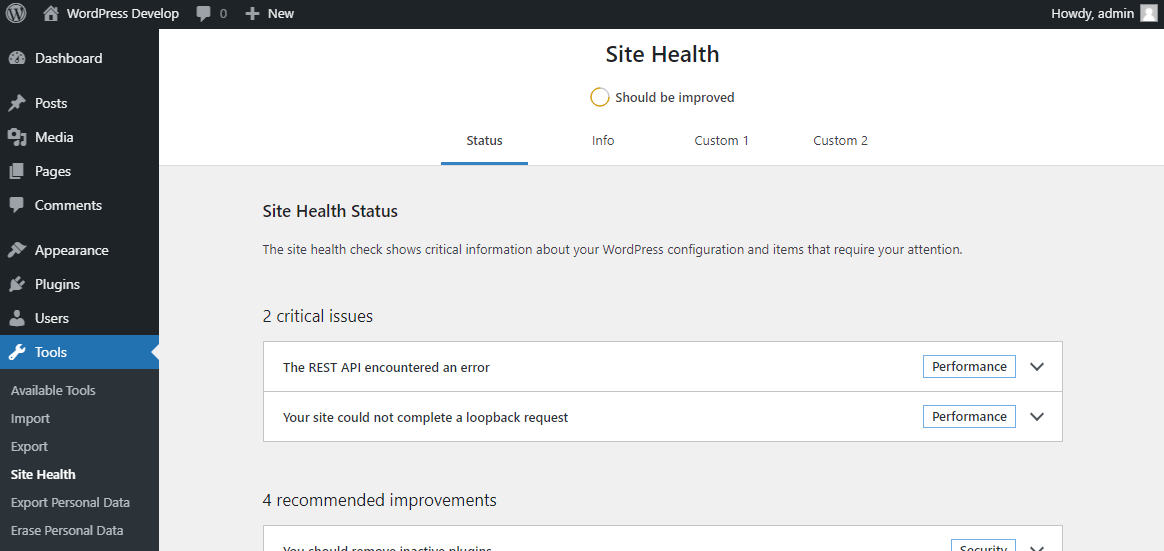
Registering a custom tab navigation
Developers need to start by creating a navigation element, so that users may access the new tab. This is done using the site_health_navigation_tabs filter, which is an associated array of tab keys, and their label.
<?php
function wporg_example_site_health_navigation_tabs( $tabs ) {
    // translators: Tab heading for Site Health navigation.
    $tabs['example-site-health-tab'] = esc_html_x( 'My New Tab', 'Site Health', 'text-domain' );

    return $tabs;
}
add_filter( 'site_health_navigation_tabs', 'wporg_example_site_health_navigation_tabs' );
The above example will add the identifier example-site-health-tab with the label My New Tab to the header navigation located in Site Health screens.
It is also possible to re-order what tabs are displayed first using this filter, or even remove tabs. By default core has two tabs, the Status and Info screens. The Status screen is the default, and therefore has no slug.
To not overburden the navigation area, if there are more than 4 items added, only the first three will be displayed directly, with the remaining items being wrapped inside a sub-navigation. This is based on usage testing in the Health Check plugin, where 4 items have shown to be enough to cover most use cases, but not so many as to become confusing.
Displaying the content of a custom tab
When a user visits a Site Health tab, other than the default screen, the site_health_tab_content action triggers. This action includes a single argument being the slug, as defined by the tab navigation in the previous filter, to help developers to identify which page is being requested.
The action fires after the header itself has been loaded, but does not include any wrappers. This gives you as a developer the full width of the screen (not counting the admin menu) to work with.
<?php
function wporg_example_site_health_tab_content( $tab ) {
    // Do nothing if this is not our tab.
    if ( 'example-site-health-tab' !== $tab ) {
        return;
    }

    // Include the interface, kept in a separate file just to differentiate code from views.
    include trailingslashit( plugin_dir_path( __FILE__ ) ) . 'views/site-health-tab.php';
}
add_action( 'site_health_tab_content', 'wporg_example_site_health_tab_content' );
The above example loads in a file with your tab content from your plugin, but only if the tab matches the tab key (or slug if you will) which was defined in the previous example.
It is possible to provide output on any tab this way, or on another tab not your own, for example if they interact with each other.
Another example might be to extend the default Info tab, which has the slug debug, and add a button to copy some information specific to only your plugin or theme:
<?php
function wporg_add_button_to_site_health_info_tab( $tab ) {
    // Do nothing if this is not the "debug" tab.
    if ( 'debug' !== $tab ) {
        return;
    }
    ?>
    <button class="copy-my-plugin-info">
        <?php esc_html_e( 'Click to copy plugin info', 'text-domain' ); ?>
    </button>
    <?php
}
add_action( 'site_health_tab_content', 'wporg_add_button_to_site_health_info_tab' );