设置选项API
概述
Options API 是 WordPress 中用于在数据库中存储数据的标准化接口,支持增删改查操作,数据存储在 wp_options 表中。本文档提供了技术参考,包括函数列表、代码示例和按类别分类的默认选项详情。
关键要点
- Options API 提供简单方法管理数据库选项,核心函数包括 add_option、delete_option、get_option 和 update_option。
- 在 WordPress 多站点环境中,可使用 _site_ 函数(如 add_site_option)处理网络级选项,数据存储在 wp_sitemeta 表。
- 文档列出了默认选项的详细分类,涵盖讨论、常规、媒体、隐私、阅读、主题、写作等多个方面,每个选项包括默认值、数据类型和描述。
- 可通过 All Settings Screen(/wp-admin/options.php)查看和修改几乎所有选项,适用于高级管理。
代码示例
// 创建选项到数据库
add_option( $option, $value = , $deprecated = , $autoload = 'yes' );

// 按名称删除选项
delete_option( $option );

// 获取已保存的选项
get_option( $option, $default = false );

// 更新已添加选项的值
update_option( $option, $newvalue );Overview
The Options API is a simple and standardized way of storing data in the database. The API makes it easy to create, access, update, and delete options. All the data is stored in the wp_options table under a given custom name.
This page contains the technical documentation needed to use the Options API. A list of default options can be found in the Option Reference (link to Codex version, waiting for content migration to HelpHub).
Note that the _site_ functions are essentially the same as their counterparts. The only differences occur for WP Multisite, when the options apply network-wide and the data is stored in the wp_sitemeta table under the given custom name.
Function Reference
Add/Delete Option:
Get/Update Option:
Examples
// Create an option to the database
add_option( $option, $value = , $deprecated = , $autoload = 'yes' );

// Removes option by name.
delete_option( $option );

// Fetch a saved option
get_option( $option, $default = false );

// Update the value of an option that was already added.
update_option( $option, $newvalue );
Available options by category
Discussion
blacklist_keys: When a comment contains any of these words in its content, name, URL, e-mail, or IP, it will be marked as spam. One word or IP per line. It will match inside words, so “press” will match “WordPress.”
Default: NULL
Data type:String (possibly multi-line)comment_max_links: Hold a comment in the queue if it contains the value of this option or more.
Default: 2
Data type:Integercomment_moderation: Before a comment appears, an administrator must always approve the comment.
1 : Yes
0 : False (default)
Data type:Integercomments_notify: E-mail me when anyone posts a comment.
1 : Yes (default)
0 : No
Data type:Integerdefault_comment_status: Allow comments (can be overridden with individual posts)
open : Allow comments (default)
closed : Disallow comments
Data type:Stringdefault_ping_status: Allow link notifications from other blogs (pingbacks and trackbacks).
open : Allow pingbacks and trackbacks from other blogs (default)
closed : Disallow pingbacks and trackbacks from other blogs
Data type:Stringdefault_pingback_flag: Attempt to notify any blogs linked to from the article (slows down posting).
1 : Yes (default)
0 : No
Data type:Integermoderation_keys: When a comment contains any of these words in its content, name, URL, e-mail, or IP, it will be held in the moderation queue. One word or IP per line. It will match inside words, so “press” will match “WordPress.”
Default: NULL
Data type:String (possibly multi-line)moderation_notify: E-mail me when a comment is held for moderation.
1 : Yes (default)
0 : No
Data type:Integerrequire_name_email: Before a comment appears, the comment author must fill out his/her name and email.
1 : Yes (default)
0 : No
Data type:Integerthread_comments: Enable WP-native threaded (nested) comments.
1 : Yes
0 : No (default)
Data type:Integerthread_comments_depth: Set the number of threading levels for comments.
1 thru
10 : levels
Default: 5
Data type:Integershow_avatars: Avatar Display
1 : (default) Show Avatars
0 : Do not show Avatars
Data type:Integeravatar_rating: Maximum Rating
G : (default) Suitable for all audiences
PG : Possibly offensive, usually for audiences 13 and above
R : Intended for adult audiences above 17
X : Even more mature than above
Data type:Stringavatar_default: Default Avatar
mystery : (default) Mystery Man
blank : Blank
gravatar_default : Gravatar Logo
identicon : Identicon (Generated)
wavatar : Wavatar (Generated)
monsterid : MonsterID (Generated)
retro : Retro (Generated)
Data type:Stringclose_comments_for_old_posts: Automatically close comments on old articles
1 : Yes
0 : No (default)
Data type:Integerclose_comments_days_old: Automatically close comments on articles older than x days
Default: 14
Data type:Integershow_comments_cookies_opt_in: Show the cookies opt-in checkbox on the comment form and enable comment cookies
1 : Yes (default as of 4.9.8)
0 : No
Data type:Integerpage_comments: Break comments into pages
1 : Yes (default)
0 : No
Data type:Integercomments_per_page:
Default: 50
Data type:Integerdefault_comments_page:
Default: ‘newest’
Data type:Stringcomment_order:
asc : (default)
desc :
Data type:Stringcomment_whitelist: Comment author must have a previously approved comment
1 : Yes (default)
0 : No
Data type:
General
admin_email: Administrator email
Default: ‘you@example.com’
Data type:Stringblogdescription: Blog tagline
Default: ‘__(‘Just another WordPress weblog’)’
Data type:Stringblogname: Blog title
Default: ‘__(‘My Blog’)’
Data type:Stringcomment_registration: Users must be registered and logged in to comment
1 : Yes
0 : No (default)
Data type:Integerdate_format: Default date format
Default: ‘__(‘F j, Y’)’
Data type:Stringdefault_role: The default role of users who register at the blog.
subscriber (default)
administrator
editor
author
contributor
Data type:Stringgmt_offset: Times in the blog should differ by this value.
-6 : GMT -6 (aka Central Time, USA)
0 : GMT (aka Greenwich Mean Time)
Default: date(‘Z’) / 3600
Data type:Integerhome: Blog address (URL)
Default: wp_guess_url()
Data type:String (URI)siteurl: WordPress address (URL)
Defaultwp_guess_url()
Data type:String (URI)start_of_week: The starting day of the week.
0 : Sunday
1 : Monday (default)
2 : Tuesday
3 : Wednesday
4 : Thursday
5 : Friday
6 : Saturday
Data type:Integertime_format: Default time format
Default: ‘__(‘g:i a’)’
Data type:Stringtimezone_string: Timezone
Default: NULL
Data type:Stringusers_can_register: Anyone can register
1 : Yes
0 : No (default)
Data type:Integer
Links
links_updated_date_format:
Default__('F j, Y g:i a')
Data type:Stringlinks_recently_updated_prepend:
Default empty
Data type: Stringlinks_recently_updated_append
Default empty
Data type:Stringlinks_recently_updated_time
Default: 120
Data type:Integer
Media
thumbnail_size_w:
Default: 150
Data type:Integerthumbnail_size_h:
Default: 150
Data type:Integerthumbnail_crop: Crop thumbnail to exact dimensions (normally thumbnails are proportional)
1 : Yes (default)
0 : No
Data type:Integermedium_size_w:
Default: 300
Data type:Integermedium_size_h
Default: 300
Data type:Integerlarge_size_w
Default: 1024
Data type:Integerlarge_size_h
Default: 1024
Data type:Integerembed_autourls: Attempt to automatically embed all plain text URLs
Default: 1
Data type:Integerembed_size_w
Default: NULL
Data type:Integerembed_size_h
Default: 600
Data type:Integer
Miscellaneous
hack_file: Use legacymy-hacks.phpfile support
1 : Yes
0 : No (default)
Data type:Integerhtml_type: Default MIME type for blog pages (text/html, text/xml+html, etc.)
Default: ‘text/html’
Data type:String (MIME type)secret: Secret value created during installation used with salting, etc.
Default: wp_generate_password(64)
Data type:String (MD5)upload_path: Store uploads in this folder (relative to the WordPress root)
Default: NULL
Data type:String (relative path)upload_url_path: URL path to upload folder (will be blank by default – Editable in “All Settings” Screen.
Data type:String (URL path)uploads_use_yearmonth_folders: Organize my uploads into month- and year-based folders
1 : Yes (default)
0 : No (default for safe mode)
Data type:Integeruse_linksupdate: Track links’ update times
1 : Yes
0 : No (default)
Data type:Integer
Permalinks
permalink_structure: The desired structure of your blog’s permalinks. Some examples:/%year%/%monthnum%/%day%/%postname%/: Date and name based/archives/%post_id%/: Numeric/%postname%/: Post name-based
Default: NULL
Data type:Stringcategory_base: The default category base of your blog categories permalink.
Default: NULL
Data type:Stringtag_base: The default tag base for your blog tags permalink.
Default: NULL
Data type:String
Privacy
blog_public:
1 : I would like my blog to be visible to everyone, including search engines (like Google, Sphere, Technorati) and archivers. (default)
0 : I would like to block search engines, but allow normal visitors.
Data type:Integer
Reading
blog_charset: Encoding for pages and feeds. The character encoding you write your blog in (UTF-8 is recommended).
Default:UTF-8
Data type:Stringgzipcompression: WordPress should compress articles (with gzip) if browsers ask for them.
1 : Yes
0 : No (default)
Data type:Integerpage_on_front: The ID of the page that should be displayed on the front page. Requiresshow_on_front‘s value to be page.
Data type:Integerpage_for_posts: The ID of the page that displays posts. Useful whenshow_on_front‘s value is page.
Data type:Integerposts_per_page: Show at most x many posts on blog pages.
Default: 10
Data type:Integerposts_per_rss: Show at most x many posts in RSS feeds.
Default: 10
Data type:Integerrss_language: Language for RSS feeds (metadata purposes only)
Default:en
Data type:String (ISO two-letter language code)rss_use_excerpt: Show an excerpt instead of the full text of a post in RSS feeds
1 : Yes
0 : No (default)
Data type:Integershow_on_front: What to show on the front page
posts : Your latest posts (default)
page : A static page (see page_on_front)
Data type:String
Themes
template: The slug of the currently activated theme (how it is accessed by path, ex./wp-content/themes/my-theme(my-themewould be the value of this option).
Default: ‘default’
Data type:Stringstylesheet: The slug of the currently activated stylesheet (style.css) (how it is accessed by path, ex./wp-content/themes/my-style(my-style would be the value of this option)
Default: ‘default’
Data type:String
Writing
default_category: ID of the category that posts will be put in by default
Default: 1
Data type:Integerdefault_email_category: ID of the category that posts will be put in by default when written via e-mail
Default: 1
Data type:Integerdefault_link_category: ID of the category that links will be put in by default
Default: 2
Data type:Integerdefault_post_edit_rows: Size of the post box (in lines)
Default: 10
Data type:Integermailserver_login: Mail server username for posting to WordPress by e-mail
Default: ‘login@example.com’
Data type:Stringmailserver_pass: Mail server password for posting to WordPress by e-mail
Default: ‘password’
Data type:Stringmailserver_port: Mail server port for posting to WordPress by e-mail
Default: 110
Data type:Integermailserver_url: Mail server for posting to WordPress by e-mail
Default: ‘mail.example.com’
Data type:Stringping_sites: When you publish a new post, WordPress automatically notifies the following site update services. For more about this, see Update Services. Separate multiple service URLs with line breaks. Requiresblog_publicto have a value of 1.
Default: ‘http://rpc.pingomatic.com/’
Data type:String (possibly multi-line)use_balanceTags: Correct invalidly-nested XHTML automatically
1 : Yes
0 : No (default)
Data type:Integeruse_smilies: Convert emoticons like:-)and:Pto graphics when displayed
1 : Yes (default)
0 : No
Data type:Integeruse_trackback: Enable sending and receiving of trackbacks
1 : Yes
0 : No (default)enable_app: Enable the Atom Publishing Protocol
1 : Yes
0 : No (default)
Data type:Integerenable_xmlrpc: Enable the WordPress, Movable Type, MetaWeblog and Blogger XML-RPC publishing protocols
1 : Yes
0 : No (default)
Data type:Integer
Uncategorized
active_plugins: Returns an array of strings containing the path of the main php file of the plugin. The path is relative to the plugins folder. An example of path in the array :/mainpage.php.
Default: array()
Data type:Arrayadvanced_edit:
Default: 0
Data type:Integerrecently_edited:
Default: NULL
Data type:image_default_link_type:
Default: ‘file’
Data type: ‘file’, ‘none’image_default_size:
Default: NULL
Data type: ‘thumbnail’, ‘medium’, ‘large’ or Custom sizeimage_default_align:
Default: NULL
Data type: ‘left’, ‘right’, ‘center’, ‘none’sidebars_widgets: Returns array of sidebar states (list of active and inactive widgets).
Default:
Data type:Arraysticky_posts:
Default: array()
Data type:widget_categories:
Default: array()
Data type:widget_text:
Default: array()
Data type:widget_rss:
Default: array()
Data type:
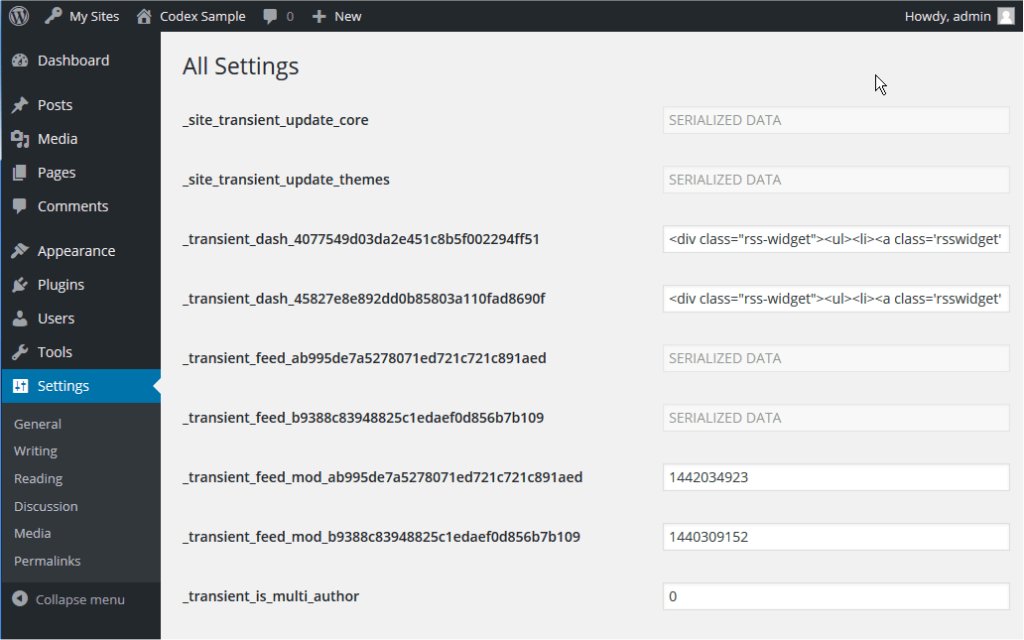
All Settings Screen
WordPress 3.0 removed Settings > Miscellaneous screen and some of the options cannot be reached (e.g. upload_url_path). You may use the All Settings Screen to view and change almost all options listed above. It is accessible by visiting /wp-admin/options.php