正确理解和使用 WordPress Nonce
什么是 Nonce?
在密码学中,Nonce 是一个在密码通信中只能使用一次的任意数字。它通常是在认证协议中发出的随机或伪随机数,以确保旧的通信不能在重放攻击中被重复使用。
如果我告诉你 WordPress Nonce 不是真正的 Nonce 呢?
像其他一些东西一样,WordPress 中的 Nonce 并非真正的 Nonce。
与传统 Nonce 不同,WordPress Nonce 在其有限的生命周期内可以使用多次,其默认生命周期在 12 小时加 1 秒到 24 小时之间。为了衡量 Nonce 的生命周期,WordPress 使用自 Unix 纪元以来的 12 小时时段。每个时段是一个“滴答”,每个 Nonce 有两个滴答的时间来发挥作用。
验证 Nonce 的函数 wp_verify_nonce() 将返回这个滴答编号:
- 1 表示 Nonce 生命的前 12 小时
- 2 表示 Nonce 生命的后 12 小时
- false 表示 Nonce 不再有效。
只有当 Nonce 在滴答开始时创建,它才能存活总共 24 小时。然而,如果它在滴答的末尾创建,它可能只比 12 小时多活一秒。
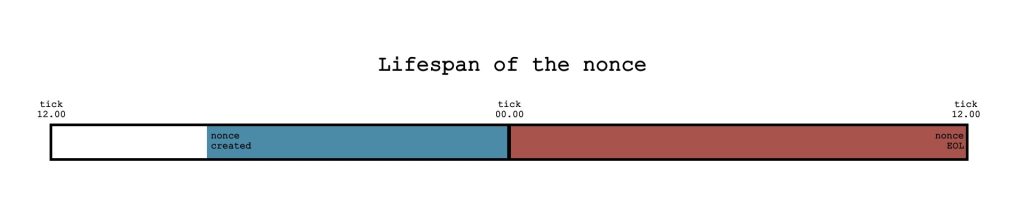
决定 Nonce 生命周期的实际函数是 wp_nonce_tick()。它包含过滤器 nonce_life,允许扩展者修改 Nonce 的生命长度。与任何其他强大工具一样,如果使用不当,此过滤器可能会破坏你的网站。
<?php
/**
 * Change the lifespan of a nonce to 4 hours.
 *
 * @param int $lifespan Lifespan of nonces in seconds. Default 86,400 seconds, or one day.
 *
 * @return float Float value rounded up to the next highest integer.
 */
add_filter( 'nonce_life', 'wporg_nonce_life' );

function wporg_nonce_life( $lifespan ) {
	return 4 * HOUR_IN_SECONDS;
}
如果你认为 24 小时对于只能使用一次的东西来说太长了,你是对的。24 小时足够长,足以让某人窃取你的 Nonce。但别担心,WordPress 的 Nonce 系统内置了足够的保护。
关于 Nonce 的官方 WordPress 文档略微触及了这个想法:“在给定上下文中,为给定用户生成的 Nonce 是相同的”。给定用户是这里的关键词。Nonce 对于当前活动用户的会话是唯一的。这意味着它们仅对当前活动用户有效。即使某人拥有你的凭据和你的 Nonce,他们还需要你的会话才能成功使用它。
创建 Nonce 时,wp_create_nonce() 函数会获取用户 ID 和会话令牌值。这些对当前用户是唯一的。此外,它还向其中添加了另外两个值,并至少对它们进行两次哈希处理。从这个函数出发,你可以探索两个“兔子洞”:
关键是它是安全的,但你永远不应该忘记运行 current_user_can() 检查,因为 Nonce 不知道用户的权限。
<?php
/**
 * Protect nonce with current_user_can() check.
 */

// Build URL for deleting the user.
$url = add_query_arg(
	array(
		'action' => 'delete',
		'user'   => $user_id,
	),
	admin_url( 'users.php' )
);
// Add nonce to the URL.
$delete_user_url = wp_nonce_url( $url, 'delete-user', 'my_custom_nonce_name' );

// $delete_user_url URL could be sent to admin via email. When clicked it can lead to a template/page where checks
// make sure current user can delete other users, verify nonce and then perform action.
if ( current_user_can( 'delete_users' ) &&
    isset( $_GET[ 'my_custom_nonce_name' ] ) &&
    wp_verify_nonce( $_GET[ 'my_custom_nonce_name' ], 'delete-user' )
   ) {
	// delete user code here
}
何时使用 Nonce?
如果 WordPress Nonce 不是真正的 Nonce,并且有这么多需要注意的地方,那它到底有什么用呢?
Nonce 对于授权对您站点的 HTTP 请求至关重要。Nonce 的目的是防止恶意的 HTTP 请求。
使用 Nonce 可以防止的最常见的恶意 HTTP 请求是跨站请求伪造攻击,包括表单提交攻击、未经授权的 AJAX 请求以及各种插件和主题漏洞利用。几年前,有报道称一些流行的 WordPress 插件存在 CSRF 漏洞。
在后端应用中使用 Nonce
Nonces API 提供了几个具有不同用途的函数。
创建 Nonce
根据使用情况,可以通过几种方式创建 Nonce。
用于表单
当您需要为表单创建 Nonce 时,wp_nonce_field() 将为您创建一个即用型隐藏字段,甚至更多。如果需要,您还可以拥有一个 referer 字段。
如果您在 WordPress 仪表盘中构建自定义表单,很可能将其作为插件设置的一部分。在这种情况下,建议使用 settings_fields() 函数,它不仅会处理 Nonce 字段,还会包含其他有用的隐藏字段。
用于 URL
当您需要为 URL 创建 Nonce 时,可以使用 wp_nonce_url()。如果您的 URL 有更多参数(很可能会有),建议始终使用 add_query_arg(),就像我们在使用 current_user_can() 检查 Nonce 的示例中所做的那样。
然而,有时 add_query_arg() 的第二个参数是一个已经包含参数且可能已用 esc_url() 转义的 URL。这样,您可能会得到一个无用的 URL,因为 wp_nonce_url() 使用 esc_html() 转义输出。这种行为是已知的,但尚未修复,因为任何修复它的尝试都会破坏其他东西。
如果您的 URL 除了转义之外还需要经过 sprintf() 处理,请查看如何正确执行此操作的示例。
用于其他任何情况
在任何其他上下文中,最好使用 wp_create_nonce() 函数创建 Nonce。
浏览 WordPress 核心,有多种使用此函数的方式。
<?php
/**
 * Found in wp-login.php
 */
?>

<div class="admin-email__actions-secondary">
	<?php
		$remind_me_link = wp_login_url( $redirect_to );
		$remind_me_link = add_query_arg(
			array(
				'action'          => 'confirm_admin_email',
				'remind_me_later' => wp_create_nonce( 'remind_me_later_nonce' ),
			),
			$remind_me_link
		);
	?>
	<a href="<?php echo esc_url( $remind_me_link ); ?>"><?php _e( 'Remind me later' ); ?></a>
</div>
<?php
/**
* Found in wp-admin/theme-install.php
* https://github.com/WordPress/wordpress-develop/blob/6.2/src/wp-admin/theme-install.php#L231
*/
?>
<label for="wporg-username-input"><?php _e( 'Your WordPress.org username:' ); ?></label>
<input type="hidden" id="wporg-username-nonce" name="_wpnonce" value="<?php echo esc_attr( wp_create_nonce( $action ) ); ?>" />
<input type="search" id="wporg-username-input" value="<?php echo esc_attr( $user ); ?>" />
<input type="button" class="button favorites-form-submit" value="<?php esc_attr_e( 'Get Favorites' ); ?>" />为主题激活设置 JavaScript 常量的函数被标记为私有,但你可以在这里找到它。
<?php
/**
* Set a JavaScript constant for theme activation.
*
* Sets the JavaScript global WP_BLOCK_THEME_ACTIVATE_NONCE containing the nonce
* required to activate a theme. For use within the site editor.
*
* @see https://github.com/WordPress/gutenberg/pull/41836.
*
* @since 6.3.0
* @private
*/
function wp_block_theme_activate_nonce() {
$nonce_handle = 'switch-theme_' . wp_get_theme_preview_path();
?>
<script type="text/javascript"></script>
<?php
}<?php
/**
* As found in rest_cookie_check_errors()
* https://developer.wordpress.org/reference/functions/rest_cookie_check_errors/
*/
// Send a refreshed nonce in header.
rest_get_server()->send_header( 'X-WP-Nonce', wp_create_nonce( 'wp_rest' ) );<?php
/**
* As found in _wp_dashboard_recent_comments_row()
* https://developer.wordpress.org/reference/functions/_wp_dashboard_recent_comments_row/
*/
$del_nonce = esc_html( '_wpnonce=' . wp_create_nonce( "delete-comment_$comment->comment_ID" ) );
$approve_nonce = esc_html( '_wpnonce=' . wp_create_nonce( "approve-comment_$comment->comment_ID" ) );
$approve_url = esc_url( "comment.php?action=approvecomment&p=$comment->comment_post_ID&c=$comment->comment_ID&$approve_nonce" );
$unapprove_url = esc_url( "comment.php?action=unapprovecomment&p=$comment->comment_post_ID&c=$comment->comment_ID&$approve_nonce" );
$spam_url = esc_url( "comment.php?action=spamcomment&p=$comment->comment_post_ID&c=$comment->comment_ID&$del_nonce" );
$trash_url = esc_url( "comment.php?action=trashcomment&p=$comment->comment_post_ID&c=$comment->comment_ID&$del_nonce" );
$delete_url = esc_url( "comment.php?action=deletecomment&p=$comment->comment_post_ID&c=$comment->comment_ID&$del_nonce" );这是评论 AJAX 功能中的一个有趣示例,其中创建 Nonce 与检查其值是同时进行的。
<?php
/**
 * As found in wp_ajax_replyto_comment()
 * https://developer.wordpress.org/reference/functions/wp_ajax_replyto_comment/
 */

if ( current_user_can( 'unfiltered_html' ) ) {
	if ( ! isset( $_POST['_wp_unfiltered_html_comment'] ) ) {
		$_POST['_wp_unfiltered_html_comment'] = '';
	}

	if ( wp_create_nonce( 'unfiltered-html-comment' ) != $_POST['_wp_unfiltered_html_comment'] ) {
		kses_remove_filters(); // Start with a clean slate.
		kses_init_filters();   // Set up the filters.
		remove_filter( 'pre_comment_content', 'wp_filter_post_kses' );
		add_filter( 'pre_comment_content', 'wp_filter_kses' );
	}
}
另一个为要在 Javascript 代码中使用的 URL 创建 Nonce 的有趣示例。
<?php
/**
 * As found in wp-admin/edit-form-blocks.php
 */

// Get admin url for handling meta boxes.
$meta_box_url = admin_url( 'post.php' );
$meta_box_url = add_query_arg(
	array(
		'post'                  => $post->ID,
		'action'                => 'edit',
		'meta-box-loader'       => true,
		'meta-box-loader-nonce' => wp_create_nonce( 'meta-box-loader' ),
	),
	$meta_box_url
);
wp_add_inline_script(
	'wp-editor',
	sprintf( 'var _wpMetaBoxUrl = %s;', wp_json_encode( $meta_box_url ) ),
	'before'
);
验证 Nonce
验证 Nonce 时,你是否进行了清理?你真的应该这样做。
验证 Nonce 的函数 wp_verify_nonce() 有两个钩子:过滤器 nonce_user_logged_out 和动作 wp_verify_nonce_failed。这意味着该函数是可插拔的,扩展者不应信任其输入值。如果你应用 WordPress 编码标准,你可能知道有一个专门用于验证 Nonce 的嗅探器。
按照 WPCS 验证 Nonce 的正确方法如下例所示:
<?php
/**
 * Verifying nonce with sanitizing as per WPCS.
 */
if ( ! wp_verify_nonce( sanitize_text_field( wp_unslash( $_GET[ 'my_custom_nonce_name' ] ) ), 'delete-user' ) ) {
  return;
}
这种方法也适用于其他验证 Nonce 的函数,check_admin_referer() 和 check_ajax_referer(),因为它们都是可插拔的,并且 WPCS 也会嗅探它们。
关于是否需要清理 Nonce 存在讨论,未来 WordPress 核心可能会自动为你完成。
如果你不确定
函数 wp_nonce_ays() 是 wp_explain_nonce() 的替代品,它会显示操作的消息以及众所周知的“你确定吗?”。如果你不确定这个函数的工作原理,你应该小心使用它。它不会阻止操作发生,并且过去曾被利用过。如有疑问,请查看它在核心中的使用方式。
刷新 Nonce
有时需要刷新 Nonce。例如,你开始创建一篇文章,但在你点击发布按钮之前,你的会话因某种原因过期了。或者你在一些用户仍然登录时更改了 WordPress 目录。或者你使用 https 登录但导航到 http URL,然后返回到仪表盘中的 https。所有这些情况都可能导致你的 Nonce 无效,WordPress 会尝试刷新它。
如果你需要这样做,建议使用 wp_refresh_nonces 过滤器。此过滤器的使用示例非常少,需要进行一些深入研究,但同样,如有疑问,请查看核心。该过程的要点如下:
- 检查接收到的数据中是否存在你的 Nonce。
- 检查你是否在处理正确的实体。
- 检查当前用户是否可以执行该操作。
- 使用 wp_create_nonce() 创建一个新的 Nonce。
- 返回响应。
此过滤器在核心中作用的示例可以在 wp_refresh_post_nonces()、wp_refresh_metabox_loader_nonces() 和 wp_refresh_heartbeat_nonces() 等函数中看到。
引入此过滤器的函数 wp_ajax_heartbeat() 也使用 wp_send_json() 来发送成功和错误消息。
用于刷新 REST API Nonce 的函数是 wp_ajax_rest_nonce(),但我还没有看到它的使用示例。然而,一眼就能看出的是,这个函数不发送任何成功或错误消息,因此在使用时请注意这一点。
如果您需要自定义器的刷新 Nonce,可以在 customize_refresh_nonces 过滤器中找到它们。
在前端应用中使用 Nonce
这里的前端可以以多种方式理解。首先想到的是将 Nonce 发送到 Javascript 代码。可能是本地的 Javascript 文件,或者 Nonce 需要发送到 WordPress 安装之外。
在第一种情况下,可以使用 wp_localize_script() 或 wp_add_inline_script() 来实现,正如我们在核心的示例中看到的那样。或者,如果您想使用 REST API,可以将 Nonce 添加到 wp_rest 操作中。
可以在 REST API 文档中找到很好的示例。
<?php
/**
 * https://developer.wordpress.org/rest-api/using-the-rest-api/authentication/
 */

wp_localize_script( 'wp-api', 'wpApiSettings', array(
    'root'  => esc_url_raw( rest_url() ),
    'nonce' => wp_create_nonce( 'wp_rest' )
) );
以这种方式创建的 Nonce 可以在您的 AJAX 调用中用作请求的数据参数或通过 X-WP-Nonce 标头使用。
/**
 * https://developer.wordpress.org/rest-api/using-the-rest-api/authentication/
 */

$.ajax( {
    url: wpApiSettings.root + 'wp/v2/posts/1',
    method: 'POST',
    beforeSend: function ( xhr ) {
        xhr.setRequestHeader( 'X-WP-Nonce', wpApiSettings.nonce );
    },
    data:{
        'title' : 'Hello Moon'
    }
} ).done( function ( response ) {
    console.log( response );
} );
在第二种情况下,除了向请求添加 Nonce 外,您还需要为外部应用程序设置身份验证,为此您可以结合其他身份验证方法使用应用程序密码。
值得一提的是 @wordpress/api-fetch 包,它有一个用于创建 Nonce 的内置中间件。
这是核心 Gutenberg 如何使用