WordPress 6.9 中注册自定义社交图标
自社区成员提出为社交图标块请求扩展架构的工单以来,已近六年。虽然等待感觉漫长,但这一天终于到来了。
Gutenberg 21.1 包含了必要的更改,使扩展该块的愿望成为现实。这意味着这些更改将包含在WordPress 6.9中,该版本计划于2025年12月2日发布。
在过去的几周里,我尝试了各种添加更多社交服务的想法,乐在其中。现在是时候与大家分享我的所学了。让我们一起构建一个插件!
在本教程中,你将学习如何设置插件、为编辑器注册社交图标、为前端注册它们,并可选择使用CSS为其添加样式。如果你想在阅读时参考最终代码,可以克隆GitHub仓库。
在撰写本文时,你必须运行 Gutenberg 21.1+ 才能测试本教程中的功能。或者,使用 WordPress 6.9 或更高版本。
插件设置
在深入核心内容之前,你需要完成设置插件的常规样板工作。在你的 /wp-content/plugins 目录中创建一个名为 devblog-custom-social-icons 的新文件夹,并包含以下文件和文件夹结构:
srcindex.jsstyle.css
package.jsonplugin.php
在你的 plugin.php 文件中,添加你的插件头部字段:
<?php
/**
 * Plugin Name:       Dev Blog Custom Social Icons
 * Plugin URI:        https://developer.wordpress.org/news
 * Description:       Registers custom icons and services for the Social Icons block.
 * Version:           1.0.0
 * Requires at least: 6.8
 * Requires PHP:      7.4
 * Requires Plugins:  gutenberg
 * Author:            Your Name
 * Author URI:        https://developer.wordpres.org/news
 * Text Domain:       devblog
 */
下一步是将项目名称和一些脚本添加到 package.json 文件中:
{
	"name": "devblog-custom-social-icons",
	"scripts": {
		"start": "wp-scripts start",
		"build": "wp-scripts build"
	}
}
然后打开你喜欢的命令行工具,导航到 /wp-content/plugins/devblog-custom-social-icons 目录。
你需要通过运行以下命令来安装 @wordpress/scripts 包。如果你从未这样做过,我推荐wp-scripts 入门指南。
npm install @wordpress/scripts --save-dev依赖项导入后,运行 start 命令:
npm run start所有设置完成后,现在我们可以进入有趣的部分了。
在编辑器中注册社交图标
要在编辑器中注册自定义社交图标,必须使用 JavaScript。在你的 src/index.js 文件中,你将注册自定义块变体。
首先将你的 JavaScript 添加到脚本队列中,将此代码放入你的 plugin.php 文件:
add_action( 'enqueue_block_editor_assets', 'devblog_custom_social_icons_editor_assets' );
function devblog_custom_social_icons_editor_assets() {
	$dir = untrailingslashit( plugin_dir_path( __FILE__ ) );
	$url = untrailingslashit( plugin_dir_url( __FILE__ ) );
	if ( file_exists( "{$dir}/build/index.asset.php" )) {
		$asset = include "{$dir}/build/index.asset.php";
		wp_enqueue_script(
			'devblog-custom-social-icons',
			"{$url}/build/index.js",
			$asset['dependencies'],
			$asset['version'],
			true
		);
	}
}
然后,打开你的 src/index.js 文件,导入一些注册变体和处理 SVG 所需的依赖项:
import { registerBlockVariation } from '@wordpress/blocks';
import {SVG, Path} from '@wordpress/primitives';
添加你的第一个自定义图标
自定义社交图标不过是 core/social-link 块的变体。所有图标都是这样注册的,即使是 WordPress 捆绑的图标也是如此。
看看注册你自己的变体时应该如何格式化:
registerBlockVariation('core/social-link', {
	name: 'the-variation-name',
	title: 'The Service Title',
	icon: theVariationIcon,
	attributes: {
		service: 'the-service-name',
	},
	isActive: ['service']
});
我想特别提请你注意两个属性:
attributes.service: 这应该是一个唯一的名称,代表你想要注册的社交服务。isActive: 这被设置为一个包含传入的service属性的数组。这告诉 WordPress,当块的service属性与变体的属性匹配时,该变体处于活动状态。
让我们尝试为流行的 Ko-fi 服务注册一个社交图标。将此代码添加到你的 index.js 文件:
registerBlockVariation('core/social-link', {
	name: 'kofi',
	title: 'Ko-fi',
	icon: (
		<SVG role="img" viewBox="0 0 24 24" xmlns="http://www.w3.org/2000/svg">
			<Path d="M11.351 2.715c-2.7 0-4.986.025-6.83.26C2.078 3.285 0 5.154 0 8.61c0 3.506.182 6.13 1.585 8.493 1.584 2.701 4.233 4.182 7.662 4.182h.83c4.209 0 6.494-2.234 7.637-4a9.5 9.5 0 0 0 1.091-2.338C21.792 14.688 24 12.22 24 9.208v-.415c0-3.247-2.13-5.507-5.792-5.87-1.558-.156-2.65-.208-6.857-.208m0 1.947c4.208 0 5.09.052 6.571.182 2.624.311 4.13 1.584 4.13 4v.39c0 2.156-1.792 3.844-3.87 3.844h-.935l-.156.649c-.208 1.013-.597 1.818-1.039 2.546-.909 1.428-2.545 3.064-5.922 3.064h-.805c-2.571 0-4.831-.883-6.078-3.195-1.09-2-1.298-4.155-1.298-7.506 0-2.181.857-3.402 3.012-3.714 1.533-.233 3.559-.26 6.39-.26m6.547 2.287c-.416 0-.65.234-.65.546v2.935c0 .311.234.545.65.545 1.324 0 2.051-.754 2.051-2s-.727-2.026-2.052-2.026m-10.39.182c-1.818 0-3.013 1.48-3.013 3.142 0 1.533.858 2.857 1.949 3.897.727.701 1.87 1.429 2.649 1.896a1.47 1.47 0 0 0 1.507 0c.78-.467 1.922-1.195 2.623-1.896 1.117-1.039 1.974-2.364 1.974-3.897 0-1.662-1.247-3.142-3.039-3.142-1.065 0-1.792.545-2.338 1.298-.493-.753-1.246-1.298-2.312-1.298"/>
		</SVG>
	),
	attributes: {
		service: 'kofi',
	},
	isActive: ['service']
});然后尝试进入你的编辑器并插入一个社交图标块,在其中添加新的Ko-fi变体。根据你选择的样式或设置,你应该会看到类似下面的示例:
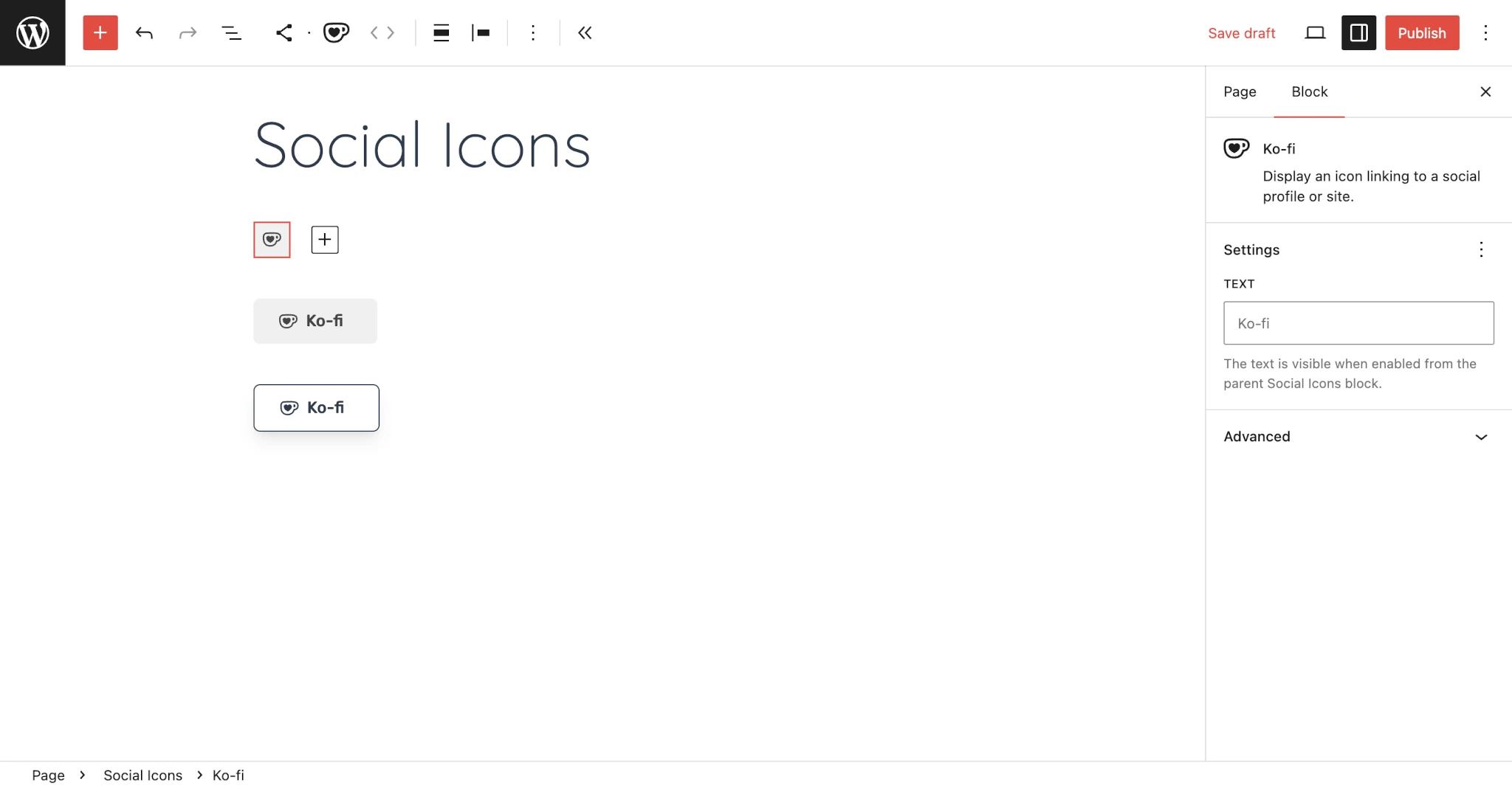
你会注意到图标没有任何关联的品牌颜色。我们稍后会处理这个问题。现在,你已经有了一个自定义图标。所以花点时间庆祝一下吧!
添加多个社交图标
当然,你可能还想添加一些其他图标来进一步测试。我冒昧地为 IMDB、Letterboxd、Signal 和 YouTube Music 创建了一些变体。
尝试通过将此代码添加到你的 src/index.js 文件来注册它们:
registerBlockVariation('core/social-link', {
	name: 'imdb',
	title: 'IMDB',
	icon: (
		<SVG role="img" viewBox="0 0 24 24" xmlns="http://www.w3.org/2000/svg">
			<Path d="M22.3781 0H1.6218C.7411.0583.0587.7437.0018 1.5953l-.001 20.783c.0585.8761.7125 1.543 1.5559 1.6191A.337.337 0 0 0 1.6016 24h20.7971a.4579.4579 0 0 0 .0437-.002c.8727-.0768 1.5568-.8271 1.5568-1.7085V1.7098c0-.8914-.696-1.6416-1.584-1.7078A.3294.3294 0 0 0 22.3781 0zm0 .496a1.2144 1.2144 0 0 1 1.1252 1.2139v20.5797c0 .6377-.4875 1.1602-1.1045 1.2145H1.6016c-.5967-.0543-1.0645-.5297-1.1053-1.1258V1.6284C.5371 1.0185 1.0184.5364 1.6217.496h20.7564zM4.7954 8.2603v7.3636H2.8899V8.2603h1.9055zm6.5367 0v7.3636H9.6707v-4.9704l-.6711 4.9704H7.813l-.6986-4.8618-.0066 4.8618h-1.668V8.2603h2.468c.0748.4476.1492.9694.2307 1.5734l.2712 1.8713.4407-3.4447h2.4817zm2.9772 1.3289c.0742.0404.122.108.1417.2034.0279.0953.0345.3118.0345.6442v2.8548c0 .4881-.0345.7867-.0955.8954-.0609.1152-.2304.1695-.5018.1695V9.5211c.204 0 .3457.0205.4211.0681zm-.0211 6.0347c.4543 0 .8006-.0265 1.0245-.0742.2304-.0477.4204-.1357.5694-.2648.1556-.1218.2642-.298.3251-.5219.0611-.2238.1021-.6648.1021-1.3224v-2.5832c0-.6986-.0271-1.1668-.0742-1.4039-.041-.237-.1431-.4543-.3126-.6437-.1695-.1973-.4198-.3324-.7456-.421-.3191-.0808-.8542-.1285-1.7694-.1285h-1.4244v7.3636h2.3051zm5.14-1.7827c0 .3523-.0199.5762-.0544.6708-.033.0947-.1894.1424-.3046.1424-.1086 0-.19-.0477-.2238-.1351-.041-.0887-.0609-.2986-.0609-.6238v-1.9469c0-.3324.0199-.5423.0543-.6237.0338-.0808.1086-.122.2171-.122.1153 0 .2709.0412.3114.1425.041.0947.0609.2986.0609.6032v1.8926zm-2.4747-5.5809v7.3636h1.7157l.1152-.4675c.1556.1894.3251.3324.5152.4271.1828.0881.4608.1357.678.1357.3047 0 .5629-.0748.7802-.237.2165-.1562.3589-.3462.4198-.5628.0543-.2173.0887-.543.0887-.9841v-2.0675c0-.4409-.0139-.7324-.0344-.8681-.0199-.1357-.0742-.2781-.1695-.4204-.1021-.1425-.2437-.251-.4272-.3325-.1834-.0742-.3999-.1152-.6576-.1152-.2172 0-.4952.0477-.6846.1285-.1835.0887-.353.2238-.5086.4007V8.2603h-1.8309z"/>
		</SVG>
	),
	attributes: {
		service: 'imdb',
	},
	isActive: ['service']
});

registerBlockVariation('core/social-link', {
	name: 'letterboxd',
	title: 'Letterboxd',
	icon: (
		<SVG role="img" viewBox="0 0 24 24" xmlns="http://www.w3.org/2000/svg">
			<Path d="M8.224 14.352a4.447 4.447 0 0 1-3.775 2.092C1.992 16.444 0 14.454 0 12s1.992-4.444 4.45-4.444c1.592 0 2.988.836 3.774 2.092-.427.682-.673 1.488-.673 2.352s.246 1.67.673 2.352zM15.101 12c0-.864.247-1.67.674-2.352-.786-1.256-2.183-2.092-3.775-2.092s-2.989.836-3.775 2.092c.427.682.674 1.488.674 2.352s-.247 1.67-.674 2.352c.786 1.256 2.183 2.092 3.775 2.092s2.989-.836 3.775-2.092A4.42 4.42 0 0 1 15.1 12zm4.45-4.444a4.447 4.447 0 0 0-3.775 2.092c.427.682.673 1.488.673 2.352s-.246 1.67-.673 2.352a4.447 4.447 0 0 0 3.775 2.092C22.008 16.444 24 14.454 24 12s-1.992-4.444-4.45-4.444z"/>
		</SVG>
	),
	attributes: {
		service: 'letterboxd',
	},
	isActive: ['service']
});